REST API
In modern distributed systems and web application development, understanding how information travels between client and server is essential. Before diving into endpoint design, we must analyze the two fundamental communication paradigms on the web: Stateful and Stateless.
1. Communication Models: Stateful vs. Stateless
The distinction between a stateful and a stateless service lies in where and how the interaction context is stored across consecutive requests.
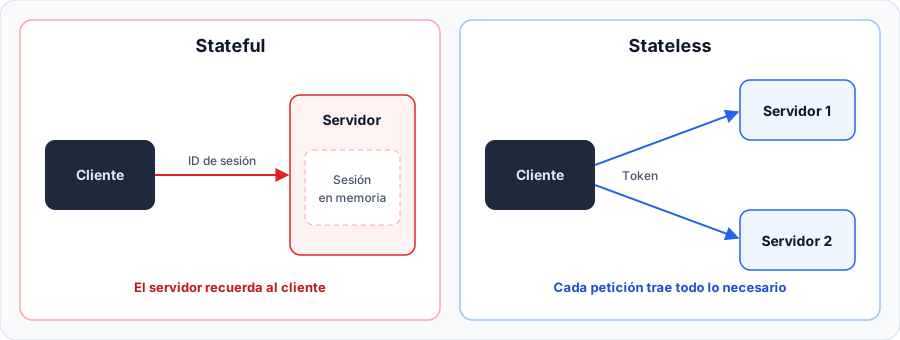
Architectural Breakdown of the Diagram
| Diagram Component | Stateful Approach (With State) | Stateless Approach (Without State / REST) |
|---|---|---|
| HTTP Client | Stores a session cookie (such as JSESSIONID) that acts purely as a pointer to the server's memory. | Stores and sends all required information (parameters, credentials, or JWT token) in every HTTP request. |
| Server Memory (RAM) | Stores user objects in memory (HttpSession), increasing RAM consumption proportionally with active users. | Zero memory dedicated to client sessions. Replicas validate the request or cryptographic signature on the fly. |
| Fault Resilience | If a server crashes, all user sessions stored in its RAM are destroyed immediately. | If an instance goes down, any other replica can handle the client's next request seamlessly. |
2. Practical Demonstration of a Stateful Service in Spring Boot
In traditional server-side rendered web applications (such as Spring MVC with Thymeleaf templates), it is common to use HttpSession to preserve user data across multiple pages:
package com.ejemplo.demo.controller;

import jakarta.servlet.http.HttpSession;
import org.springframework.stereotype.Controller;
import org.springframework.ui.Model;
import org.springframework.web.bind.annotation.GetMapping;
import org.springframework.web.bind.annotation.PostMapping;
import org.springframework.web.bind.annotation.RequestParam;

@Controller
public class UsuarioController {

    /**
     * Step 1: The user submits their name in the login form.
     * The server stores the value in its local RAM heap via HttpSession.
     */
    @PostMapping("/login")
    public String login(@RequestParam String nombre, HttpSession session) {
        // Stores the 'usuario' attribute in the server-side session
        session.setAttribute("usuario", nombre);
        // Redirects the browser to the profile view
        return "redirect:/perfil";
    }

    /**
     * Step 2: The browser requests the profile, automatically sending the JSESSIONID cookie.
     * The server looks up the associated session in memory and retrieves the stored name.
     */
    @GetMapping("/perfil")
    public String perfil(HttpSession session, Model model) {
        // Retrieves the previously stored name
        String nombreUsuario = (String) session.getAttribute("usuario");

        // If no active session exists, redirect back to login
        if (nombreUsuario == null) {
            return "redirect:/login";
        }

        // Injects the name into the Thymeleaf view model
        model.addAttribute("nombre", nombreUsuario);
        return "perfil";
    }

    /**
     * Step 3: Explicit logout.
     * Invalidates and clears the session record from the server's RAM.
     */
    @GetMapping("/logout")
    public String logout(HttpSession session) {
        session.invalidate();
        return "redirect:/login";
    }
}
Step-by-Step Interaction Lifecycle
Login and Creation of JSESSIONID (POST /login)
The client submits credentials. The servlet container (Apache Tomcat) creates an HttpSession object in the server heap, assigns a unique alphanumeric ID, and sends it back to the browser via the HTTP header Set-Cookie: JSESSIONID=a81f....
Subsequent Requests with Shared Memory (GET /perfil)
On each subsequent request, the browser automatically attaches Cookie: JSESSIONID=a81f.... The server intercepts the cookie, resolves the session in memory, and reads the "usuario" attribute. If this server restarts, the session is lost.
Context Destruction (GET /logout)
Upon executing session.invalidate(), the server frees the memory space held by the client attributes. Any subsequent attempt to access /perfil triggers a redirect to /login.
3. What is a REST API?
A REST (Representational State Transfer) API is a software architectural style proposed by Roy Fielding in 2000 that establishes a set of constraints for building lightweight, maintainable, and highly scalable web services on top of HTTP.
In a REST API, the core concept is the Resource. Each resource is an entity of information uniquely identified by a URI (Uniform Resource Identifier) and manipulated using standard HTTP verbs:
Core Rules of the REST Contract
- Nouns instead of verbs: URIs represent plural resources (
/api/usuarios,/api/productos), never operational actions such asGET /api/obtenerUsuariosorPOST /api/eliminarProducto. - HTTP methods as semantic actions: The action performed on the resource is dictated by the HTTP method (
GET,POST,PUT,DELETE). - Decoupled representations: The resource is exchanged using structured representations agreed upon by both parties, with JSON (JavaScript Object Notation) being the predominant industry standard.
4. Fundamental Principles of REST
To be considered genuinely RESTful, a web service must adhere to six architectural principles:
1. Uniform Interface
Simplifies and decouples the architecture, allowing each part to evolve independently:
- Each resource has a unique, consistent URI.
- Returned representations (JSON) contain sufficient information for the client to understand the resource's state.
- Messages are self-descriptive via HTTP headers (
Content-Type,Cache-Control).
2. Stateless
Each request sent to the server must contain all information necessary to understand and process it. The server never assumes or retains context from previous requests.
Because servers do not hold shared session memory, REST applications can scale horizontally across multiple instances or containers without requiring sticky session routing.
3. Cacheable
Server responses must explicitly declare whether they can be cached by browsers or intermediate proxies (Cache-Control: max-age=3600) to optimize network bandwidth and response times.
4. Client-Server Separation
The user interface and client applications (React, Flutter, iOS, Android) are completely separated from backend business logic, validation, and data storage.
5. Layered System
The client does not need to know whether it connects directly to the end application server or through intermediate gateways, load balancers, or security firewalls.
6. Code on Demand (Optional)
The server can optionally extend client functionality by transmitting executable code (such as JavaScript scripts or WebAssembly binaries).
5. REST Resource URI Design and Best Practices
| Resource URI | HTTP Method | Semantic Action | Typical Status Code |
|---|---|---|---|
/api/usuarios | GET | Retrieve the complete list of users | 200 OK |
/api/usuarios/10 | GET | Retrieve details for user ID 10 | 200 OK or 404 Not Found |
/api/usuarios | POST | Create a new user with body payload | 201 Created |
/api/usuarios/10 | PUT | Completely replace user ID 10 | 200 OK |
/api/usuarios/10 | PATCH | Partially update fields of user ID 10 | 200 OK |
/api/usuarios/10 | DELETE | Permanently delete user ID 10 | 204 No Content |
/api/usuarios?rol=admin | GET | Filter active users with admin role | 200 OK |
/api/usuarios?page=2&size=20 | GET | Pagination: fetch page 2 with 20 items | 200 OK |
/api/usuarios/10/pedidos | GET | Nested resource: list orders belonging to user 10 | 200 OK |
6. HTTP Methods and Idempotency Semantics
In REST, a method is idempotent if making multiple identical requests has the same intended effect on the server state as a single request:
| HTTP Method | Semantic Purpose | Idempotent | Safe (Read-Only) |
|---|---|---|---|
GET | Query and retrieve resource representations. | Yes | Yes |
POST | Create secondary resources or process non-idempotent operations. | No | No |
PUT | Completely replace or create a resource at a specific URI. | Yes | No |
PATCH | Partially update existing resource fields. | No | No |
DELETE | Remove a resource by its URI. | Yes | No |
OPTIONS | Inspect allowed HTTP methods and headers for the endpoint. | Yes | Yes |
7. Essential HTTP Status Codes
Status codes inform the client about the outcome of the request using standardized numeric categories:
| Status Code | Standard Name | When to Use in Spring Boot |
|---|---|---|
200 OK | Request Succeeded | GET queries, successful PUT/PATCH updates. |
201 Created | Resource Created | Successful POST creations. Should include a Location header. |
204 No Content | No Content | Successful requests that return an empty body (standard in DELETE). |
400 Bad Request | Bad Request | JSON parsing errors or input validation failures (@Valid). |
401 Unauthorized | Unauthorized | Request requires authentication or the JWT token expired/is invalid. |
403 Forbidden | Forbidden | The user is authenticated, but lacks required roles or permissions. |
404 Not Found | Not Found | The resource requested in the path does not exist. |
409 Conflict | Conflict | Duplicate resource conflict (e.g., email already registered). |
500 Internal Error | Server Error | Unhandled exception or unexpected error on the backend. |