JWT Implementation
This practical guide provides a step-by-step walkthrough for implementing security using JSON Web Tokens (JWT) in a Spring Boot 3 / Spring Security 6 project.
We will focus on clean code architecture, stateless security filter chain configuration, cryptographic token generation and validation, and building authentication endpoints.
1. Implementation Architecture and Class Map
Before coding, review the class map, dependency injections, and individual responsibilities of each component in the backend:
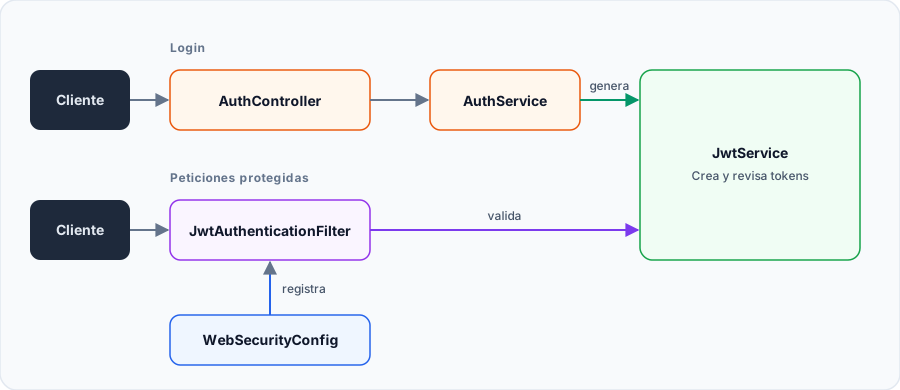
Technical Responsibility Breakdown
| Class / Component | Package | System Responsibility |
|---|---|---|
WebSecurityConfig | com.ejemplo.demo.config | Defines the SecurityFilterChain for /api/** routes. Disables CSRF, sets session creation policy to STATELESS, and positions the JWT filter before UsernamePasswordAuthenticationFilter. |
JwtAuthenticationFilter | com.ejemplo.demo.config | Intercepts each incoming HTTP request (OncePerRequestFilter), extracts the token from Authorization: Bearer <token>, validates its signature with IJwtService, and sets the authentication in SecurityContextHolder. |
IJwtService / JwtServiceImpl | com.ejemplo.demo.service | Encapsulates the JJWT (io.jsonwebtoken) library. Generates signed tokens, decodes claims, extracts authorities, and validates expiration against the configured secret key. |
AuthController | com.ejemplo.demo.controller | Exposes the public endpoint POST /api/public/auth/login, receives user credentials in LoginRequestDTO, and returns TokenResponseDTO. |
AuthServiceImpl | com.ejemplo.demo.service | Loads the user via UserDetailsService, verifies the password hash using PasswordEncoder.matches(), and requests JwtService to issue the token upon success. |
2. Step-by-Step Construction Guide
Install JJWT Dependencies in Maven
To manipulate JWT tokens in modern Java, we will use the official JJWT (Java JSON Web Token) library version 0.12+. Add the following dependencies inside your pom.xml:
<!-- Public JJWT API (interfaces and contracts) -->
<dependency>
    <groupId>io.jsonwebtoken</groupId>
    <artifactId>jjwt-api</artifactId>
    <version>0.12.3</version>
</dependency>

<!-- Concrete JJWT cryptographic engine implementation -->
<dependency>
    <groupId>io.jsonwebtoken</groupId>
    <artifactId>jjwt-impl</artifactId>
    <version>0.12.6</version>
    <scope>runtime</scope>
</dependency>

<!-- Support for JSON serialization/deserialization via Jackson -->
<dependency>
    <groupId>io.jsonwebtoken</groupId>
    <artifactId>jjwt-jackson</artifactId>
    <version>0.12.6</version>
    <scope>runtime</scope>
</dependency>
Update your project dependencies by running:
mvn clean install
Configure Properties and Secret Key
The HS256 algorithm requires a symmetric secret key with a minimum length of 256 bits (32 secure alphanumeric characters). Define the secret key and token expiration time in your properties configuration:
# Symmetric secret key for signing and verifying tokens (minimum 256 bits)
app.security.jwt.secret-key=dGhpc0lzQVZlcnlTZWN1cmVTZWNyZXRLZXlGb3JKV1RBdXRoZW50aWNhdGlvbkluU3ByaW5nQm9vdDIwMjU=

# Access token expiration time in milliseconds (86400000 ms = 24 hours)
app.security.jwt.expiration-time=86400000
In real-world production environments, never store secrets in plain text inside your Git repository. Inject the secret via environment variables (e.g., APP_SECURITY_JWT_SECRET_KEY=${JWT_SECRET}).
Implement the IJwtService Cryptographic Service
Define the service contract and implementation to sign, parse, and extract claims from JWT tokens.
First, define the interface:
package com.ejemplo.demo.service;

import io.jsonwebtoken.Claims;
import org.springframework.security.core.Authentication;
import org.springframework.security.core.authority.SimpleGrantedAuthority;
import org.springframework.security.core.userdetails.UserDetails;
import com.ejemplo.demo.model.User;

import java.util.List;
import java.util.function.Function;

public interface IJwtService {
    // Generates a signed token from user identity and authentication authorities
    String generateToken(User user, Authentication authentication);

    // Extracts the subject (username) from the token
    String extractUsername(String token);

    // Extracts roles and permissions stored within the payload
    List<SimpleGrantedAuthority> extractAuthorities(String token);

    // Extracts an arbitrary claim using a resolver function
    <T> T extractClaim(String token, Function<Claims, T> claimsResolver);

    // Reconstructs UserDetails for Spring Security context injection
    UserDetails getUserDetailsFromToken(String token);

    // Checks whether the token has expired
    boolean isTokenExpired(String token);

    // Cryptographically validates the integrity and expiration of the token
    boolean isTokenValid(String token);
}
Now, implement the service using the fluent JJWT API:
package com.ejemplo.demo.service;

import io.jsonwebtoken.Claims;
import io.jsonwebtoken.Jwts;
import io.jsonwebtoken.io.Decoders;
import io.jsonwebtoken.security.Keys;
import org.springframework.beans.factory.annotation.Value;
import org.springframework.security.core.Authentication;
import org.springframework.security.core.authority.SimpleGrantedAuthority;
import org.springframework.security.core.userdetails.UserDetails;
import org.springframework.stereotype.Service;
import com.ejemplo.demo.model.User;

import javax.crypto.SecretKey;
import java.util.Date;
import java.util.List;
import java.util.Map;
import java.util.function.Function;

@Service
public class JwtServiceImpl implements IJwtService {

    // Injected secret key from application.properties
    @Value("${app.security.jwt.secret-key}")
    private String secretKey;

    // Injected expiration time in milliseconds
    @Value("${app.security.jwt.expiration-time}")
    private long expirationTime;

    /**
     * Decodes Base64-encoded key string and builds the HMAC SecretKey
     */
    private SecretKey getSignInKey() {
        byte[] keyBytes = Decoders.BASE64.decode(secretKey);
        return Keys.hmacShaKeyFor(keyBytes);
    }

    @Override
    public String generateToken(User user, Authentication auth) {
        // Extract granted authorities from authentication object
        List<String> authorities = (auth != null && auth.getAuthorities() != null)
                ? auth.getAuthorities().stream().map(a -> a.getAuthority()).toList()
                : List.of();

        return Jwts.builder()
                .id(user.getId().toString()) // Unique JWT ID
                .claims(Map.of(
                        "username", user.getUsername(),
                        "email", user.getEmail(),
                        "authorities", authorities // Roles embedded in payload
                ))
                .subject(user.getUsername()) // Standard 'sub' claim
                .issuedAt(new Date(System.currentTimeMillis())) // Issuance date
                .expiration(new Date(System.currentTimeMillis() + expirationTime)) // Expiration date
                .signWith(getSignInKey()) // Sign with HMAC-SHA256
                .compact(); // Serializes into Header.Payload.Signature string
    }

    @Override
    public <T> T extractClaim(String token, Function<Claims, T> claimsResolver) {
        Claims claims = Jwts.parser()
                .verifyWith(getSignInKey()) // Validates signature prior to parsing
                .build()
                .parseSignedClaims(token)
                .getPayload();
        return claimsResolver.apply(claims);
    }

    @Override
    public String extractUsername(String token) {
        return extractClaim(token, Claims::getSubject);
    }

    @Override
    public boolean isTokenExpired(String token) {
        return extractClaim(token, Claims::getExpiration).before(new Date());
    }

    @Override
    @SuppressWarnings("unchecked")
    public List<SimpleGrantedAuthority> extractAuthorities(String token) {
        Claims claims = extractClaim(token, Function.identity());
        List<String> authorities = claims.get("authorities", List.class);
        if (authorities == null) {
            return List.of();
        }
        return authorities.stream()
                .map(SimpleGrantedAuthority::new)
                .toList();
    }

    @Override
    public UserDetails getUserDetailsFromToken(String token) {
        String username = extractUsername(token);
        List<SimpleGrantedAuthority> authorities = extractAuthorities(token);
        // Builds UserDetails instance in memory without database queries
        return new org.springframework.security.core.userdetails.User(username, "", authorities);
    }

    @Override
    public boolean isTokenValid(String token) {
        try {
            // Throws exception if signature was altered or structure is invalid
            Jwts.parser()
                    .verifyWith(getSignInKey())
                    .build()
                    .parseSignedClaims(token);

            return !isTokenExpired(token);
        } catch (Exception e) {
            // Token is modified, expired, or improperly signed
            return false;
        }
    }
}
Create the JwtAuthenticationFilter Interceptor
The filter extends OncePerRequestFilter to ensure single execution per HTTP request:
package com.ejemplo.demo.config;

import com.ejemplo.demo.service.IJwtService;
import jakarta.servlet.FilterChain;
import jakarta.servlet.ServletException;
import jakarta.servlet.http.HttpServletRequest;
import jakarta.servlet.http.HttpServletResponse;
import org.springframework.beans.factory.annotation.Autowired;
import org.springframework.security.authentication.UsernamePasswordAuthenticationToken;
import org.springframework.security.core.context.SecurityContextHolder;
import org.springframework.security.core.userdetails.UserDetails;
import org.springframework.security.web.authentication.WebAuthenticationDetailsSource;
import org.springframework.stereotype.Component;
import org.springframework.web.filter.OncePerRequestFilter;

import java.io.IOException;

@Component
public class JwtAuthenticationFilter extends OncePerRequestFilter {

    @Autowired
    private IJwtService jwtService;

    @Override
    protected void doFilterInternal(HttpServletRequest request,
                                    HttpServletResponse response,
                                    FilterChain filterChain) throws ServletException, IOException {

        // 1. Read 'Authorization' HTTP header
        String authHeader = request.getHeader("Authorization");
        String token = null;
        UserDetails userDetails = null;

        // 2. Validate header presence and 'Bearer ' prefix
        if (authHeader != null && authHeader.startsWith("Bearer ")) {
            token = authHeader.substring(7); // Extract substring following prefix

            // 3. Cryptographically validate signature and expiration
            if (jwtService.isTokenValid(token)) {
                // 4. Reconstruct user identity and authorities from payload
                userDetails = jwtService.getUserDetailsFromToken(token);

                // 5. Build Spring Security authentication token
                UsernamePasswordAuthenticationToken authentication =
                        new UsernamePasswordAuthenticationToken(userDetails, null, userDetails.getAuthorities());

                authentication.setDetails(new WebAuthenticationDetailsSource().buildDetails(request));

                // 6. Populate SecurityContext for current thread
                SecurityContextHolder.getContext().setAuthentication(authentication);
            }
        }

        // 7. Proceed to next filter in the security chain
        filterChain.doFilter(request, response);
    }
}
Configure the Security Chain in WebSecurityConfig
Configure the dedicated SecurityFilterChain for the REST API (/api/**). Disable CSRF and set session management to STATELESS:
package com.ejemplo.demo.config;

import org.springframework.context.annotation.Bean;
import org.springframework.context.annotation.Configuration;
import org.springframework.core.annotation.Order;
import org.springframework.security.config.annotation.method.configuration.EnableMethodSecurity;
import org.springframework.security.config.annotation.web.builders.HttpSecurity;
import org.springframework.security.config.annotation.web.configuration.EnableWebSecurity;
import org.springframework.security.config.http.SessionCreationPolicy;
import org.springframework.security.crypto.bcrypt.BCryptPasswordEncoder;
import org.springframework.security.crypto.password.PasswordEncoder;
import org.springframework.security.web.SecurityFilterChain;
import org.springframework.security.web.authentication.UsernamePasswordAuthenticationFilter;
import org.springframework.web.cors.CorsConfiguration;
import org.springframework.web.cors.CorsConfigurationSource;
import org.springframework.web.cors.UrlBasedCorsConfigurationSource;

@Configuration
@EnableWebSecurity
@EnableMethodSecurity
public class WebSecurityConfig {

    @Bean
    public PasswordEncoder passwordEncoder() {
        return new BCryptPasswordEncoder();
    }

    @Bean
    public JwtAuthenticationFilter jwtAuthenticationFilter() {
        return new JwtAuthenticationFilter();
    }

    /**
     * Dedicated security filter chain for REST API (/api/**)
     */
    @Bean
    @Order(1)
    public SecurityFilterChain securityRestFilterChain(HttpSecurity http) throws Exception {
        return http
                // Applies strictly to paths matching /api/**
                .securityMatcher("/api/**")

                // Disable CSRF: stateless API without session cookies is not vulnerable
                .csrf(csrf -> csrf.disable())

                // Enable CORS for SPA frontend clients
                .cors(cors -> cors.configurationSource(corsConfigurationSource()))

                // Endpoint authorization rules
                .authorizeHttpRequests(authz -> authz
                        // Public endpoints for login/registration
                        .requestMatchers("/api/public/**").permitAll()
                        // All other /api/** routes require a valid token
                        .anyRequest().authenticated()
                )

                // Place JWT filter BEFORE the form-based login filter
                .addFilterBefore(jwtAuthenticationFilter(), UsernamePasswordAuthenticationFilter.class)

                // STATELESS session policy: never create or use HttpSession
                .sessionManagement(session -> session.sessionCreationPolicy(SessionCreationPolicy.STATELESS))

                .build();
    }

    /**
     * CORS configuration allowing requests from frontend apps
     */
    private CorsConfigurationSource corsConfigurationSource() {
        CorsConfiguration configuration = new CorsConfiguration();
        configuration.setAllowCredentials(true);
        configuration.addAllowedOriginPattern("*");
        configuration.addAllowedHeader("*");
        configuration.addAllowedMethod("*");

        UrlBasedCorsConfigurationSource source = new UrlBasedCorsConfigurationSource();
        source.registerCorsConfiguration("/**", configuration);
        return source;
    }
}
Create DTOs and Authentication Endpoint (Login)
Implement data transfer objects, the authentication service, and the REST controller handling login requests:
First, DTOs:
package com.ejemplo.demo.dto;

public class LoginRequestDTO {
    private String username;
    private String password;

    public LoginRequestDTO() {}

    public LoginRequestDTO(String username, String password) {
        this.username = username;
        this.password = password;
    }

    public String getUsername() { return username; }
    public void setUsername(String username) { this.username = username; }

    public String getPassword() { return password; }
    public void setPassword(String password) { this.password = password; }
}
package com.ejemplo.demo.dto;

public class TokenResponseDTO {
    private String accessToken;

    public TokenResponseDTO() {}

    public TokenResponseDTO(String accessToken) {
        this.accessToken = accessToken;
    }

    public String getAccessToken() { return accessToken; }
    public void setAccessToken(String accessToken) { this.accessToken = accessToken; }
}
Next, the authentication service:
package com.ejemplo.demo.service;

import com.ejemplo.demo.dto.LoginRequestDTO;
import com.ejemplo.demo.dto.TokenResponseDTO;
import com.ejemplo.demo.model.CustomUserDetails;
import com.ejemplo.demo.model.User;
import org.springframework.beans.factory.annotation.Autowired;
import org.springframework.security.authentication.UsernamePasswordAuthenticationToken;
import org.springframework.security.core.Authentication;
import org.springframework.security.core.userdetails.UserDetails;
import org.springframework.security.core.userdetails.UserDetailsService;
import org.springframework.security.crypto.password.PasswordEncoder;
import org.springframework.stereotype.Service;

@Service
public class AuthServiceImpl implements IAuthService {

    @Autowired
    private IJwtService jwtService;

    @Autowired
    private UserDetailsService userDetailsService;

    @Autowired
    private PasswordEncoder passwordEncoder;

    @Override
    public TokenResponseDTO login(LoginRequestDTO request) {
        // 1. Load user from persistence
        UserDetails userDetails = userDetailsService.loadUserByUsername(request.getUsername());
        if (userDetails == null) {
            throw new RuntimeException("Invalid credentials: user not found");
        }

        // 2. Verify password against stored BCrypt hash
        if (!passwordEncoder.matches(request.getPassword(), userDetails.getPassword())) {
            throw new RuntimeException("Invalid credentials: incorrect password");
        }

        // 3. Obtain domain user entity and assemble authentication
        CustomUserDetails customUD = (CustomUserDetails) userDetails;
        User user = customUD.getUser();
        Authentication auth = new UsernamePasswordAuthenticationToken(userDetails, "", userDetails.getAuthorities());

        // 4. Issue signed token via JJWT
        String token = jwtService.generateToken(user, auth);
        return new TokenResponseDTO(token);
    }
}
Finally, the REST controller:
package com.ejemplo.demo.controller;

import com.ejemplo.demo.dto.LoginRequestDTO;
import com.ejemplo.demo.dto.TokenResponseDTO;
import com.ejemplo.demo.service.IAuthService;
import org.springframework.beans.factory.annotation.Autowired;
import org.springframework.http.HttpStatus;
import org.springframework.http.ResponseEntity;
import org.springframework.web.bind.annotation.*;

@RestController
@RequestMapping("/api/public/auth")
public class AuthController {

    @Autowired
    private IAuthService authService;

    /**
     * Public endpoint to log in and receive the accessToken
     */
    @PostMapping("/login")
    public ResponseEntity<?> login(@RequestBody LoginRequestDTO request) {
        try {
            TokenResponseDTO token = authService.login(request);
            return ResponseEntity.ok(token);
        } catch (RuntimeException e) {
            return ResponseEntity.status(HttpStatus.UNAUTHORIZED).body(e.getMessage());
        }
    }
}
Verification and Testing with HTTP Client
Verify the complete cycle using tools like Postman, cURL, or Thunder Client:
-
Step A: Obtain Token (Login)
Login RequestPOST http://localhost:8080/api/public/auth/loginContent-Type: application/json{"username": "juan","password": "Password123*"}Expected response (HTTP 200 OK):
{"accessToken": "eyJhbGciOiJIUzI1NiIsInR5cCI6..."} -
Step B: Access Protected Resource
Protected RequestGET http://localhost:8080/api/usuariosAuthorization: Bearer eyJhbGciOiJIUzI1NiIsInR5cCI6...Expected response (HTTP 200 OK). Omitting the
Authorizationheader or supplying an invalid token returns HTTP401 Unauthorized.
3. Sample Repository
If you would like to examine the reference implementation with complete package structure, clone the course GitHub repository: