Thymeleaf Fundamentals and Server Side Rendering (SSR)
In enterprise web application development, generating user interfaces can occur directly in the client's browser using JavaScript frameworks or on the server before transmitting the HTTP response over the network. The latter approach is known as Server Side Rendering (SSR). Within the Java and Spring Boot ecosystem, Thymeleaf is the premier template engine for implementing secure, maintainable, and high-performance Model-View-Controller (MVC) architectures.
1. Concepts and Theoretical Foundations
How Does Spring Boot Generate Templates?
To understand how Thymeleaf operates, it is essential to dispel a common misconception: the client's web browser never downloads or views the original template file (.html). What the end user receives on their screen is the output of an in-memory compilation and transformation process executed entirely on the server.
The following diagram illustrates the complete processing lifecycle in Spring Boot MVC:
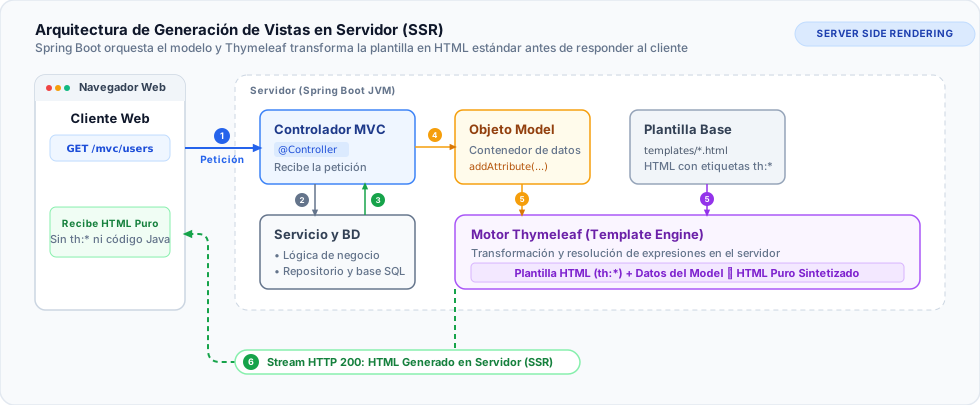
Detailed Explanation of the Flow Components
- Client / Web Browser:
- The user issues a request for a web route (for example,
GET /mvc/users) from the browser address bar or via a hyperlink. - The browser expects a
text/htmldocument in response.
- The user issues a request for a web route (for example,
- Web Controller (
@Controller):- The
UserMVCControllerclass intercepts the HTTP request using@GetMapping("/mvc/users"). - Unlike a
@RestController(which serializes data directly into JSON or XML format), a traditional@Controllerorchestrates the view by returning a string containing the logical template name ("users/list").
- The
- Business Logic and Persistence Layer (Service, Repository, and Database):
- The controller delegates data retrieval to
UserService.findAll(). - The service layer coordinates business rules and queries the JPA repository (
UserRepository), which executes SQL queries against the relational database engine (such as PostgreSQL or MySQL). - Data returns to the JVM heap as domain entities or DTOs (
List<User>).
- The controller delegates data retrieval to
- Injection into the
ModelObject:- The controller receives a Spring-provided container called
org.springframework.ui.Model. - Using
model.addAttribute("users", userList), the controller injects the retrieved data under a designated key ("users").
- The controller receives a Spring-provided container called
- Thymeleaf Template Engine (
SpringTemplateEngineandTemplateResolver):- Spring Boot locates the physical file on the classpath via
SpringResourceTemplateResolver(by default insrc/main/resources/templates/users/list.html). - The engine parses the template Document Object Model (DOM), detects standard dialect attributes (
th:text,th:each,th:if), and evaluates expressions against the data present in theModel.
- Spring Boot locates the physical file on the classpath via
- Transformation and Pure HTML Emission (Server Side Rendering):
- The engine replaces placeholder dummy text with actual values from database entities and completely removes all Thymeleaf attributes (
th:*). - The server streams the resulting valid HTML5 text into the HTTP response body (
HttpServletResponse) with status code 200 OK. - Client Outcome: The end user receives only standard HTML elements (
<table>,<tr>,<td>), ensuring that internal database schemas and Java business logic remain completely isolated and inaccessible from the client.
- The engine replaces placeholder dummy text with actual values from database entities and completely removes all Thymeleaf attributes (
The Principle of Natural Templating
One of the standout competitive advantages of Thymeleaf compared to legacy technologies like JSP (JavaServer Pages) or engines like FreeMarker and Velocity is the concept of Natural Templating.
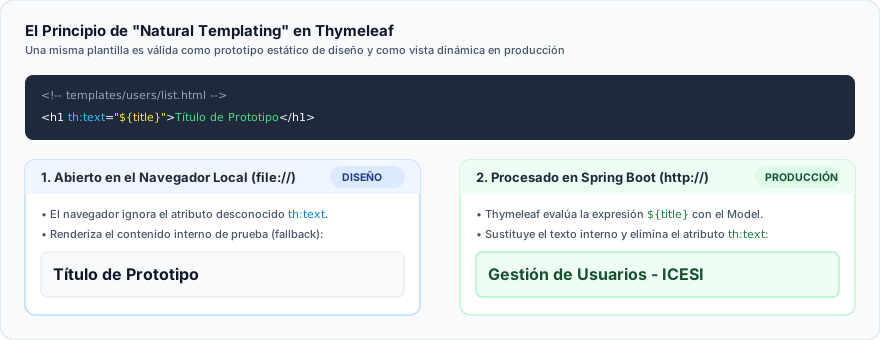
Comparison of Visualization Modes
- Static Prototype Mode (Web Designer / Frontend):
- When a designer opens the
list.htmlfile directly in Google Chrome or Mozilla Firefox using the local filesystem protocol (file:///...), the browser's rendering engine simply ignores unknown attributes prefixed withth:. - Instead, the browser renders the plain fallback text enclosed between standard HTML tags. This allows styling CSS and previewing visual layouts without needing to boot a Spring Boot server or connect to a database.
- When a designer opens the
- Dynamic Runtime Mode (Spring Boot in Production):
- When processed by the web server via
http://localhost:8080/..., theSpringTemplateEngineintercepts the tags and replaces static placeholder content with dynamic data injected into theModel.
- When processed by the web server via
Comparison: Server Side Rendering (SSR) vs. Client Side Rendering (CSR)
To make informed architectural decisions, consider the key trade-offs between server-side rendering (Thymeleaf) and client-side rendering (Single Page Applications like React or Vue):
| Criterion | Server Side Rendering (SSR - Thymeleaf) | Client Side Rendering (CSR - React / Vue) |
|---|---|---|
| HTML Generation | On the server (JVM) before transmitting the response. | In the client browser using JavaScript runtime execution. |
| First Contentful Paint (FCP) | Immediate. The browser receives complete markup ready to paint. | Slower. Requires downloading and parsing JS bundles before rendering UI. |
| Search Engine Optimization (SEO) | Excellent. Web crawlers immediately read fully populated textual content. | Requires pre-rendering, hydration, or specialized crawler configurations. |
| CPU Overhead | The server assumes the compute burden of evaluating templates per request. | The client assumes rendering and DOM manipulation overhead. |
| Sensitive Data Security | High. Business logic and filtering execute on the server; client sees only markup. | Moderate. All REST API endpoints must be strictly secured against data exposure. |
| Dynamic Interactivity | Requires full/partial page reloads or HTMX/AJAX integration. | Fluid and reactive in memory without full-page reloads. |
Request and Response Lifecycle in Spring MVC
The following sequence diagram details the internal chronological interactions between the DispatcherServlet, controller, and template engine:
Sequence Diagram Components
DispatcherServlet: Central Spring MVC Front Controller that receives all incoming requests and routes them to mapped controllers.ThymeleafViewResolver: Infrastructure component that resolves logical view names ("users/list") into executableThymeleafViewinstances.SpringTemplateEngine: Core engine responsible for resolving fragments, applying dialects, and evaluating Spring Expression Language (SpEL) expressions.
2. Configuring Thymeleaf in Spring Boot
Spring Boot provides intelligent auto-configuration via its official starter dependency.
Maven and Gradle Dependencies
To enable Thymeleaf in your application, add the appropriate starter dependency to your build configuration:
- Maven (pom.xml)
- Gradle (build.gradle)
<dependencies>
    <!-- Official Spring Boot Starter for Thymeleaf and Spring MVC -->
    <dependency>
        <groupId>org.springframework.boot</groupId>
        <artifactId>spring-boot-starter-thymeleaf</artifactId>
    </dependency>

    <!-- Web starter required for embedded Tomcat server and Spring MVC -->
    <dependency>
        <groupId>org.springframework.boot</groupId>
        <artifactId>spring-boot-starter-web</artifactId>
    </dependency>
</dependencies>
dependencies {
    // Thymeleaf starter with auto-configuration
    implementation 'org.springframework.boot:spring-boot-starter-thymeleaf'
    implementation 'org.springframework.boot:spring-boot-starter-web'
}
By including spring-boot-starter-thymeleaf, Spring Boot automatically registers SpringResourceTemplateResolver, SpringTemplateEngine, and ThymeleafViewResolver beans without requiring manual configuration classes in standard use cases.
Directory Structure by Convention
Following standard Spring Boot conventions, web resources must be structured inside src/main/resources:
src/
└── main/
    ├── java/com/icesi/store/
    │   └── controller/
    │       └── UserMVCController.java      # Controllers annotated with @Controller
    └── resources/
        ├── static/                         # Static assets served directly to browsers
        │   ├── css/                        # Cascading Style Sheets (.css)
        │   ├── js/                         # Client-side JavaScript (.js)
        │   └── images/                     # Graphic assets, logos, and icons
        ├── templates/                      # Server-side processed Thymeleaf templates
        │   ├── components/                 # Reusable layout fragments (header, footer, etc.)
        │   │   ├── header.html
        │   │   └── footer.html
        │   └── users/                      # Domain-specific view templates
        │       ├── list.html
        │       ├── add.html
        │       └── edit.html
        └── application.properties          # Global application properties
Files placed inside static/ are directly and publicly accessible by browsers via their URL path (e.g., http://localhost:8080/css/styles.css). In contrast, files inside templates/ are strictly protected: users cannot request http://localhost:8080/templates/users/list.html directly; they must always be routed through a @Controller.
Key Properties in application.properties
# Classpath prefix where HTML templates are stored
spring.thymeleaf.prefix=classpath:/templates/

# Default suffix appended to logical view names returned by controllers
spring.thymeleaf.suffix=.html

# Template mode compliant with modern HTML5 specifications
spring.thymeleaf.mode=HTML

# Standard character encoding preventing accent and character set issues
spring.thymeleaf.encoding=UTF-8

# MIME content type emitted in the Content-Type response header
spring.thymeleaf.servlet.content-type=text/html

# Template cache management:
# In development: 'false' enables instant reloading of .html changes without restarting the app.
# In production: must be set to 'true' to cache the parsed DOM tree and conserve CPU resources.
spring.thymeleaf.cache=false

# Validates at startup that the template directory actually exists
spring.thymeleaf.check-template-location=true