Containers
Before diving into containers, it is helpful to first understand virtual machines (VMs), as containers evolved from this technology.
Virtual Machines
Virtual machines allow running operating systems and applications in a virtualized environment, separated from physical hardware. For example, if you have Linux installed but need to run a Windows-exclusive application, you can create a Windows VM inside your Linux system. In this context, the physical computer is called the "host" and each virtual machine is a "guest". It is possible to have multiple guests on the same host, sharing physical resources.
Hypervisor
The hypervisor is the software responsible for managing virtual machines. Its main function is to allocate resources (CPU, memory, storage) between the host and guests. There are two main types:
- Type 1 Hypervisor ("bare-metal"): Runs directly on physical hardware without a underlying operating system. Offers higher performance and efficiency. Examples: VMware ESXi, Microsoft Hyper-V.
- Type 2 Hypervisor: Installs on an existing operating system, making it easier to use but potentially impacting performance. Examples: Oracle VirtualBox, VMware Workstation.
Types of Virtual Machines
- Full VMs: Emulate all hardware, running full operating systems. Ideal for applications requiring total isolation, but consume more resources.
- Lightweight VMs (Containers): Share the host operating system kernel, making them more efficient. Ideal for specific applications.
- Special-Purpose VMs: Optimized for specific tasks, sacrificing versatility for performance.
Advantages and Disadvantages of Virtual Machines
Advantages:
- Complete isolation between environments.
- Flexibility to run multiple operating systems.
- Useful for testing and development across different platforms.
Disadvantages:
- High resource consumption.
- Complex management of multiple VMs.
- Lower performance compared to running directly on hardware.
Containers
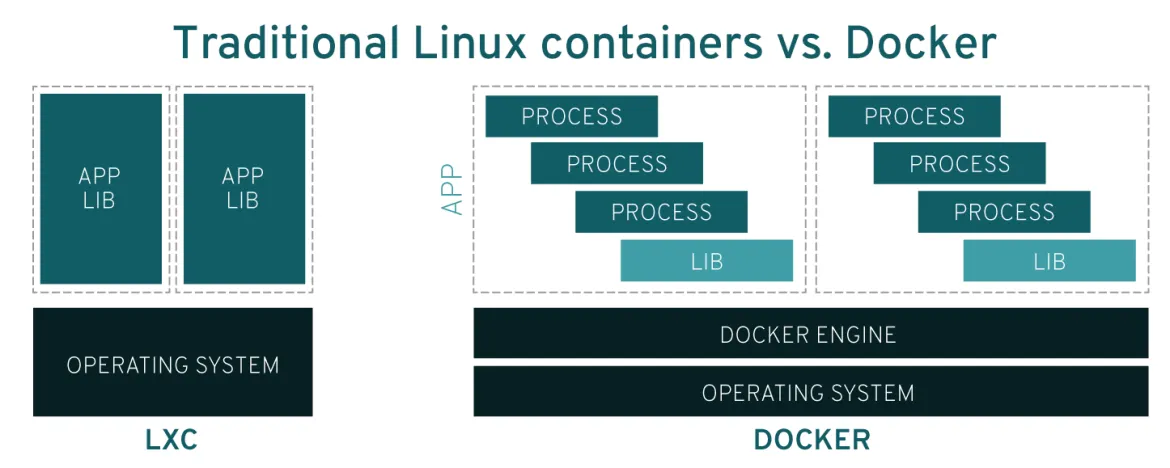
Containers represent an evolution in virtualization, focusing on efficiency and portability. Unlike VMs, containers do not emulate full hardware; instead, they share the host operating system kernel. This allows applications to start quickly while consuming fewer resources.
A container encapsulates an application and its dependencies, ensuring consistent execution across any environment. To manage containers, platforms like Docker are used, simplifying the creation, deployment, and administration of these isolated environments.
Docker
Docker is the most popular container platform. It allows packaging applications along with their dependencies into portable images, facilitating deployment on any compatible system. Docker uses a container engine that manages execution and isolation.
Key Reasons for Popularity:
- Portability: Docker images can run on any system with Docker installed, from laptops to cloud servers.
- Isolation: Each container is independent, preventing dependency conflicts.
- Efficiency: Containers are lightweight, enabling more applications to run on the same hardware.
Key Differences Between Containers and Virtual Machines
- Architecture: VMs emulate full hardware; containers share the host kernel.
- Resource Consumption: Containers are lighter and more efficient.
- Startup Speed: Containers start in seconds, whereas VMs can take minutes.
- Portability: Containers simplify deployment across different environments without configuration changes.
Advantages and Disadvantages of Containers
Advantages:
- Portability and consistency across development, testing, and production environments.
- Application isolation, avoiding dependency hell.
- Resource efficiency and rapid deployment.
Disadvantages:
- Lower security isolation compared to VMs, as they share the host kernel.
- Complex management in large container fleets (solvable with orchestration tools like Kubernetes).
- Data Persistence: Data inside a container can be lost upon deletion; volumes or external storage services are recommended.