Redux in the Project
In the previous lesson, we explored the fundamental concepts of Redux Toolkit: stores, slices, reducers, selectors, actions, and thunks. However, the most critical engineering challenge is not memorizing the Redux API, but integrating it into a modern enterprise application with Next.js (App Router) without degrading the layered architecture we built previously.
In this step-by-step guide, you will learn how to transform the local state of our workout routines application into a robust, predictable global state, without changing a single line of JSX code in the visual components.
1. Starting Point and Objective
The course project includes two working branches on GitHub illustrating this transition:
Starting Point: week-11/next-clean Branch
Application structured with Clean Architecture on the frontend, featuring dependency inversion and local state managed via useState in the useRoutines hook.
Final Solution: week-12/next-redux Branch
Complete integration of Redux Toolkit in Next.js App Router, featuring a makeStore factory, StoreProvider for SSR, async Thunks, and an adapted useRoutines facade hook.
Design Objective
In many naive implementations, introducing Redux involves cluttering UI components (RoutineForm, RoutineCard, pages) with direct calls to useDispatch(), useSelector(), and actions such as dispatch(fetchRoutines()). This couples the view to the state management library and breaks the substitution principle.
Our goal in this guide is to replace the internal state engine while preserving the public API of the Facade Hook (useRoutines) intact. React components will continue invoking createRoutine() and reading routines, isLoading, and errorMessage without ever knowing whether the underlying data originates from useState, Redux Toolkit, or Zustand.
2. Where Redux Lives in Clean Architecture
To maintain architectural integrity, we must precisely define the boundaries of each element:
- Domain Layer (
domain): 100% agnostic of React, Next.js, and Redux. It contains Entities (Routine), repository interfaces (RoutineRepository), and Use Cases (GetRoutinesUseCase,CreateRoutineUseCase). Regardless of which state manager is installed, the Domain never changes. - Infrastructure Layer (
infrastructure): Implements data access contracts (RoutineRepositoryImpl) and datasources (RoutineMockDatasource, HTTP API). - Presentation Layer (
presentation): This is where Redux Toolkit resides. Redux is a global reactive state manager for the user interface.- Async Thunks orchestrate asynchronous operations by invoking Use Cases through the dependency injection container (
routineContainer). - The Slice stores ViewModels (flat, serializable data structures ready to render on screen), never class entities with business methods.
- The Facade Hook (
useRoutines) acts as a bridge between visual components and the Redux Store.
- Async Thunks orchestrate asynchronous operations by invoking Use Cases through the dependency injection container (
Explore the full lifecycle of a mutation in the following interactive layered diagram:
3. Folder Structure: Before and After
The physical organization of files reflects the distinction between what is application-wide and what belongs to a specific feature.
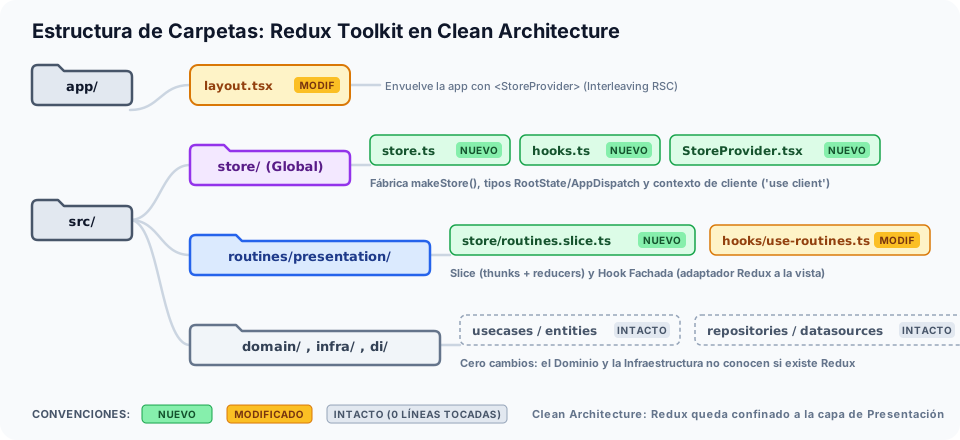
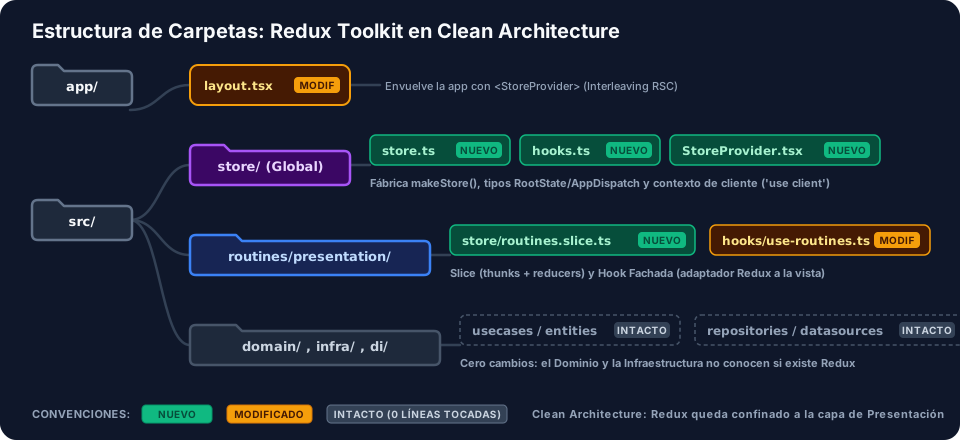
Why is src/store/ Application-Wide and the Slice Lives in the Feature?
src/store/(Application-wide / Cross-cutting): Contains the central Store configuration (store.ts), typed convenience hooks (hooks.ts), and the context provider component (StoreProvider.tsx). These elements apply to the entire application and unify all reducers from different modules.src/features/routines/presentation/store/(Feature-specific): The slice (routines.slice.ts) belongs exclusively to the routines feature. If we remove the routines module in the future, we can delete its folder without leaving orphaned code across the rest of the project.
File Comparison in the Repository
compunet3-202602/
├── app/
│   ├── layout.tsx                                          # [MODIFIED] Wrapper with <StoreProvider>
│   └── routines-clean/
│       └── page.tsx                                        # [INTACT] 0 JSX changes
├── package.json                                            # [MODIFIED] Dependencies @reduxjs/toolkit and react-redux
└── src/
    ├── features/
    │   └── routines/
    │       ├── di/
    │       │   └── routine.container.ts                    # [INTACT] Agnostic Composition Root
    │       ├── domain/                                     # [INTACT] Entities and Use Cases
    │       ├── infrastructure/                             # [INTACT] Repositories and Datasources
    │       └── presentation/
    │           ├── components/                             # [INTACT] RoutineCard and RoutineForm
    │           ├── hooks/
    │           │   └── use-routines.ts                     # [MODIFIED] Facade connected to Redux
    │           ├── store/
    │           │   └── routines.slice.ts                   # [NEW] Slice, Thunks, and Reducers
    │           └── viewmodels/
    │               └── routine.viewmodel.ts                # [INTACT] Interface DTOs and Mappers
    └── store/                                              # [NEW] Global Redux infrastructure
        ├── hooks.ts                                        # [NEW] useAppDispatch and useAppSelector
        ├── store.ts                                        # [NEW] makeStore factory and TypeScript types
        └── StoreProvider.tsx                               # [NEW] Client Provider ('use client')
4. Step-by-Step Setup Guide
Install Official Redux Dependencies
In Next.js, we require two libraries: @reduxjs/toolkit (the officially recommended toolset for store logic) and react-redux (bindings to connect the store to React components).
Run the following command at the root of your project:
npm install @reduxjs/toolkit react-redux
Verify that your package.json file includes both dependencies:
{
  "dependencies": {
    "@reduxjs/toolkit": "^2.13.0",
    "next": "16.3.8",
    "react": "19.2.8",
    "react-dom": "19.2.8",
    "react-redux": "^9.3.0"
  }
}
Create the Feature Slice (routines.slice.ts)
The slice encapsulates the state definition for routines, async thunks orchestrating operations with Clean Architecture, and reducers mutating state immutably.
Create the file src/features/routines/presentation/store/routines.slice.ts:
import { createSlice, createAsyncThunk, PayloadAction } from '@reduxjs/toolkit';
import { routineContainer } from '../../di/routine.container';
import { CreateRoutineParams } from '../../domain/repositories/routine.repository';
import { RoutineItemViewModel, RoutineViewModelMapper } from '../viewmodels/routine.viewmodel';

interface RoutinesState {
    items: RoutineItemViewModel[];
    isLoading: boolean;
    isMutating: boolean;
    errorMessage: string | null;
}

const initialState: RoutinesState = {
    items: [],
    isLoading: false,
    isMutating: false,
    errorMessage: null,
};

/**
 * 1. Query Thunk (Read)
 * Invokes the GetRoutinesUseCase use case and maps domain entities to ViewModels.
 */
export const fetchRoutines = createAsyncThunk(
    'routines/fetchAll',
    async (_, { rejectWithValue }) => {
        try {
            const domainEntities = await routineContainer.getRoutines.execute();
            return domainEntities.map((entity) => RoutineViewModelMapper.toViewModel(entity));
        } catch (err: unknown) {
            const message = err instanceof Error ? err.message : 'Error loading routines';
            return rejectWithValue(message);
        }
    }
);

/**
 * 2. Mutation Thunk
 * Invokes the CreateRoutineUseCase use case to save a new routine and returns the new ViewModel.
 */
export const createRoutineMutation = createAsyncThunk(
    'routines/create',
    async (params: CreateRoutineParams, { rejectWithValue }) => {
        try {
            const newEntity = await routineContainer.createRoutine.execute(params);
            return RoutineViewModelMapper.toViewModel(newEntity);
        } catch (err: unknown) {
            const message = err instanceof Error ? err.message : 'Could not create routine';
            return rejectWithValue(message);
        }
    }
);

export const routinesSlice = createSlice({
    name: 'routines',
    initialState,
    reducers: {
        clearError: (state) => {
            state.errorMessage = null;
        },
    },
    extraReducers: (builder) => {
        // --- Read Lifecycle (fetchRoutines) ---
        builder
            .addCase(fetchRoutines.pending, (state) => {
                state.isLoading = true;
                state.errorMessage = null;
            })
            .addCase(fetchRoutines.fulfilled, (state, action: PayloadAction<RoutineItemViewModel[]>) => {
                state.isLoading = false;
                state.items = action.payload;
            })
            .addCase(fetchRoutines.rejected, (state, action) => {
                state.isLoading = false;
                state.errorMessage = (action.payload as string) ?? 'Error fetching routines';
            });

        // --- Mutation Lifecycle (createRoutineMutation) ---
        builder
            .addCase(createRoutineMutation.pending, (state) => {
                state.isMutating = true;
                state.errorMessage = null;
            })
            .addCase(createRoutineMutation.fulfilled, (state, action: PayloadAction<RoutineItemViewModel>) => {
                state.isMutating = false;
                state.items.unshift(action.payload); // Update local Redux state
            })
            .addCase(createRoutineMutation.rejected, (state, action) => {
                state.isMutating = false;
                state.errorMessage = (action.payload as string) ?? 'Error saving routine';
            });
    },
});

export const { clearError } = routinesSlice.actions;
export const routinesReducer = routinesSlice.reducer;
- Why does the state store
RoutineItemViewModelinstead ofRoutine(Entity)?:
Domain entities may contain business methods, private constructors, or complex non-serializable properties. Redux strictly requires state to be a serializable plain JavaScript object. Furthermore,RoutineItemViewModelalready includes formatted text and computed colors ready for immediate consumption by the UI. - What is the purpose of
rejectWithValue(message)?:
If we let thecatchblock throw a standard error withthrow err, Redux Toolkit catches the error and places a generic serialized object intoaction.error. By usingrejectWithValue(message), the custom error message travels directly inaction.payloadwhen the action reaches therejectedstate, greatly simplifying how it is read in the reducer. reducersvs.extraReducers:reducers: Defines synchronous actions generated internally by the slice itself (such asclearError), automatically generating action creators inroutinesSlice.actions.extraReducers: Listens to actions generated externally to the slice, such as the promise lifecycle generated bycreateAsyncThunk(pending,fulfilled,rejected).
- Pessimistic vs. Optimistic Updates:
The project implements a pessimistic update flow: inserting into the array (state.items.unshift(action.payload)) occurs only in thefulfilledcase, once the datasource and database confirm the record was saved. If we wanted an optimistic flow (chat-style), we would insert a temporary item onpendingand revert the insertion via a rollback onrejected.
Create the Store Factory (store.ts)
In server architectures such as Next.js App Router, configuring the Store requires a factory (makeStore) rather than exporting a global instance (singleton).
Create the file src/store/store.ts:
import { configureStore } from '@reduxjs/toolkit';
import { routinesReducer } from '@/src/features/routines/presentation/store/routines.slice';

/**
 * Factory to create a new instance of the Redux Store.
 *
 * Why a function instead of a global constant?
 * In Next.js (App Router with Server Components / SSR), a global constant
 * would share the same store across multiple user requests on the server.
 * With makeStore(), each context receives its own clean instance.
 */
export const makeStore = () => {
    return configureStore({
        reducer: {
            routines: routinesReducer,
        },
    });
};

// Types inferred directly from the Store
export type AppStore = ReturnType<typeof makeStore>;
export type RootState = ReturnType<AppStore['getState']>;
export type AppDispatch = AppStore['dispatch'];
In classic SPAs (Vite, CRA), developers typically write: export const store = configureStore(...).
In Next.js with Server Components, module code lives inside the shared Node.js process on the server. If two concurrent users (User A and User B) request pages simultaneously, a Singleton Store would share the same RAM between both clients. If the server were to inject User A's data into the store, User B could receive HTML containing User A's private information.
The official solution is defining the factory makeStore = () => configureStore(...). Each request lifecycle on the server or client generates its own isolated instance.
Compare both behaviors in the following interactive widget:
Create Typed Hooks (hooks.ts)
Native React-Redux hooks (useDispatch and useSelector) are generic and have no knowledge of our global state types or async Thunk types. To avoid writing useSelector((state: RootState) => ...) across every file, we create strongly typed hooks.
Create the file src/store/hooks.ts:
import { TypedUseSelectorHook, useDispatch, useSelector, useStore } from 'react-redux';
import type { AppDispatch, AppStore, RootState } from './store';

// Typed hooks to use across the entire application instead of generic react-redux hooks (useDispatch and useSelector).
export const useAppDispatch: () => AppDispatch = useDispatch;
export const useAppSelector: TypedUseSelectorHook<RootState> = useSelector;
export const useAppStore: () => AppStore = useStore;
Recent versions of Redux Toolkit (v2.0+) and React-Redux (v9.0+) introduced the .withTypes convenience method:
export const useAppDispatch = useDispatch.withTypes<AppDispatch>();
export const useAppSelector = useSelector.withTypes<RootState>();
The course branch used traditional explicit type annotations (TypedUseSelectorHook<RootState>). Both approaches are technically equivalent at compile time and guarantee full autocompletion and strict type inference.
Create the Client Provider (StoreProvider.tsx)
react-redux requires the React Context API to propagate the Store to descendant components. Because the Context API only exists in the browser (Client Components), we must wrap <Provider> inside a component marked with the 'use client' directive.
Create the file src/store/StoreProvider.tsx:
'use client';

import { useState, type ReactNode } from 'react';
import { Provider } from 'react-redux';
import { makeStore, AppStore } from './store';

/**
 * Redux Provider for Next.js App Router.
 *
 * Why 'use client'?
 * Redux uses the React Context API internally, which is only available
 * in Client Components.
 * Why useState(makeStore)?
 * Guarantees that the store instance is created exactly once during the client
 * lifecycle and remains stable without reinitializing on every render.
 */
export function StoreProvider({ children }: { children: ReactNode }) {
    const [store] = useState<AppStore>(makeStore);

    return <Provider store={store}>{children}</Provider>;
}
If we wrote const store = makeStore() directly in the component body, a new Redux store would be created every time the parent component re-renders, destroying all accumulated user session state.
By passing the makeStore function as a lazy initializer to useState(makeStore), React guarantees that the factory is invoked only during the initial client mount and preserves the exact same instance in memory permanently.
(Official Redux documentation for Next.js also showcases the pattern using useRef<AppStore | null>(null) and if (!storeRef.current) storeRef.current = makeStore(). Both alternatives serve the same pedagogical purpose).
Wrap the Application in app/layout.tsx
Now we need to wire StoreProvider into the application's root entry point so all pages and components gain access to the Store.
Modify app/layout.tsx:
import type { Metadata } from "next";
import "./globals.css";
import { StoreProvider } from "@/src/store/StoreProvider";

export const metadata: Metadata = {
    title: "Create Next App",
    description: "Generated by create next app",
};

export default function RootLayout({ children }: LayoutProps<"/">) {
    return (
        <html
            lang="en"
            className={`h-full antialiased`}
        >
            <body className="min-h-full flex flex-col">
                <StoreProvider>
                    {children}
                </StoreProvider>
            </body>
        </html>
    );
}
Note a fundamental detail of Next.js architecture: app/layout.tsx does NOT use 'use client'.
It remains a Server Component. StoreProvider is a client boundary component that receives children as a prop.
Thanks to the Interleaving pattern (covered in Week 9), Next.js can render server components inside {children} and pass them down fully resolved through the Redux provider without converting the entire application into a traditional SPA.
Refactor the Facade Hook (use-routines.ts)
We arrive at the crucial step: replacing the useState-based implementation with Redux Toolkit in the Facade Hook, while keeping the return signature identical.
Examine the comparison between both implementations:
- After (With Redux Toolkit - week-12)
- Before (With useState - week-11 after commit 3ff5dda)
'use client';

import { useEffect, useCallback } from 'react';
import { useAppDispatch, useAppSelector } from '@/src/store/hooks';
import { fetchRoutines, createRoutineMutation } from '../store/routines.slice';
import { CreateRoutineParams } from '../../domain/repositories/routine.repository';

/**
 * Facade hook (Presentation Layer).
 *
 * Acts as an adapter between React components and the Redux Store:
 * 1. Hides Redux implementation details from visual components (RoutineForm, RoutineCard).
 * 2. Preserves the exact same public API originally built with useState.
 */
export function useRoutines() {
    const dispatch = useAppDispatch();

    // 1. Reading global state managed by Redux
    const routines = useAppSelector((state) => state.routines.items);
    const isLoading = useAppSelector((state) => state.routines.isLoading);
    const isMutating = useAppSelector((state) => state.routines.isMutating);
    const errorMessage = useAppSelector((state) => state.routines.errorMessage);

    // 2. Initial load: if the store has no data yet and is not loading, fetch routines
    useEffect(() => {
        if (routines.length === 0 && !isLoading) {
            dispatch(fetchRoutines());
        }
    }, [dispatch, routines.length, isLoading]);

    // 3. Creation mutation: delegates to the async thunk
    const createRoutine = async (params: CreateRoutineParams): Promise<boolean> => {
        const resultAction = await dispatch(createRoutineMutation(params));
        // Returns true if the action resolved to fulfilled (success), or false if rejected (error)
        return createRoutineMutation.fulfilled.match(resultAction);
    };

    // 4. Manual reload
    const reload = useCallback(() => {
        dispatch(fetchRoutines());
    }, [dispatch]);

    return {
        routines,
        // The UI considers it loading if fetching initially or saving a mutation
        isLoading: isLoading || isMutating,
        errorMessage,
        reload,
        createRoutine,
    };
}
'use client';

import { useState, useEffect, useCallback } from 'react';
import { routineContainer } from '../../di/routine.container';
import { CreateRoutineParams } from '../../domain/repositories/routine.repository';
import { RoutineItemViewModel, RoutineViewModelMapper } from '../viewmodels/routine.viewmodel';

export function useRoutines() {
const [routines, setRoutines] = useState<RoutineItemViewModel[]>([]);
const [isLoading, setIsLoading] = useState<boolean>(true);
const [errorMessage, setErrorMessage] = useState<string | null>(null);

useEffect(() => {
    let isMounted = true;
    const loadInitialRoutines = async () => {
        try {
            const domainEntities = await routineContainer.getRoutines.execute();
            if (isMounted) {
                const viewModels = domainEntities.map((entity) =>
                    RoutineViewModelMapper.toViewModel(entity)
                );
                setRoutines(viewModels);
            }
        } catch (err: unknown) {
            if (isMounted) {
                setErrorMessage(err instanceof Error ? err.message : 'Unknown error loading routines');
            }
        } finally {
            if (isMounted) setIsLoading(false);
        }
    };
    loadInitialRoutines();
    return () => { isMounted = false; };
}, []);

// Manual reload (triggered by user in week-11/next-clean)
const reload = useCallback(async () => {
    try {
        setIsLoading(true);
        setErrorMessage(null);
        const domainEntities = await routineContainer.getRoutines.execute();
        const viewModels = domainEntities.map((entity) =>
            RoutineViewModelMapper.toViewModel(entity)
        );
        setRoutines(viewModels);
    } catch (err: unknown) {
        const message =
            err instanceof Error ? err.message : 'Unknown error reloading routines';
        setErrorMessage(message);
    } finally {
        setIsLoading(false);
    }
}, []);

const createRoutine = async (params: CreateRoutineParams): Promise<boolean> => {
    try {
        setIsLoading(true);
        setErrorMessage(null);
        const newEntity = await routineContainer.createRoutine.execute(params);
        const newViewModel = RoutineViewModelMapper.toViewModel(newEntity);
        setRoutines((prev) => [newViewModel, ...prev]);
        return true;
    } catch (err: unknown) {
        setErrorMessage(err instanceof Error ? err.message : 'Could not save routine');
        return false;
    } finally {
        setIsLoading(false);
    }
};

return {
    routines,
    isLoading,
    errorMessage,
    reload,
    createRoutine,
};
}
- Conditional Initial Load:
if (routines.length === 0 && !isLoading) dispatch(fetchRoutines());
Unlike the originaluseState(which forced a network request every time the component mounted), Redux data persists in global memory. If the user navigates to another page and returns,routines.length > 0, so the API request is not repeated, providing instant navigation. - Unwrapping the Thunk with
.fulfilled.match(...):
When dispatching a thunk withdispatch(createRoutineMutation(params)), the promise returned bydispatchalways resolves (even if the internal operation failed and went down therejectedpath). To determine whether the operation succeeded without wrapping everything in anothertry/catch, Redux Toolkit provides thecreateRoutineMutation.fulfilled.match(resultAction)type guard, which returnstrueif the action succeeded orfalseif it failed. This maintains thePromise<boolean>return signature expected by the UI form. - Unified Loading State:
isLoading: isLoading || isMutating. The view only needs to know whether an operation is in progress to disable buttons or show loading spinners.
Verify Integration and Debug with Redux DevTools
Open the page in your browser (http://localhost:3000/routines-clean). You will observe that the visual components:
RoutineCard: Still receives its ViewModel via props and renders cards identically.RoutineForm: Still invokescreateRoutine(values)and resets the form when returningtrue.RoutinesCleanPage: Still reads routines from the hook and maps them to components.
Inspecting with Redux DevTools
Install the Redux DevTools extension in Chrome or Firefox. When opening developer tools, you will observe the complete sequence of actions dispatched by the engine:
1. @@INIT                           # Store initialization on client
2. routines/fetchAll/pending        # Dispatched on mounting useRoutines (isLoading = true)
3. routines/fetchAll/fulfilled      # ViewModels received (items = [...], isLoading = false)
4. routines/create/pending          # User clicked "Save routine" (isMutating = true)
5. routines/create/fulfilled        # Datasource confirmed and new item inserted
You can click on any action to inspect state diffs, examine exact payloads, or perform time-travel debugging to reproduce errors step by step.
5. Guide for Applying This to Your Own Project
When building your semester project or adding a second feature (such as exercise management exercises or user management users), follow this checklist:
-
Define ViewModels for the new feature:
Create flat serializable types insrc/features/<feature>/presentation/viewmodels/. -
Create the Slice in the Presentation Layer:
Createsrc/features/<feature>/presentation/store/<feature>.slice.ts:- Define the
<Feature>Stateinterface storing arrays of ViewModels. - Create Thunks that invoke container Use Cases (
<feature>Container.<usecase>.execute()). - Use
rejectWithValueinside thecatchblock. - Handle
pending,fulfilled, andrejectedinextraReducers.
- Define the
-
Register the New Reducer in the Global Factory:
Opensrc/store/store.tsand add the corresponding key tomakeStore:
export const makeStore = () => configureStore({
    reducer: {
        routines: routinesReducer,
        exercises: exercisesReducer, // <-- New registered module
    },
});
-
Build or Adapt the Facade Hook:
Createsrc/features/<feature>/presentation/hooks/use-<feature>.ts:- Read data using
useAppSelector((state) => state.<feature>.items). - Dispatch intents using
useAppDispatch(). - Preserve a developer-friendly API for visual components.
- Read data using
-
Connect the View:
Consume solely the Facade Hook within JSX components. Never importreact-reduxinside visual components.
6. Common Pitfalls When Integrating Redux with Clean Architecture
| Common Mistake | Root Cause | Application Impact | Architectural Solution |
|---|---|---|---|
Forgetting 'use client' in StoreProvider.tsx | Server Components cannot execute React Context or React hooks. | Next.js compilation error: "createContext only works in Client Components". | Declare the 'use client'; directive on the first line of StoreProvider.tsx. |
| Exporting a Singleton Store on the Server | Declaring export const store = configureStore(...) at module scope in Next.js. | Data leakage across concurrent requests (Cross-Request State Pollution). | Use a factory function: export const makeStore = () => configureStore(...). |
| Storing Class Entities in State | Storing instances with methods (e.g., new Routine(...)) in state.items. | Serialization errors in Redux DevTools and SSR hydration mismatches. | Always store flat ViewModels generated via mappers. |
Calling fetch() Directly Inside the Thunk | Bypassing Use Cases and invoking HTTP endpoints directly in the thunk. | Breaks Clean Architecture, duplicates business logic, and hinders domain testing. | The Thunk must call only use cases exposed by the Composition Root (routineContainer). |
| Using Redux Directly in JSX Components | Invoking useAppDispatch or useAppSelector inside RoutineCard or RoutineForm. | Couples the visual interface to Redux, hindering component reuse or state manager migration. | Always consume the Facade Hook (useRoutines), which encapsulates Redux. |
| Creating the Store Without Lazy Initialization | Writing const store = makeStore() directly in the body of StoreProvider. | Every layout re-render recreates the store, resetting user session data. | Use lazy state initialization: const [store] = useState(makeStore). |