State in React
In previous weeks, we learned how to structure frontend applications in Next.js following the principles of Clean Architecture: we modeled pure entities in the Domain Layer, isolated data sources using Repositories and Datasources in the Infrastructure Layer, and connected Use Cases to visual components using Custom Hooks that acted as adapters in the Presentation Layer.
However, as a user interface grows in number of screens, widgets, and concurrent flows, an inevitable challenge arises: where does the reactive memory of the application reside, and how does it travel between components that do not share a direct parent-child relationship?
In this lesson, we will analyze the fundamentals of state in React (useState), local synchronization mechanisms (State Hoisting), the consequences of Prop Drilling, the native solution with Context API and its technical limitations, laying the pedagogical foundation for adopting a global state manager such as Redux Toolkit.
1. What is State and How Does It Differ from Props?
In React, an application is conceptually a pure function that projects data into DOM elements:
Although both props and state trigger visual updates upon changing, they represent radically opposite architectural concepts:
| Characteristic | Props (Properties) | State (Reactive State) |
|---|---|---|
| Origin | Come from the outside (injected by the parent component). | Originated and managed internally within the component. |
| Mutability | Strictly read-only (read-only). A child component must never alter its props. | Mutable only through its dispatcher function (setState). |
| Purpose | Configuration, parameterization, and passing communication channels (callbacks). | Reactive memory storing ephemeral data, interactions, and network responses. |
| Location in Next.js | Valid in both Server Components and Client Components. | Exclusive to Client Components (requires the 'use client' directive). |
In the Next.js App Router, React Server Components (RSC) run exclusively on the server during build time or on demand. Therefore, hooks such as useState or useEffect can only run in components marked with 'use client'.
1.1. Anatomy of useState and the Render Cycle
The useState hook registers a memory cell bound to the component's node in React's virtual tree. Each call returns a tuple with the current value and an updater function:
'use client';

import { useState } from 'react';

export function RoutineCounterBadge() {
  const [completedCount, setCompletedCount] = useState<number>(0);

  const handleIncrement = () => {
    // Recommended functional update
    setCompletedCount((prev) => prev + 1);
  };

  return (
    <button onClick={handleIncrement}>
      <span>Completed:</span>
      <strong>{completedCount}</strong>
    </button>
  );
}
1.2. Immutability: Why You Must Never Mutate Arrays or Objects
React detects state changes using a shallow equality comparison by referential identity (Object.is(prev, next)).
If you mutate an array or object directly (for example, by executing routines.push(newRoutine)), the memory reference remains the same. Consequently, React concludes that no changes occurred and completely bails out of re-rendering (bail out).
// Anti-pattern: Direct mutation (breaks reactivity)
const handleAddRoutineWrong = (newRoutine: RoutineItemViewModel) => {
  routines.push(newRoutine); // Mutates the array in memory
  setRoutines(routines);     // Object.is(routines, routines) === true -> Does not re-render
};

// Correct: Creating a new immutable reference
const handleAddRoutineCorrect = (newRoutine: RoutineItemViewModel) => {
  setRoutines((prev) => [newRoutine, ...prev]); // Generates a completely new array
};
1.3. Asynchronous Updates and Automatic Batching
Calls to setState do not synchronously alter the variable on the following line of execution. Instead, React queues the request and batches multiple calls within the same event cycle (Automatic Batching). For this reason, when an update depends on the immediately preceding value, it is mandatory to use the functional form: setCount((prev) => prev + 1).
The following interactive animation illustrates the lifecycle of useState, contrasting a successful immutable update against the silent error of direct mutation:
2. Local State vs. Shared State
When building an atomic view, local state satisfies every need. For example, a search input's text field or a modal dialog's open/closed state is data that no other component in the system needs to know about.
However, consider the gym routine domain of our application:
RoutineForm: form where the user types the routine name, objective, and clicks "Save".RoutineList: grid that renders existing routine cards.RoutineCounter: badge located in the navigation bar or header displaying how many active routines the athlete has.
// RoutineForm creates the routine internally
export function RoutineForm() {
  const [routines, setRoutines] = useState<RoutineItemViewModel[]>([]);
  // ... How does RoutineList find out that a routine was added here?
}

// RoutineList lives in another file and has no access to setRoutines
export function RoutineList() {
  // Completely decoupled and blind state
  return <div>{/* Empty or desynchronized list */}</div>;
}
If RoutineForm stores the list of routines in its own local state with useState, that information remains trapped within its subtree. RoutineList and RoutineCounter are sibling components that have no physical access to RoutineForm's variables.
In React, data flow is strictly unidirectional and top-down. There is no direct route to send data horizontally between sibling components without a common intermediary.
3. Lifting State Up (State Hoisting)
The natural solution proposed by React's architecture for the problem of disconnected siblings is lifting state up (State Hoisting): moving the reactive variable and its updater function to the closest common ancestor of all components requiring that data.
By locating state in the container page (RoutinesCleanPage), it assumes the responsibility of storing reactive memory, distributing variables downward via props (RoutineList, RoutineCounter), and receiving event notifications upward via callbacks (RoutineForm):
'use client';

import { useState } from 'react';
import { RoutineItemViewModel } from '@/src/features/routines/presentation/viewmodels/routine.viewmodel';
import { RoutineForm } from '@/src/features/routines/presentation/components/RoutineForm';
import { RoutineCard } from '@/src/features/routines/presentation/components/RoutineCard';

export default function RoutinesCleanPage() {
  const [routines, setRoutines] = useState<RoutineItemViewModel[]>([]);

  const handleCreateRoutine = (newRoutine: RoutineItemViewModel) => {
    setRoutines((prev) => [newRoutine, ...prev]);
  };

  return (
    <main>
      <header>
        <h1>My Routines</h1>
        <span>Total: {routines.length}</span>
      </header>

      {/* Callback passed to the form */}
      <RoutineForm onSubmit={handleCreateRoutine} />

      {/* Collection passed to the list */}
      <section>
        {routines.map((routine) => (
          <RoutineCard key={routine.id} routine={routine} />
        ))}
      </section>
    </main>
  );
}
Advantages and Costs of State Hoisting
- Advantages: Preserves the predictability of unidirectional data flow. Logic remains in standard TypeScript and React without external libraries.
- Cost: The ancestor component begins accumulating heterogeneous state and handler functions, becoming a bottleneck (Fat Component). Furthermore, every state update in the ancestor triggers the re-evaluation of its entire render subtree.
4. The Prop Drilling Problem
State Hoisting works wonderfully when components sharing state are located one or two levels deep from their common ancestor. However, in real-world enterprise applications, component hierarchies are rarely so shallow.
Imagine that the routine counter does not live directly in the page header, but rather in a widget inside the navigation sidebar (SidebarNavigation), which is in turn housed within a structural layout template (DashboardLayout):
// 1. Common ancestor: owns the data
export function RoutinesPage() {
  const [routines] = useState<RoutineItemViewModel[]>([]);
  return <DashboardLayout totalRoutines={routines.length} />;
}

// 2. Intermediate 1: does NOT use totalRoutines, only forwards it
export function DashboardLayout({ totalRoutines }: { totalRoutines: number }) {
  return (
    <div>
      <SidebarNavigation totalRoutines={totalRoutines} />
      <main>{/* content */}</main>
    </div>
  );
}

// 3. Intermediate 2: NEITHER uses totalRoutines, only forwards it
export function SidebarNavigation({ totalRoutines }: { totalRoutines: number }) {
  return (
    <aside>
      <RoutineCounter count={totalRoutines} />
    </aside>
  );
}

// 4. Final consumer: finally uses the data
export function RoutineCounter({ count }: { count: number }) {
  return <span>{count}</span>;
}
This phenomenon is known as Prop Drilling: the forced passing of data and callbacks across multiple layers of intermediate components that have no functional interest in them, solely to feed a distant descendant.
Technical Consequences of Prop Drilling
- Artificial Coupling: Pure layout components like
DashboardLayoutbecome dependent on the routines domain. They cannot be reused in other pages without dragging along unnecessary prop contracts. - Fragility During Refactoring: Renaming or changing the type of a prop requires altering the signatures of all intermediate components in the chain.
- Unnecessary Re-renders: Every time the total count of routines changes,
DashboardLayout,SidebarNavigation, and all their children are re-evaluated by React, degrading performance in complex interfaces. - Autocomplete Pollution: Developers see dozens of properties on container components that merely act as passive conduits.
5. Context API as a First Solution and Its Limits
React natively provides the Context API (createContext, useContext, Provider) to solve cross-cutting data transportation without relying on external npm dependencies.
Context establishes a kind of "wormhole" in the component tree: a higher-level component provides a value, and any descendant can consume it directly without requesting permission from intermediaries.
'use client';

import { createContext, useContext, ReactNode } from 'react';
import { useRoutines } from '../hooks/use-routines';
import { RoutineItemViewModel } from '../viewmodels/routine.viewmodel';
import { CreateRoutineParams } from '../../domain/repositories/routine.repository';

interface RoutinesContextType {
  routines: RoutineItemViewModel[];
  isLoading: boolean;
  errorMessage: string | null;
  createRoutine: (params: CreateRoutineParams) => Promise<boolean>;
  reload: () => Promise<void>;
}

const RoutinesContext = createContext<RoutinesContextType | null>(null);

export function RoutinesProvider({ children }: { children: ReactNode }) {
  // A single hook instance for the entire subtree
  const routinesState = useRoutines();

  return (
    <RoutinesContext.Provider value={routinesState}>
      {children}
    </RoutinesContext.Provider>
  );
}

export function useRoutinesContext(): RoutinesContextType {
  const context = useContext(RoutinesContext);
  if (!context) {
    throw new Error('useRoutinesContext must be used within a RoutinesProvider');
  }
  return context;
}
Any descendant component can now consume context cleanly:
'use client';

import { useRoutinesContext } from '../context/RoutinesContext';

export function RoutineCounter() {
  // Direct consumption without traversing Layout or Sidebar
  const { routines } = useRoutinesContext();
  return <div>Total: {routines.length}</div>;
}
Technical Limits of Context API in Complex Applications
Although Context eliminates Prop Drilling, it was not designed as a state manager for high-frequency data or complex asynchronous workflows:
- Indiscriminate Cascading Re-renders: React Context does not support granular subscriptions by default. When the Provider's
valuechanges, every component callinguseContext(RoutinesContext)re-renders, even if a component only cares aboutisLoadingand what actually changed was an item insideroutines. - Scattered Mutation Logic: As the application grows, the Provider becomes overloaded with dozens of handler functions, or the update logic ends up fragmented and scattered across multiple consuming components.
- Absence of an Asynchronous Effect Pipeline: Context offers no formal conventions for handling intermediate loading states, retries, cancellations, or concurrent requests.
- Lack of Traceability and Debugging Tools: There is no event history or time-travel capability (Time Travel Debugging) to inspect exactly which action modified a state property five minutes ago.
6. Complete Walkthrough: State in the Component Tree
Before concluding, let us bring everything together by viewing the page as what it truly is: a component tree. The following piece demonstrates, on the same routines tree, where local state lives, how it is shared by lifting it to the common ancestor (data flows down as props and changes bubble up as callbacks), why prop drilling emerges when the consumer is far away, and how Context avoids it, along with its re-rendering limitations.
7. Wrap-up and Bridge: The Need for a Global State Manager
To overcome the restrictions of Context API without compromising the architectural purity of our application, the industry relies on Global State Managers such as Redux Toolkit or Zustand.
A global state manager provides:
- A single centralized Store with optimized granular subscriptions (a component only re-renders if the specific selector it observes changes value).
- Strict and predictable unidirectional data flow: state is never mutated by hand; formal actions are dispatched (
dispatch(action)). - Native support for organized asynchronous workflows: Thunks that encapsulate invocations to Domain Use Cases.
- Advanced inspection tools: Redux DevTools to audit every live mutation.
Architectural Decision Matrix
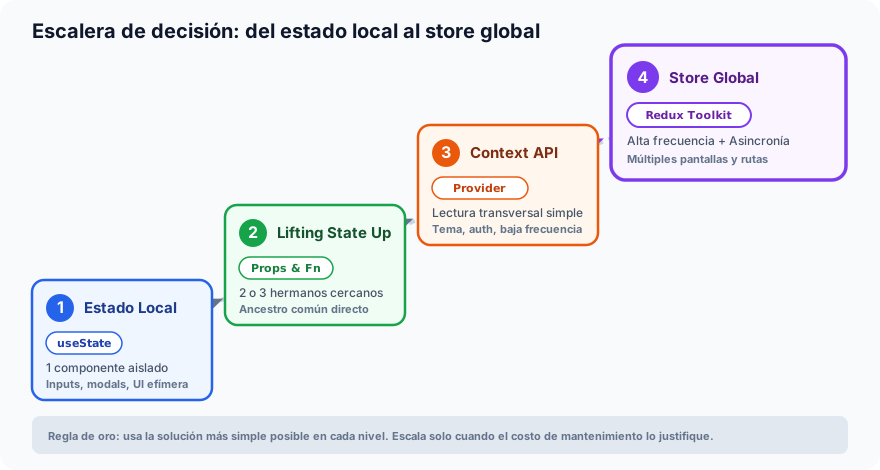
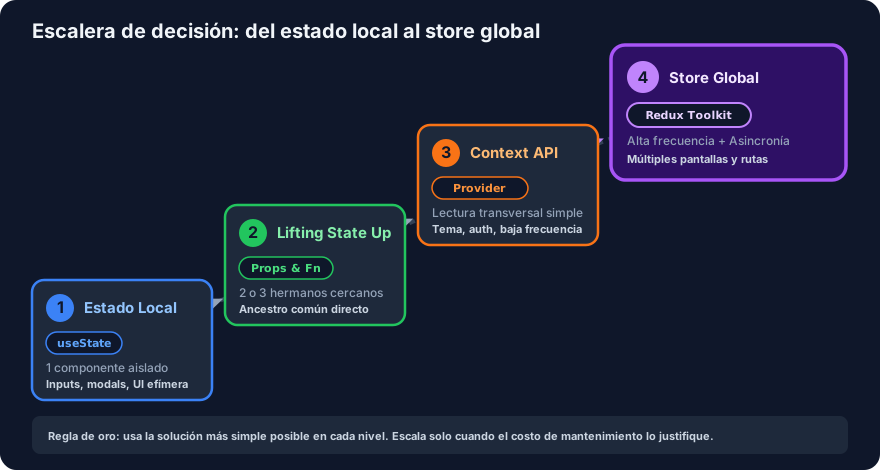
To know exactly which tool to choose for each scenario, consult the following decision matrix:
| Solution Level | Tool | When to Use It? | Domain Example |
|---|---|---|---|
| 1. Local State | useState | Ephemeral data relevant to a single component only. | Text in the RoutineForm input, modal open/closed state. |
| 2. State Hoisting | Props + Callbacks | 2 or 3 close components sharing a direct common ancestor. | RoutineForm and RoutineList within the same RoutinesCleanPage. |
| 3. Context API | createContext + useContext | Cross-cutting global data with low update frequency. | Visual theme (dark/light), application language, authenticated session user. |
| 4. Global Store | Redux Toolkit | Shared business data across multiple routes, with high update frequency or complex async flows. | Routines collection, API synchronization state, cross-cutting filters, and athlete metrics. |
8. Visual Decision Ladder
The following infographic graphically summarizes the state scalability path in React applications: