Redux Concepts
In the previous lesson, we analyzed how React manages local state using useState, the limits of lifting state up, and why React Context is not a global state engine designed for high-frequency changing data. When an application scales to multiple independent modules that must share information and synchronize with a backend, scattered state leads to duplication, visual inconsistencies, and severe coupling through prop drilling.
In this lesson, we will study the theoretical foundations and architecture of Redux Toolkit (RTK), the official and modern standard for managing predictable state in complex applications, understanding each of its components before implementing it on top of our clean architecture.
1. What Redux Is and What Problem It Solves
Redux is a predictable state container for JavaScript applications. It was created to address the fundamental problem of state dispersion: when multiple distant components in the view tree need to read and update the same data (such as the workout routines list or user session), keeping local copies in sync becomes an endless source of bugs.
The Three Principles of Redux
The design of Redux rests on three immutable principles that guarantee mathematical predictability and traceability:
- Single source of truth: The global state of the entire application resides in an object tree within a single store (Store). There are no parallel stores competing with one another; any part of the application requiring data queries the same source.
- State is read-only: No component, service, or function can directly modify the state tree. The only way to express an intent to change is by dispatching an action (Action), a plain object that formalizes what event just took place.
- Changes are made with pure functions: State transformation based on an action is calculated exclusively by reducers (Reducers). A reducer never produces side effects (it does not perform HTTP requests, write to disk, or mutate external variables); it takes the current state, processes the action, and returns a new state reference.
2. Architecture and Technical Vocabulary
To master Redux, it is essential to assimilate its foundational technical vocabulary. Each concept fulfills a well-defined role in the state machinery:
Store
The Store is the central container that holds the application's global state tree. Only a single active store instance exists on the client.
Analogy: A bank's main vault. Nobody can enter to change the money directly; every deposit or withdrawal must be formally recorded at the teller window.
import { configureStore } from '@reduxjs/toolkit';
import { routinesReducer } from '@/src/features/routines/presentation/store/routines.slice';

export const store = configureStore({
  reducer: {
    routines: routinesReducer,
  },
});
In Next.js (App Router), a shared global store would cause state leakage across concurrent requests on the server. In our project, we will create the store using a makeStore factory function per render, as explained in Configuring Redux in Next.js.
State
The State is the living data structure reflecting the application's condition at a given moment. In medium-to-large applications, it is organized into slices (slices).
Analogy: The snapshot photograph of the gym's inventory at the start of the day.
interface RoutinesState {
  items: RoutineItemViewModel[];
  isLoading: boolean;
  isMutating: boolean;
  errorMessage: string | null;
}
Action
An Action is a plain JavaScript object describing an event that occurred in the system. It mandatorily has a type property (a string identifying the operation) and optionally a payload with associated data.
Analogy: A stamped application form you hand over at the counter describing the transaction you wish to perform.
const createRoutineAction = {
  type: 'routines/create',
  payload: {
    name: 'Back and Biceps',
    description: 'Pull hypertrophy routine',
  },
};
Reducer
A Reducer is a pure function with the signature (state, action) => newState. It receives the current state and the incoming action, and calculates the resulting new state without altering the previous state.
Analogy: An accountant who takes the previous balance sheet, reviews the received payment receipt, and writes a completely new balance sheet without scratching or erasing the previous one.
function counterReducer(state = { value: 0 }, action: { type: string; payload?: number }) {
  switch (action.type) {
    case 'counter/increment':
      return { ...state, value: state.value + 1 };
    default:
      return state;
  }
}
In traditional Redux, deep destructuring (...state, items: [...state.items, newItem]) was required to avoid mutating state. RTK incorporates the Immer library, which wraps state in a Proxy draft object. This allows writing seemingly mutable syntax like state.items.unshift(action.payload) or state.isLoading = true; Immer intercepts every assignment and internally produces an impeccable immutable copy.
Slice
A Slice is a logical slice of the global state that packages the initial state, corresponding reducers, and auto-generated action creators (action creators) for a specific feature into a single file.
Analogy: The specialized loan department within the bank; it manages its own rules and data, but operates under the same financial institution.
import { createSlice, PayloadAction } from '@reduxjs/toolkit';

export const routinesSlice = createSlice({
  name: 'routines',
  initialState: { items: [], isLoading: false } as RoutinesState,
  reducers: {
    setLoading: (state, action: PayloadAction<boolean>) => {
      state.isLoading = action.payload; // Safe Immer syntax
    },
  },
});
Dispatch
The dispatch method is the only mechanism the store provides to request a state mutation. It is passed an action object, and the store takes care of routing it to the relevant reducers.
Analogy: Dropping a formal letter through the mailbox slot.
dispatch(routinesSlice.actions.setLoading(true));
Selector and useSelector
A Selector is a pure function that extracts specific fragments from the global state tree. The React Redux useSelector hook subscribes the component to that data; if the store changes but the extracted portion retains referential equality, the component does not re-render, optimizing React's performance.
Analogy: Asking the bank only for your checking account balance, without requesting the balance sheet of every customer at the branch.
import { useSelector } from 'react-redux';
import { RootState } from '@/src/store/store';

export function RoutineCounter() {
  const count = useSelector((state: RootState) => state.routines.items.length);
  return <span>Total routines: {count}</span>;
}
useDispatch
Hook provided by React Redux to access the store's dispatch function inside client components ('use client').
import { useDispatch } from 'react-redux';
import { routinesSlice } from '@/src/features/routines/presentation/store/routines.slice';

export function ClearErrorButton() {
  const dispatch = useDispatch();
  return <button onClick={() => dispatch(routinesSlice.actions.clearError())}>Clear</button>;
}
Provider
The <Provider store={store}> component supplies the store instance to the entire React tree using the native Context API.
There is a critical distinction between:
- Using Context as a state manager: Placing frequently changing objects in native context forces all consuming components to re-render upon any minimal mutation.
- Using Context as a Store injection mechanism:
<Provider>only transports the static store reference down the tree. Granular reactivity and preventing unnecessary re-renders are handled by Redux's internal subscription engine throughuseSelector.
3. Unidirectional Data Flow
In Redux, information always travels in a single predictable direction (One-Way Data Flow). No data travels backward, and there are no shortcuts bypassing steps in the chain:
- The View (UI) detects a user event (for example, clicking "Create Routine").
- The component invokes
dispatch(action), sending a descriptive object with the data. - The Store receives the action and forwards it to the corresponding Reducer function.
- The Reducer immutably calculates the next state and returns the new tree.
- The Store updates its reference and notifies subscribers.
- The Selectors verify whether the slice of data they observe changed; if so, affected components re-render with updated information.
Below, you can interactively experience this full cycle using the course's routines domain:
4. Asynchronous Operations and Thunk Lifecycle
Reducers must remain strictly pure and synchronous: given the same state and action, they must always return the same result immediately. Where, then, do we perform HTTP requests to the backend, read from databases, or manage timers?
What is a Thunk?
A Thunk is a function that encapsulates an operation to delay its evaluation. In the Redux ecosystem, Redux Thunk is a middleware that intercepts dispatched actions: if the action is a plain object, it forwards it directly to reducers; if it is a function, it executes it, providing access to dispatch and getState.
The thunk extracts all asynchronous behavior and side effects outside React components and outside reducers, keeping views 100% declarative.
createAsyncThunk and Its Three States
Redux Toolkit provides the createAsyncThunk function to automate standard asynchronous operations. From an action prefix, it automatically generates three action creators modeling the lifecycle of a promise:
pending: Dispatched immediately before executing the asynchronous promise. Ideal for turning on visual indicators (isLoading = true) and resetting previous error messages.fulfilled: Dispatched when the promise resolves successfully. The value returned by the async function automatically travels inaction.payload.rejected: Dispatched when the promise is rejected or throws an exception.
import { createAsyncThunk } from '@reduxjs/toolkit';
import { routineContainer } from '@/src/features/routines/di/routine.container';
import { RoutineViewModelMapper } from '../viewmodels/routine.viewmodel';

export const fetchRoutines = createAsyncThunk(
  'routines/fetchAll',
  async (_, { rejectWithValue }) => {
    try {
      const domainEntities = await routineContainer.getRoutines.execute();
      return domainEntities.map(RoutineViewModelMapper.toViewModel);
    } catch (err: unknown) {
      const message = err instanceof Error ? err.message : 'Failed to load routines';
      return rejectWithValue(message);
    }
  }
);
rejectWithValue in a sentencerejectWithValue allows catching exceptions in the catch block and returning a controlled domain error message or code directly in action.payload under the rejected state. If the error were allowed to escape or be rethrown, RTK would serialize it by default as a generic SerializedError in action.error ({ name, message, stack, code }), leaving action.payload as undefined.
reducers vs. extraReducers
When defining a slice in Redux Toolkit, there is a fundamental distinction between both properties:
reducers(Local and synchronous actions): Defines internal reducers for the feature. Automatically generates action creators with the same name inslice.actions(for example,clearError()).extraReducers(External and asynchronous actions): Allows the slice to respond to actions created outside of it, such as thepending,fulfilled, andrejectedactions generated bycreateAsyncThunk, or actions from other slices (for example, clearing the routines list ifauth/logoutoccurs). It does not generate new action creators; it is structured using the recommendedbuilder.addCase()notation.
Pessimistic vs. Optimistic Updates
In interactive web applications, two strategies exist to synchronize global state with backend mutations:
- Pessimistic Update (Our project strategy): Waits for server confirmation. The new item is appended to
state.itemsonly inside thebuilder.addCase(createRoutineMutation.fulfilled, ...)block. If the server rejects the creation, local state was never altered and onlyerrorMessageis set. It is the safest strategy and free from inconsistencies. - Optimistic Update: Inserts the item into state as soon as
pendingis dispatched with a temporary identifier, providing instant feedback to the user. If the request fails inrejected, a rollback mechanism must be programmed to remove the ghost item from the list.
Thunks and Clean Architecture
In a frontend architected with Clean Architecture, the asynchronous thunk never performs direct fetch calls or HTTP invocations with hardcoded URLs. Its responsibility is to orchestrate calls to the Domain Use Case (GetRoutinesUseCase or CreateRoutineUseCase) injected via the dependency container, subsequently transforming domain entities into ViewModels ready for the interface.
Explore in the following interactive piece how an asynchronous thunk's lifecycle behaves, toggling the switch to compare a successful response against a network failure:
5. Anatomy of a Slice in Redux Toolkit
The slice is the primary building block in modern Redux development. Understanding how its properties fit together enables structuring any application module cleanly and consistently:
6. Comparison: Redux Toolkit vs. Zustand and React Context
In the modern React ecosystem, several tools coexist for managing state. None is intrinsically superior to the others in every scenario; the choice depends on team size, domain complexity, and reactive update volume:
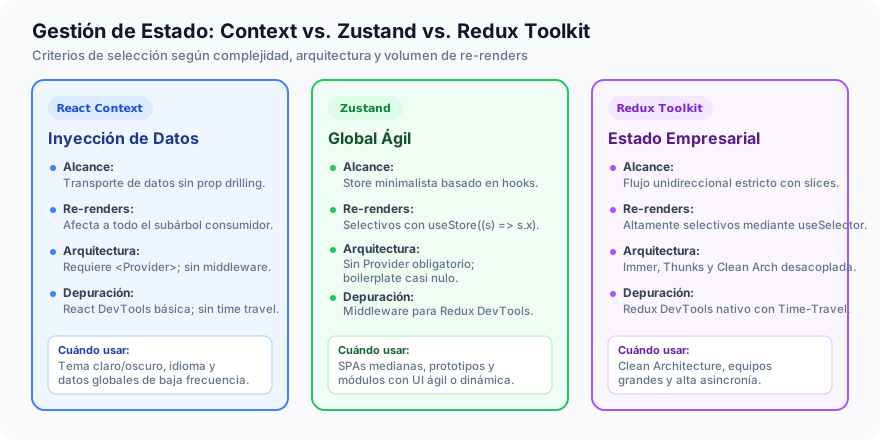
| Criterion | React Context | Zustand | Redux Toolkit (RTK) |
|---|---|---|---|
| Primary purpose | Dependency injection and static data | Minimalist and agile global store | Structured and highly predictable global state |
| Boilerplate | Minimal | Practically none | Moderate (structured into Slices) |
| Learning curve | Immediate | Very low | Moderate (requires grasping actions and reducers) |
| Re-renders | Massive (entire consuming subtree) | Surgical per selector | Surgical per referential selector |
| Middleware support | Non-native | Simple via plugins | Robust and extensible (Thunk built-in by default) |
| Requires Provider | Yes (<Context.Provider>) | Not required | Yes (<Provider store={store}>) |
| Debugging tools | Generic React DevTools | Middleware for Redux DevTools | Native Redux DevTools with Time Travel |
| Team scalability | Low (easy disarray) | Medium / High | Excellent (enforces uniform conventions) |
7. Redux DevTools: Traceability and Time Travel
One of the greatest strengths of Redux's unidirectional flow is its native integration with the browser's Redux DevTools extension. Because state is immutable and every change is cataloged in an explicit action with its corresponding payload, DevTools enable real-time inspection of the application's full event history. It is possible to examine the exact difference (diff) each action produced in the data tree, export and import debugging sessions, and leverage the Time-Travel Debugging capability, allowing developers to rewind state step by step into the past to reproduce bugs with absolute fidelity.