Event-Driven Navigation
Navigating in a web application means changing routes and updating the view without a full page reload in the browser. In Next.js (App Router), navigation can be initiated declaratively from the client or programmatically in both client components and on the server. In Week 9 we covered the basic folder structure and routing; now we will dive into triggering transitions via user events and interactions.
Navigation Mechanisms
Next.js provides several tools to change routes or modify the URL depending on the execution context:
| Mechanism | Environment | When to Use | Example |
|---|---|---|---|
<Link> | Client and Server | Static links and visible on-screen menus. | <Link href="/productos">Catálogo</Link> |
router.push() | Client ('use client') | Navigating after a user action or event. | router.push('/productos') |
router.replace() | Client ('use client') | Redirecting without adding the current route to history. | router.replace('/dashboard') |
router.back() | Client ('use client') | Going back to the previous page in history. | router.back() |
router.forward() | Client ('use client') | Moving forward to the next page in history. | router.forward() |
router.refresh() | Client ('use client') | Refreshing server data without losing local client state. | router.refresh() |
router.prefetch() | Client ('use client') | Prefetching a route in the background before navigating. | router.prefetch('/productos') |
redirect() | Server (and client render) | Redirecting before rendering the page or inside an action. It does not work inside event handlers. | redirect('/login') |
permanentRedirect() | Server | Redirecting permanently (HTTP status code 308). | permanentRedirect('/nuevo-catalogo') |
notFound() | Server | Rendering the 404 view when a record does not exist. | notFound() |
pushState / replaceState | Client ('use client') | Updating the URL without navigating or requesting the page from the server. | window.history.pushState(null, '', '?orden=asc') |
The Link Component
The <Link> component is the standard declarative navigation mechanism in Next.js. It renders an accessible <a> tag and optimizes performance by prefetching routes in the background.
Basic Usage and Dynamic Routes
For static routes or dynamic routes using template literals:
import Link from 'next/link';

export function MenuNavegacion({ productoId }: { productoId: string }) {
  return (
    <nav className="flex gap-4">
      <Link href="/productos">All products</Link>
      <Link href={`/productos/${productoId}`}>Product details</Link>
    </nav>
  );
}
Main Props of Link
href: the destination route. It can be a string ("/productos"or a template like`/productos/${id}`) or a{ pathname, query }object:href={{ pathname: '/buscar', query: { q: 'tenis' } }}navigates to/buscar?q=tenis.replace: whentrue, replaces the current URL in the history stack instead of adding a new entry (replace={true}). Defaults tofalse.scroll: controls whether the page scrolls to the top after navigation. Defaults totrue. Withscroll={false}, the vertical scroll position is preserved.prefetch: controls background prefetching when the link enters the viewport. It defaults to"auto"(same asnull): for a static route it prefetches the full route, and for a dynamic route it prefetches down to the nearestloading.tsx. Withtrueit prefetches the full route for dynamic routes too, and withfalseit never prefetches.onNavigate: a function that runs during client-side navigation. Callinge.preventDefault()inside it cancels the navigation. It does not run withCtrl/Cmd+ click or for external links.
During development (npm run dev) Next.js does not prefetch routes. To see the effect of prefetch, build the app with npm run build and run it with npm run start.
Active Link with usePathname
To highlight the link for the page the user is currently on, use the usePathname hook:
'use client';

import Link from 'next/link';
import { usePathname } from 'next/navigation';

export function NavLink({ href, children }: { href: string; children: React.ReactNode }) {
  const pathname = usePathname();
  const isActive = pathname === href;

  return (
    <Link href={href} className={isActive ? 'font-bold text-blue-600' : 'text-gray-600'}>
      {children}
    </Link>
  );
}
Two more tools are related to the state of a link:
useSelectedLayoutSegment(): returns the active segment one level below the layout where it is used (for example,'productos'). It is useful in a navbar inside a layout, because the link stays active on every subroute (/productos/42) and not only on the exact route.useLinkStatus(): returns{ pending }, which istruewhile the<Link>navigation is in progress. It is imported fromnext/linkand must be used in a child component of the<Link>, for example to show a loading indicator.
'use client';

import { useLinkStatus } from 'next/link';

export function IndicadorEnlace() {
  const { pending } = useLinkStatus();
  return <span>{pending ? 'Loading…' : 'Go'}</span>;
}

// Usage: <Link href="/productos"><IndicadorEnlace /></Link>
The useRouter Hook
The useRouter hook allows programmatic navigation in response to JavaScript events.
It requires the 'use client' directive because it accesses browser history, which only exists on the client.
Available Methods
router.push(href, options?): navigates to the specified route and pushes a new entry onto the history stack.router.replace(href, options?): navigates to the specified route and replaces the current entry in the history stack.router.back(): navigates back one position in browser history.router.forward(): navigates forward one position in browser history.router.refresh(): requests fresh Server Components from the server without resetting client local state (for example, the contents of auseStateor the scroll position). It clears the client cache for the current route but does not invalidate the server cache: userevalidatePathorrevalidateTagfor that.router.prefetch(href): manually prefetches the code and data for a route in the background, for examplerouter.prefetch('/productos').
Both push and replace accept a second argument with options; the most common is { scroll: false }, which keeps the page's vertical position:
router.push('/productos', { scroll: false });
router.push and router.replace must not receive URLs that come from user input without validating them: a URL with the javascript: scheme would run in the context of your page.
In the App Router, pathname and query from next/router are replaced by usePathname() and useSearchParams(), and router.events no longer exists: to react to a route change, combine both hooks inside a useEffect.
Navigation with onClick
The most direct use case occurs when clicking a button or card:
'use client';

import { useRouter } from 'next/navigation';

export function BotonVerProducto({ id }: { id: string }) {
  const router = useRouter();

  return (
    <button type="button" onClick={() => router.push(`/productos/${id}`)}>
      View product
    </button>
  );
}
Navigation After Form Submission
In a form, navigation should only execute once the asynchronous operation concludes successfully:
'use client';

import { useState } from 'react';
import { useRouter } from 'next/navigation';

export function FormularioProducto() {
  const router = useRouter();
  const [nombre, setNombre] = useState('');
  const [error, setError] = useState<string | null>(null);

  const handleSubmit = async (e: React.FormEvent) => {
    e.preventDefault();
    setError(null);

    const ok = await guardar({ nombre });
    if (ok) {
      router.push('/productos');
    } else {
      setError('The product could not be saved.');
    }
  };

  return (
    <form onSubmit={handleSubmit} className="space-y-4">
      {error && <p className="text-red-600">{error}</p>}
      <input
        type="text"
        value={nombre}
        onChange={(e) => setNombre(e.target.value)}
        placeholder="Product name"
      />
      <button type="submit">Save</button>
    </form>
  );
}

async function guardar(datos: { nombre: string }): Promise<boolean> {
  return datos.nombre.trim().length > 0;
}
Explore in the following interactive animation how saving flows between the User, the Client Component, and the Next.js Router. Toggle the bottom switch to simulate a failed save:
The flow above demonstrates two paths:
- Success: the promise resolves successfully, the component enters the
ifblock and executesrouter.push('/productos'). Next.js mounts the new view. - Failure: the promise returns
false, enters theelseblock, sets error state, and does not invokerouter.push(). The user preserves their entered text.
push vs. replace
The difference between router.push and router.replace lies in how they manage the browser's history stack:
push: adds a new URL to the top of the stack. The "Back" button returns to the previous screen.replace: replaces the current URL with the new one without expanding the stack. The "Back" button skips back to the route prior to the replaced one.
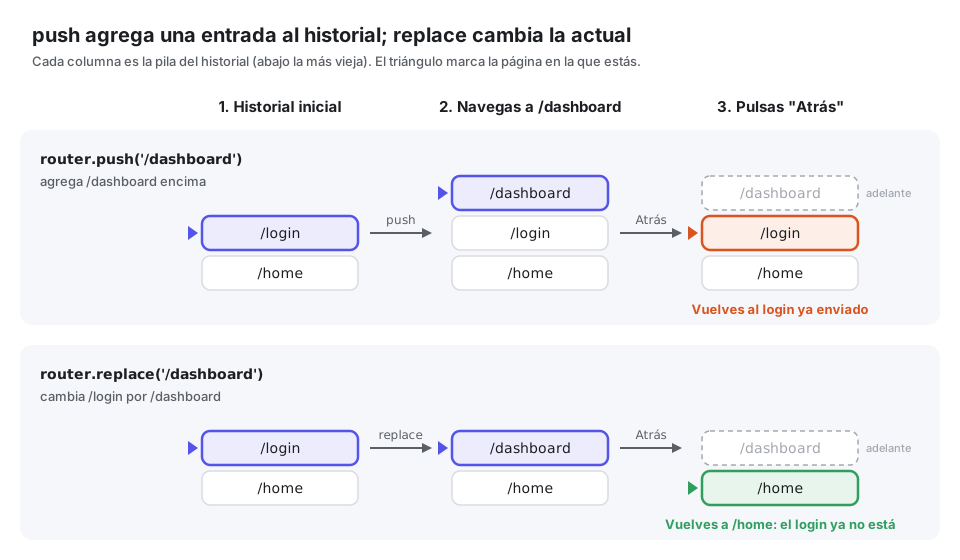
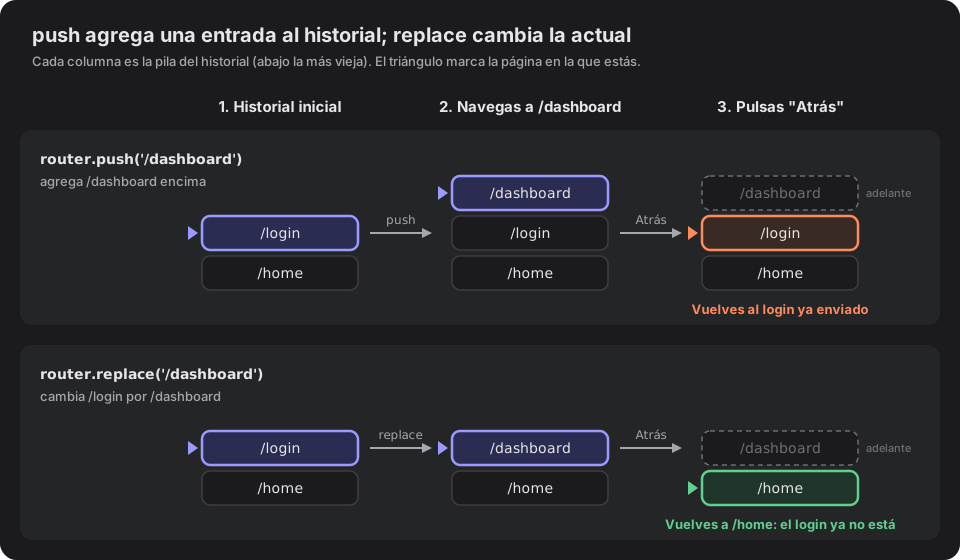
The classic use case for replace is user authentication. Once the user is logged in, redirecting with replace prevents pressing the "Back" button from returning to the login form:
'use client';

import { useState } from 'react';
import { useRouter } from 'next/navigation';

export function FormularioLogin() {
  const router = useRouter();
  const [email, setEmail] = useState('');

  const handleLogin = async (e: React.FormEvent) => {
    e.preventDefault();
    const ok = await loginSimulado(email);
    if (ok) {
      router.replace('/dashboard');
    }
  };

  return (
    <form onSubmit={handleLogin}>
      <input type="email" value={email} onChange={(e) => setEmail(e.target.value)} />
      <button type="submit">Sign in</button>
    </form>
  );
}

async function loginSimulado(email: string): Promise<boolean> {
  return email.includes('@');
}
Reading the URL
To read routes and parameters, Next.js provides utilities on both the client and the server.
On the Client
In Client Components, three hooks from next/navigation are used:
usePathname(): returns the current pathname (for example,"/productos").useParams(): returns an object with dynamic route segments (for example,{ id: '42' }).useSearchParams(): returns a read-only instance of query parameters (for example,?categoria=calzado).
Any Client Component that uses useSearchParams() must be wrapped inside a <Suspense> boundary to prevent disabling static prerendering for the page.
Example of a reactive filter that updates ?categoria= with router.push:
'use client';

import { usePathname, useRouter, useSearchParams } from 'next/navigation';

export function FiltroCategoria() {
  const router = useRouter();
  const pathname = usePathname();
  const searchParams = useSearchParams();

  const handleSelect = (categoria: string) => {
    const params = new URLSearchParams(searchParams.toString());
    if (categoria) {
      params.set('categoria', categoria);
    } else {
      params.delete('categoria');
    }
    const query = params.toString();
    router.push(query ? `${pathname}?${query}` : pathname, { scroll: false });
  };

  return (
    <select onChange={(e) => handleSelect(e.target.value)}>
      <option value="">All</option>
      <option value="ropa">Clothing</option>
      <option value="calzado">Footwear</option>
    </select>
  );
}
On the Server
In Next.js 16, the params and searchParams props received by server pages are promises (Promise) and must be resolved using await:
interface Props {
  params: Promise<{ id: string }>;
  searchParams: Promise<{ categoria?: string }>;
}

export default async function ProductoPage({ params, searchParams }: Props) {
  const { id } = await params;
  const { categoria } = await searchParams;

  return (
    <main>
      <h1>Product: {id}</h1>
      <p>Active category: {categoria || 'general'}</p>
    </main>
  );
}
Server-Side Navigation
In Server Components, Route Handlers, and Server Actions, the useRouter hook is not available. Navigation is managed using functions from next/navigation:
redirect(path, type?): interrupts rendering and redirects to another route. The optional second argument is'replace'or'push'and decides whether the redirect replaces or adds a history entry. By default it usespushin Server Actions andreplaceeverywhere else. In a Server Component the argument has no effect.permanentRedirect(path, type?): same asredirect, but issues a permanent redirect with HTTP status code 308.notFound(): cancels rendering and displays the nearestnot-found.tsxfile.
redirect responds with status 307 (and 303 when it comes from a Server Action submitted by a form). It can be called in Server Components, Route Handlers and Server Actions, and also during the render of a Client Component, but not inside an event handler: use useRouter there.
Example in Server Component and Server Action
import { redirect } from 'next/navigation';

export default async function DashboardPage() {
  const sesion = await verificarSesion();
  if (!sesion) {
    redirect('/login');
  }

  return <h1>Private dashboard</h1>;
}

async function verificarSesion() {
  return null;
}
In a Server Action after saving a form:
'use server';

import { redirect } from 'next/navigation';

export async function crearProducto(formData: FormData) {
  const nombre = formData.get('nombre') as string;
  // Save to the database...
  redirect('/productos');
}
For a non-existent resource:
import { notFound } from 'next/navigation';

export default async function ProductoDetalle({ params }: { params: Promise<{ id: string }> }) {
  const { id } = await params;
  if (id === '0' || id === 'inexistente') {
    notFound();
  }

  return <h1>Product {id}</h1>;
}
Both redirect() and notFound() throw internal errors (NEXT_REDIRECT and NEXT_NOT_FOUND) to halt execution and pass control to Next.js. If you place them inside a generic try/catch block, the block will catch the error and prevent the redirect from working. If you need to catch other errors, call redirect outside the try/catch.
Redirects Outside Components
Not every redirect is written inside a page. Next.js offers two more places, depending on the logic you need:
redirects()innext.config.js: for fixed routes that always redirect to another one (for example, a route that was renamed). Withpermanent: trueit responds 308 and withfalseit responds 307.proxy.ts: to decide the redirect using each request's information (cookies, headers, path). In Next.js 16 the oldmiddleware.tsfile was renamed toproxy.tsand its exported function is calledproxy.
module.exports = {
  async redirects() {
    return [
      { source: '/antiguo', destination: '/nuevo', permanent: true },
    ];
  },
};
import { NextResponse, type NextRequest } from 'next/server';

export function proxy(request: NextRequest) {
  return NextResponse.redirect(new URL('/home', request.url));
}

// Only runs on the routes that match the matcher
export const config = { matcher: '/viejo/:path*' };
Native History API
In Client Components, you can directly use the browser's window.history.pushState and window.history.replaceState methods.
This allows updating the URL in the address bar (for example, when sorting a list or opening a secondary tab) without navigating or requesting the page again from the server. Next.js automatically synchronizes these calls with usePathname and useSearchParams.
'use client';

import { useSearchParams } from 'next/navigation';

export function OrdenLista() {
  const searchParams = useSearchParams();

  const cambiarOrden = (orden: string) => {
    const params = new URLSearchParams(searchParams.toString());
    params.set('orden', orden);
    window.history.pushState(null, '', `?${params.toString()}`);
  };

  return (
    <div className="flex gap-2">
      <button type="button" onClick={() => cambiarOrden('asc')}>Ascending</button>
      <button type="button" onClick={() => cambiarOrden('desc')}>Descending</button>
    </div>
  );
}
Decision Guide
Apply this rule of thumb to choose the appropriate mechanism:
- If the user clicks a visible menu or button: use
<Link>. - If navigation depends on a client-side event or validation: use
router.push. - If you completed a flow that should not be reopened (login or checkout): use
router.replace. - If redirecting from the server due to missing session or permissions: use
redirect. - If the requested identifier does not exist in the database: use
notFound. - If you are only updating URL parameters without reloading views: use
window.history.pushState.
Common Pitfalls
| Mistake | Root Cause | Solution |
|---|---|---|
Importing from next/router | Confusing the Pages Router package with the App Router package. | Always import useRouter from next/navigation. |
Calling router.push during render | Executing navigation directly within the function body. | Move the call inside an event handler (onClick, onSubmit) or useEffect. |
Using <a> for internal routes | Using native HTML anchors instead of the <Link> component. | Use <Link> to prevent full page reloads. |
Forgetting 'use client' with useRouter | Attempting to run interactive hooks inside a Server Component. | Add 'use client'; to the first line of the file. |