Node JS
General aspects of Node JS, how it differs from browser JavaScript, and how it is used on the server side.
What is Node JS?
Node.js is a JavaScript runtime environment built on Chrome's V8 engine. It lets you run JavaScript code on the server side, outside the browser. It was created by Ryan Dahl in 2009 with the goal of building highly scalable and efficient applications for handling I/O (input/output) operations.
For some reason, Node and its modules are now used on the server side...
Key features
- Asynchronous and non-blocking: Node uses asynchronous operations by default, which makes it ideal for applications that handle many simultaneous requests.
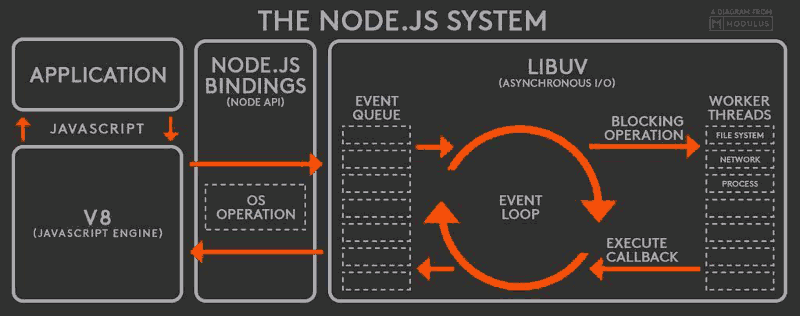
- Single-threaded: Although it runs on a single thread, it can handle concurrency through the Event Loop and by delegating I/O operations to system threads through libuv.
- Large ecosystem: It has npm, the largest ecosystem of open source packages.
Difference from JavaScript in the browser
- In the browser, JavaScript runs in the context of the DOM.
- In Node.js, there is no DOM; you use modules such as
fsorhttpto access the file system or create servers.
How can Node JS be concurrent?
Node.js is single-threaded, but it can handle concurrency thanks to:
- Event Loop: It manages asynchronous tasks and dispatches them.
- libuv: A library that provides a thread pool that lets blocking tasks (such as disk or network access) run without blocking the main thread. These threads do not belong to Node; they belong to the operating system.
Example:
const fs = require('fs');

console.log('Inicio');

fs.readFile('archivo.txt', 'utf-8', (err, data) => {
  if (err) throw err;
  console.log('Contenido:', data);
});

console.log('Fin');
Event Loop
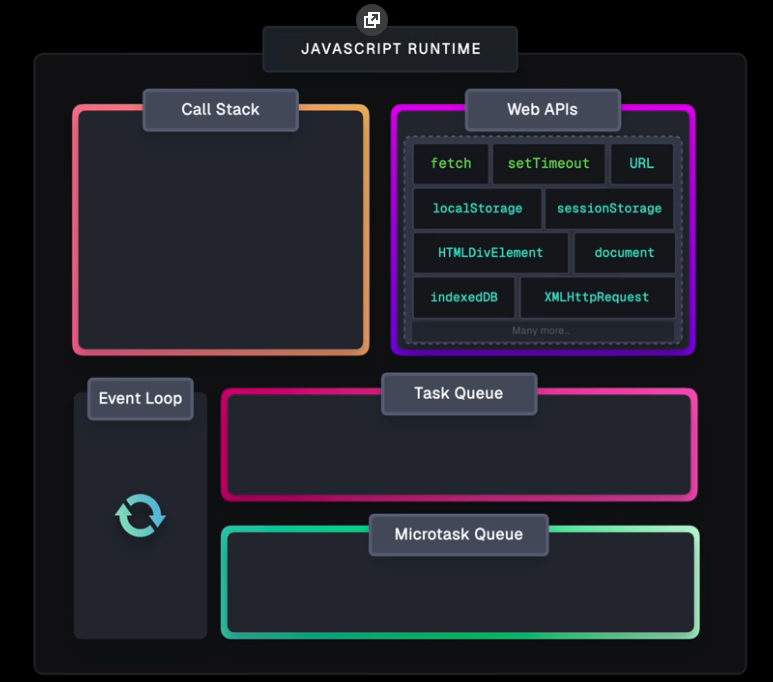
The Event Loop is the mechanism that allows Node.js to run non-blocking operations, despite being single-threaded.
Event Loop phases (simplified):
- Timers: Runs
setTimeoutandsetIntervalcallbacks. - Pending callbacks: Callbacks deferred by certain system operations.
- Idle/prepare: Internal to Node.
- Poll: Retrieves new events and runs I/O.
- Check: Runs
setImmediate(). - Close callbacks: E.g.
socket.on('close').
Microtasks vs Macrotasks
- Microtasks: Promises (
Promise.then),queueMicrotask. - Macrotasks:
setTimeout,setInterval,setImmediate.
Example:
console.log('Inicio');

setTimeout(() => console.log('Timeout'), 0);

Promise.resolve().then(() => console.log('Promesa'));

console.log('Fin');
Expected output:
Inicio
Fin
Promesa
Timeout
What is a callback?
A callback is a function that is passed as an argument to another function and is executed after that function finishes its work.
Callback example:
function saludar(nombre, callback) {
  console.log(`Hola ${nombre}`);
  callback();
}

saludar('Kevin', () => {
  console.log('Callback ejecutado');
});
Callback Hell
When many callbacks are nested, the code becomes unreadable. This is known as "callback hell".
fs.readFile('archivo1.txt', 'utf-8', (err, data1) => {
    if (err) throw err;
    console.log('Archivo 1 leído');

    fs.readFile('archivo2.txt', 'utf-8', (err, data2) => {
        if (err) throw err;
        console.log('Archivo 2 leído');

        fs.readFile('archivo3.txt', 'utf-8', (err, data3) => {
            if (err) throw err;
            console.log('Archivo 3 leído');

            fs.readFile('archivo4.txt', 'utf-8', (err, data4) => {
                if (err) throw err;
                console.log('Archivo 4 leído');
            });
        });
    });
});
Promises
A Promise represents a value that may be available now, in the future, or never.
States:
- Pending: waiting.
- Fulfilled: resolved successfully.
- Rejected: failed.
Example:
const promesa = new Promise((resolve, reject) => {
  setTimeout(() => resolve('Hecho!'), 1000);
});

promesa.then(res => console.log(res));
With async/await:
async function saludar() {
  const resultado = await promesa;
  console.log(resultado);
}

saludar();
Difference between require/export and import/export
Node.js has two module systems:
- CommonJS: Uses
requireandmodule.exports. - ES6 Modules: Uses
importandexport.
This is because Node.js was created before ES6 modules were standardized.
const fs = require('fs'); // CommonJS
import fs from 'fs'; // ES6 Modules
Node JS modules
fs module
It lets you work with the file system.
Example:
const fs = require('fs');

fs.readFile('archivo.txt', 'utf-8', (err, data) => {
  if (err) throw err;
  console.log(data);
});
http module
It lets you create HTTP servers.
Example:
const http = require('http');

const server = http.createServer((req, res) => {
  res.writeHead(200, { 'Content-Type': 'text/plain' });
  res.end('Hola desde Node.js');
});

server.listen(3000, () => console.log('Servidor en puerto 3000'));
path module
It lets you work with file paths.
const path = require('path');

const ruta = path.join(__dirname, 'archivo.txt');
console.log(ruta);
os module
It provides information about the operating system.
const os = require('os');

console.log('Sistema operativo:', os.platform());
console.log('Memoria libre:', os.freemem());
console.log('CPUs:', os.cpus());
process.nextTick() example
process.nextTick() lets you run code asynchronously on the next iteration of the event loop, before any other asynchronous event:
console.log('Inicio del programa');

// Runs immediately
console.log('1. Código síncrono');

// Runs on the next iteration of the event loop
process.nextTick(() => {
    console.log('3. nextTick callback');
});

// Runs after nextTick
setTimeout(() => {
    console.log('4. setTimeout callback');
}, 0);

console.log('2. Final del código síncrono');

// Output:
// Inicio del programa
// 1. Código síncrono
// 2. Final del código síncrono
// 3. nextTick callback
// 4. setTimeout callback
Common use case: Error handling
function asyncFunction(callback) {
    if (typeof callback !== 'function') {
        // Use nextTick to handle errors asynchronously
        process.nextTick(() => {
            throw new TypeError('Callback debe ser una función');
        });
        return;
    }

    // Simulate an asynchronous operation
    process.nextTick(callback);
}

// Usage
asyncFunction(() => {
    console.log('Callback ejecutado correctamente');
});