Dependency Injection and Providers
In the previous guides, we explored NestJS fundamentals, built controllers and services with in-memory storage, and modeled relational entities using TypeORM and PostgreSQL. However, for all these parts to function cohesively in an enterprise-grade backend, understanding how layers communicate is essential: Inversion of Control (IoC), Dependency Injection (DI), and Providers.
1. Layered Architecture in NestJS
A modern backend application decouples responsibilities across well-defined tiers so that each element fulfills a single responsibility. In NestJS, data flows through structured architectural layers:
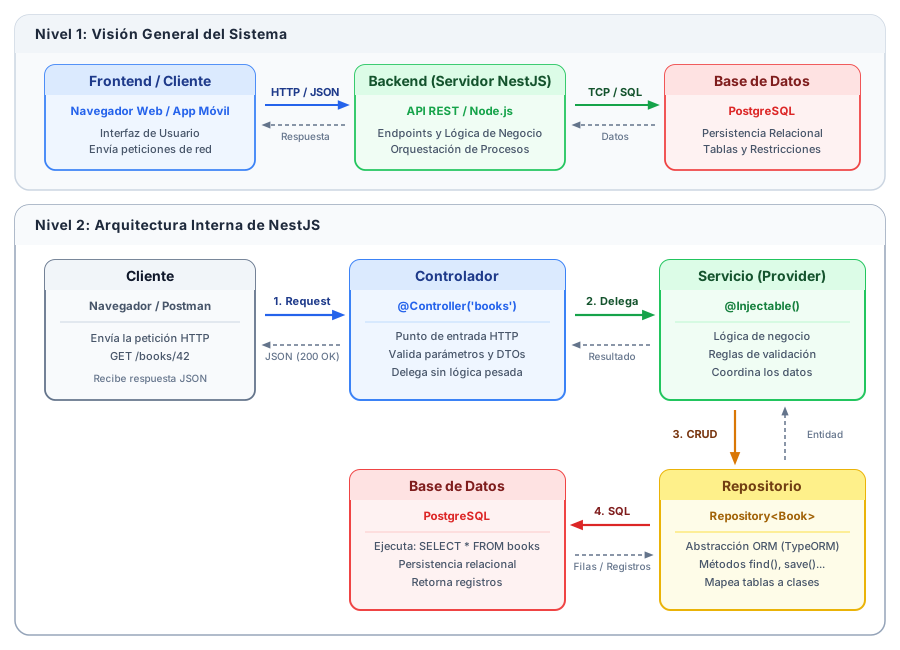
- Client: Browser, mobile application, or HTTP client initiating the request and consuming the response.
- Controller (
@Controller): Entry point for HTTP requests; routes URLs, validates parameters, and delegates execution to services. - Service (
@Injectable): Contains domain business logic, data validations, and workflow orchestration. - Repository (
Repository<T>): Abstracts database access through TypeORM, translating object-oriented operations into safe SQL queries. - Database (PostgreSQL): Physical storage engine enforcing relational constraints and persistent tables.
2. Tight Coupling vs. Inversion of Control
Now that the layers are defined, the core architectural question arises: how does a controller obtain an instance of its service or repository?
Traditional Coupled Approach (Manual Instantiation with new)
In traditional object-oriented programming without dependency injection containers, a class directly instantiates its dependencies using new:
export class UsersController {
  private usersService: UsersService;

  constructor() {
    // Rigid coupling: the controller instantiates the service directly
    this.usersService = new UsersService();
  }

  getUsers() {
    return this.usersService.findAll();
  }
}
This pattern creates severe architectural issues:
- Rigid coupling: If
UsersServicemodifies its constructor signature in the future (for example, to require a database connection or repository), every controller instantiating it withnewwill fail to compile and require manual updates. - Impossibility of unit testing: It becomes impossible to substitute the real service with a mock object, preventing developers from isolating the controller during unit tests.
- Inefficient memory usage: Every consumer instantiates a new dependency, duplicating resources and state.
Inversion of Control (IoC) and Dependency Injection (DI)
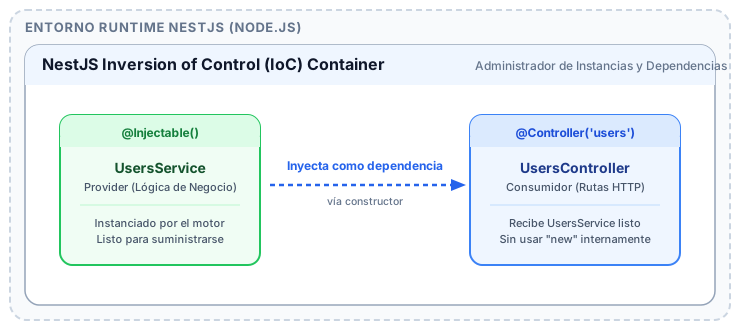
NestJS solves this using the Inversion of Control (IoC) design pattern. The consuming class is no longer responsible for manufacturing what it needs; instead, it simply declares its requirements as constructor parameters.
The NestJS IoC Container automatically instantiates components, resolves the dependency graph in the correct order, and injects them ready for use:
| Criterion | Manual Instantiation (new) | Dependency Injection (IoC) |
|---|---|---|
| Creation Responsibility | Consuming class creates its own dependencies | The NestJS IoC Container constructs them automatically |
| Coupling Level | High (classes depend on concrete implementations) | Low (classes depend on decoupled contracts or abstractions) |
| Unit Testing | Complex (cannot substitute mocks) | Straightforward (simply pass mocked objects in the constructor) |
| Maintainability | Fragile when constructor signatures change | Centralized and managed across NestJS modules |
3. What is a Provider in NestJS?
In NestJS, a Provider is any plain TypeScript class decorated with @Injectable() that can be managed by the IoC container and injected as a dependency into other components.
The vast majority of classes containing operational logic in NestJS are providers:
- Services (
Services): Pure business logic and domain rules. - Repositories (
Repositories): Database interaction and TypeORM table management. - API Clients & Adapters: Communication with external services (payment gateways, mailers, third-party APIs).
- Helpers & Utilities: Reusable calculation and utility functions.
The @Injectable() Decorator
The @Injectable() decorator attaches reflection metadata that signals to the NestJS runtime: "this class is a provider and can be injected wherever requested":
import { Injectable } from '@nestjs/common';

export interface UserItem {
  id: number;
  email: string;
}

@Injectable()
export class UsersService {
  private readonly users: UserItem[] = [
    { id: 1, email: 'ada@icesi.edu.co' },
    { id: 2, email: 'alan@icesi.edu.co' },
  ];

  findAll(): UserItem[] {
    return this.users;
  }

  findById(id: number): UserItem | undefined {
    return this.users.find((u) => u.id === id);
  }
}
4. Constructor-Based Dependency Injection
NestJS primarily relies on constructor-based injection. Required dependencies are declared as parameters inside the constructor signature.
By prefixing an access modifier such as private readonly in TypeScript, the property is declared and initialized simultaneously in one concise line:
import { Controller, Get, Param, ParseIntPipe, NotFoundException } from '@nestjs/common';
import { UsersService, UserItem } from './users.service';

@Controller('users')
export class UsersController {
  // Constructor injection:
  // NestJS identifies the UsersService type and injects the singleton instance
  constructor(private readonly usersService: UsersService) {}

  @Get()
  getAll(): UserItem[] {
    return this.usersService.findAll();
  }

  @Get(':id')
  getById(@Param('id', ParseIntPipe) id: number): UserItem {
    const user = this.usersService.findById(id);
    if (!user) {
      throw new NotFoundException(`User with ID ${id} not found`);
    }
    return user;
  }
}
Declaring injected dependencies as readonly ensures that the reference cannot be accidentally reassigned throughout the class lifecycle.
5. Modular Organization: The Structure of @Module()
For the IoC container to know which providers exist and which components are authorized to consume them, they must be registered within a Module.
A module is a class decorated with @Module() that establishes an encapsulation boundary:
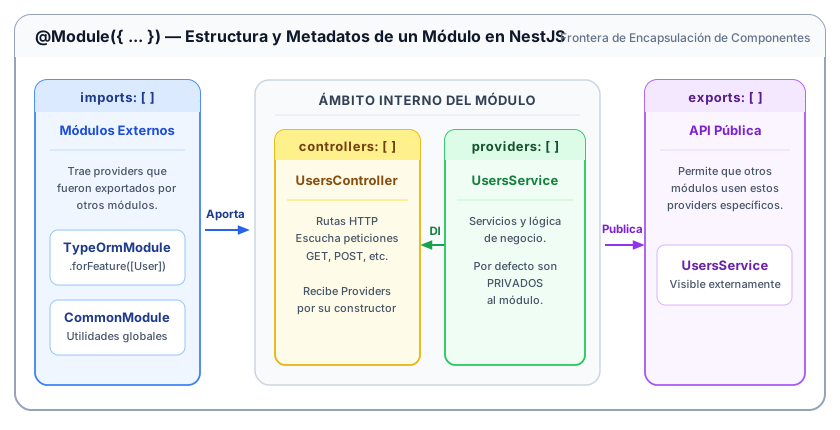
Main Properties of @Module()
controllers: [ ... ]: Controllers belonging to this module that should be instantiated to listen for incoming HTTP routes.providers: [ ... ]: Services and providers managed by the IoC container within this module. By default, they are private to the module.imports: [ ... ]: External modules whose exported providers are required within this module.exports: [ ... ]: Subset of providers from this module that are made public for other importing modules to inject.
import { Module } from '@nestjs/common';
import { UsersController } from './users.controller';
import { UsersService } from './users.service';

@Module({
  imports: [],                    // Imported modules
  controllers: [UsersController], // Route handling controllers
  providers: [UsersService],      // Providers registered in module
  exports: [UsersService],        // Makes UsersService available to importing modules
})
export class UsersModule {}
6. Troubleshooting Common Dependency Errors
Error: Nest can't resolve dependencies of the UsersController (?)
This is the most common error encountered when configuring dependency injection in NestJS. It occurs when a component requests a provider in its constructor, but the IoC container finds no matching provider definition in the current module:
Error: Nest can't resolve dependencies of the UsersController (?).
Please make sure that the argument UsersService at index [0] is available in the UsersModule context.

Potential solutions:
- If UsersService is a provider, is it part of the current UsersModule?
- If UsersService is exported from a separate @Module, is that module imported within UsersModule?
Step-by-step resolution checklist:
- Check
@Injectable(): Ensure the service class is decorated with@Injectable(). - Check
providersarray: Verify the service is registered in theprovidersarray ofUsersModule. - Check
exportsandimports: If the service belongs to another module (e.g.,AuthModule), verify thatAuthModuleexports it andUsersModuleimportsAuthModule.