Repositories and Queries with TypeORM
Once our database entities have been modeled and providers configured in NestJS, the next essential step is interacting with persisted data. Rather than writing manual SQL statements across our services, NestJS and TypeORM implement the Repository Pattern—an object-oriented abstraction allowing you to query, insert, update, and delete records via safe, strongly typed methods.
1. The Repository Pattern in Layered Architecture
The Repository pattern acts as a mediator between application business logic and the underlying relational database. Its goal is to decouple operations on tables so that services remain agnostic of raw SQL syntax:
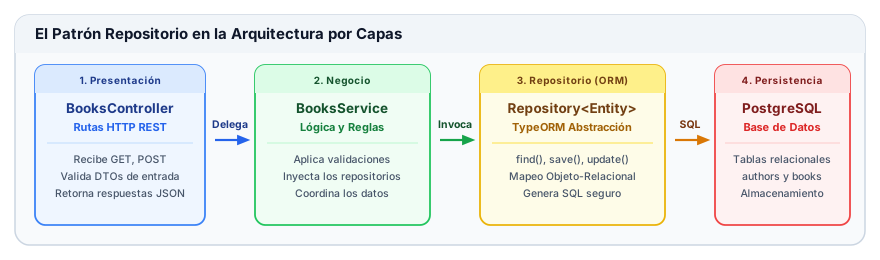
- Controller (
Controller): Receives the incoming HTTP request, validates input data with DTOs, and delegates execution to the service. - Service (
Service): Applies business domain logic and calls methods provided by injected repositories. - Repository (
Repository<T>): Exposes TypeORM persistence methods (find,save,update,delete) and translates them into safe SQL. - Database (PostgreSQL): Physically stores records across tables and enforces relational constraints.
2. Sample Data Model: Authors and Books Relationship
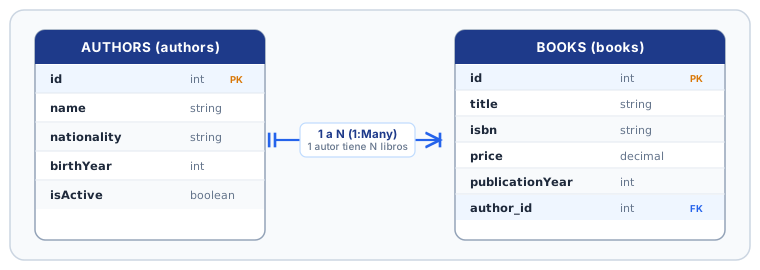
To illustrate relational operations and queries with foreign keys, we will use a classic one-to-many (1:N) association: an author can write multiple books, and each book belongs to a single author.
TypeScript Entities with TypeORM
We declare both entities using TypeORM relational decorators:
import { Entity, PrimaryGeneratedColumn, Column, OneToMany } from 'typeorm';
import { Book } from '../../books/entities/book.entity';

@Entity('authors')
export class Author {
  @PrimaryGeneratedColumn()
  id: number;

  @Column({ length: 150 })
  name: string;

  @Column({ length: 80, nullable: true })
  nationality: string;

  @Column({ name: 'birth_year', type: 'int', nullable: true })
  birthYear: number;

  @Column({ name: 'is_active', type: 'boolean', default: true })
  isActive: boolean;

  // An author has many books
  @OneToMany(() => Book, (book) => book.author)
  books: Book[];
}
import { Entity, PrimaryGeneratedColumn, Column, ManyToOne, JoinColumn } from 'typeorm';
import { Author } from '../../authors/entities/author.entity';

@Entity('books')
export class Book {
  @PrimaryGeneratedColumn()
  id: number;

  @Column({ length: 200 })
  title: string;

  @Column({ unique: true, length: 20 })
  isbn: string;

  @Column({ type: 'decimal', precision: 8, scale: 2 })
  price: number;

  @Column({ name: 'publication_year', type: 'int' })
  publicationYear: number;

  @Column({ length: 60 })
  genre: string;

  // Many books belong to a single author
  @ManyToOne(() => Author, (author) => author.books, { onDelete: 'CASCADE' })
  @JoinColumn({ name: 'author_id' }) // Physical foreign key column in PostgreSQL
  author: Author;
}
In @ManyToOne / @OneToMany relationships, the physical foreign key column (author_id) resides in the table on the "many" side (books). For this reason, the @JoinColumn decorator is always placed on the Book entity.
3. Injecting Repositories in NestJS
To consume repositories within our services, we follow a two-step procedure:
Step 1: Register Entities in the Module (TypeOrmModule.forFeature)
The TypeOrmModule.forFeature() method registers repository providers (Repository<Book> and Repository<Author>) within the module's IoC container:
import { Module } from '@nestjs/common';
import { TypeOrmModule } from '@nestjs/typeorm';
import { Book } from './entities/book.entity';
import { Author } from '../authors/entities/author.entity';
import { BooksService } from './books.service';
import { BooksController } from './books.controller';

@Module({
  imports: [TypeOrmModule.forFeature([Book, Author])],
  controllers: [BooksController],
  providers: [BooksService],
  exports: [BooksService],
})
export class BooksModule {}
Step 2: Inject with @InjectRepository() in the Service Constructor
import { Injectable } from '@nestjs/common';
import { InjectRepository } from '@nestjs/typeorm';
import { Repository } from 'typeorm';
import { Book } from './entities/book.entity';
import { Author } from '../authors/entities/author.entity';

@Injectable()
export class BooksService {
  constructor(
    @InjectRepository(Book)
    private readonly bookRepository: Repository<Book>,

    @InjectRepository(Author)
    private readonly authorRepository: Repository<Author>,
  ) {}
}
4. Basic CRUD Operations with the Repository
The Repository<T> class provides built-in persistence methods:
| Method | Purpose | Database Behavior |
|---|---|---|
create(dto) | Instantiates the entity in memory | Does not execute SQL (only creates the JS object in memory) |
save(entity) | Inserts a new row or updates an existing one | Executes INSERT or UPDATE |
find(options) | Returns all rows matching conditions | Executes SELECT * FROM... |
findOne(options) | Returns the first matching row or null | Executes SELECT * ... LIMIT 1 |
findBy(criteria) | Shorthand lookup by simple field equality | Executes SELECT * WHERE col = val |
findOneBy(criteria) | Shorthand to retrieve a single row by fields | Executes SELECT * WHERE ... LIMIT 1 |
update(id, partial) | Updates columns by ID without loading the entity | Executes UPDATE ... WHERE id = ... |
delete(id) | Physically deletes a record by ID | Executes DELETE FROM ... WHERE id = ... |
count(options) | Returns total count of matching rows | Executes SELECT COUNT(*) FROM... |
findAndCount(options) | Returns [records, total] tuple for pagination | Executes both data fetch and count queries |
Key Distinction: create() vs. save()
// 1. create() only instantiates the object in TypeScript memory (validates types)
const bookInstance = this.bookRepository.create({
  title: 'One Hundred Years of Solitude',
  isbn: '978-0307474728',
  price: 45000,
  publicationYear: 1967,
  genre: 'Magical Realism',
  author: authorInstance,
});
// At this point, NO SQL statement has been executed against the database

// 2. save() physically persists the entity into PostgreSQL
const savedBook = await this.bookRepository.save(bookInstance);
// Executes: INSERT INTO books (title, isbn, price...) VALUES (...)
5. Declarative Queries with FindOptions
The find() method accepts a FindManyOptions configuration object with expressive declarative options:
const books = await this.bookRepository.find({
  // 1. select: Project specific columns (avoids SELECT *)
  select: {
    id: true,
    title: true,
    price: true,
  },

  // 2. where: Filtering conditions
  where: {
    genre: 'Fantasy',
  },

  // 3. relations: Load related associations via SQL JOIN
  relations: {
    author: true,
  },

  // 4. order: Sorting criteria
  order: {
    price: 'DESC',
    title: 'ASC',
  },

  // 5. Pagination: Records count and offset
  take: 10, // LIMIT 10
  skip: 0,  // OFFSET 0
});
6. TypeORM Query Operators
To apply expressive filtering beyond simple equality, TypeORM includes dedicated operators exported from typeorm:
| TypeORM Operator | SQL Equivalent | Common Use Case |
|---|---|---|
ILike('%term%') | WHERE col ILIKE '%term%' | Case-insensitive substring matching |
Like('%term%') | WHERE col LIKE '%term%' | Case-sensitive pattern matching |
Between(min, max) | WHERE col BETWEEN min AND max | Range of prices, dates, or years |
In([a, b, c]) | WHERE col IN (a, b, c) | Matches any value within an array |
MoreThan(n) | WHERE col > n | Values strictly greater than a threshold |
MoreThanOrEqual(n) | WHERE col >= n | Values greater than or equal |
LessThan(n) | WHERE col < n | Books published prior to a given year |
LessThanOrEqual(n) | WHERE col <= n | Prices lower than or equal to a cap |
IsNull() | WHERE col IS NULL | Records where a field is not set |
Not(condition) | WHERE NOT (...) | Negates any inner condition |
Example with Combined Operators
import { Between, ILike, In } from 'typeorm';

// Find Sci-Fi or Novel books priced between 20 and 70 USD,
// whose title contains the word "guide"
const results = await this.bookRepository.find({
  where: {
    genre: In(['Sci-Fi', 'Novel']),
    price: Between(20, 70),
    title: ILike('%guide%'),
  },
  relations: {
    author: true,
  },
  order: {
    price: 'ASC',
  },
  take: 10,
});
7. Complete Service Implementation (BooksService)
The following complete NestJS service consolidates CRUD persistence, relational loading, and filtered queries:
import { Injectable, NotFoundException, ConflictException } from '@nestjs/common';
import { InjectRepository } from '@nestjs/typeorm';
import { Repository, ILike, Between, In } from 'typeorm';
import { Book } from './entities/book.entity';
import { Author } from '../authors/entities/author.entity';

export interface CreateBookDto {
  title: string;
  isbn: string;
  price: number;
  publicationYear: number;
  genre: string;
  authorId: number;
}

@Injectable()
export class BooksService {
  constructor(
    @InjectRepository(Book)
    private readonly bookRepository: Repository<Book>,

    @InjectRepository(Author)
    private readonly authorRepository: Repository<Author>,
  ) {}

  // 1. Create a book linked to an existing author
  async create(dto: CreateBookDto): Promise<Book> {
    const author = await this.authorRepository.findOneBy({ id: dto.authorId });
    if (!author) {
      throw new NotFoundException(`Author with ID ${dto.authorId} does not exist`);
    }

    const existingBook = await this.bookRepository.findOneBy({ isbn: dto.isbn });
    if (existingBook) {
      throw new ConflictException(`A book with ISBN ${dto.isbn} already exists`);
    }

    const newBook = this.bookRepository.create({
      ...dto,
      author, // Assign loaded entity relation
    });

    return await this.bookRepository.save(newBook);
  }

  // 2. List books with pagination and populated author relation
  async findAll(page: number = 1, limit: number = 10): Promise<{ data: Book[]; total: number }> {
    const [data, total] = await this.bookRepository.findAndCount({
      relations: {
        author: true,
      },
      order: {
        id: 'DESC',
      },
      take: limit,
      skip: (page - 1) * limit,
    });

    return { data, total };
  }

  // 3. Find book by ID with author relation
  async findOne(id: number): Promise<Book> {
    const book = await this.bookRepository.findOne({
      where: { id },
      relations: { author: true },
    });

    if (!book) {
      throw new NotFoundException(`Book with ID ${id} not found`);
    }

    return book;
  }

  // 4. Filter books by price range and genres list
  async findByPriceAndGenres(min: number, max: number, genres: string[]): Promise<Book[]> {
    return await this.bookRepository.find({
      where: {
        price: Between(min, max),
        genre: In(genres),
      },
      relations: {
        author: true,
      },
      order: {
        price: 'ASC',
      },
    });
  }

  // 5. Approximate title search
  async searchByTitle(term: string): Promise<Book[]> {
    return await this.bookRepository.find({
      where: {
        title: ILike(`%${term}%`),
      },
      relations: {
        author: true,
      },
    });
  }

  // 6. Update price
  async updatePrice(id: number, newPrice: number): Promise<Book> {
    const book = await this.findOne(id);
    book.price = newPrice;
    return await this.bookRepository.save(book);
  }

  // 7. Physical deletion
  async remove(id: number): Promise<void> {
    const result = await this.bookRepository.delete(id);
    if (result.affected === 0) {
      throw new NotFoundException(`Unable to delete book with ID ${id}`);
    }
  }
}