Authentication with JWT
In this section, we transition from theoretical concepts to hands-on implementation by building a complete authentication module (AuthModule) in NestJS. We implement credential validation with cryptographic hashing, signed token generation via JwtService, the JwtStrategy strategy to validate incoming Bearer headers, and the authentication entrypoint controller (AuthController).
1. Component Architecture
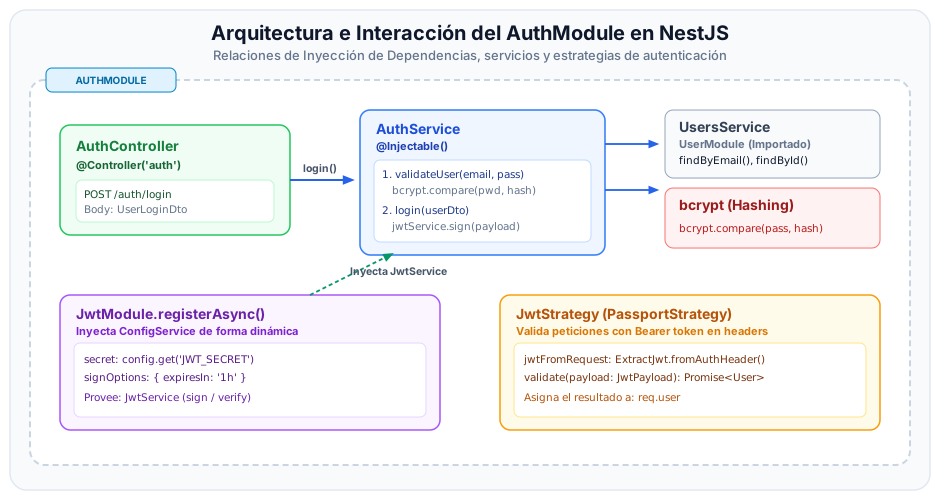
The following diagram illustrates dependency injection relationships and request data flows across authentication module components:
2. Step-by-Step Implementation
Follow this sequential walkthrough to construct and wire all required security components.
Configure Environment Variables
Ensure your application secret key and token expiration interval are declared in your .env file. Never commit production secrets to public version control.
JWT_SECRET=super_secret_signing_key_jwt_icesi_2026
JWT_EXPIRES_IN=1h
In production deployments, JWT_SECRET must be a high-entropy cryptographically random string (at least 256 bits) provisioned dynamically via CI/CD secrets or secrets management services (such as AWS Secrets Manager or Doppler).
Define DTOs and Data Interfaces
Create strongly-typed classes and interfaces defining incoming login request bodies and the decoded JWT payload structure.
import { IsEmail, IsNotEmpty, IsString, MinLength } from 'class-validator';

export class UserLoginDto {
  @IsEmail({}, { message: 'The provided email is invalid' })
  @IsNotEmpty({ message: 'Email is required' })
  email: string;

  @IsString()
  @IsNotEmpty({ message: 'Password is required' })
  @MinLength(6, { message: 'Password must be at least 6 characters long' })
  password: string;
}
Declare the TypeScript interface describing decoded token claims:
export interface JwtPayload {
  sub: number;
  email: string;
  permissions: string[];
  iat?: number;
  exp?: number;
}
Implement Authentication Service (AuthService)
AuthService orchestrates credential validation against the database (via bcrypt.compare) and delegates token signing to JwtService.
import {
  Injectable,
  NotFoundException,
  UnauthorizedException,
} from '@nestjs/common';
import { JwtService } from '@nestjs/jwt';
import * as bcrypt from 'bcrypt';
import { UsersService } from '../users/users.service';
import { UserLoginDto } from './dto/user-login.dto';
import { JwtPayload } from './interfaces/jwt-payload.interface';

@Injectable()
export class AuthService {
  constructor(
    private readonly usersService: UsersService,
    private readonly jwtService: JwtService,
  ) {}

  /**
   * Validates whether user exists and matches the stored cryptographic password hash.
   */
  async validateUser(email: string, pass: string) {
    // findByEmail must eagerly or explicitly load role and permission relations
    const user = await this.usersService.findByEmail(email);
    if (!user) {
      throw new NotFoundException('User not found');
    }

    const isMatch = await bcrypt.compare(pass, user.passwordHash);
    if (!isMatch) {
      throw new UnauthorizedException('Invalid credentials');
    }

    // Omit sensitive passwordHash before returning
    const { passwordHash, ...safeUser } = user;
    return safeUser;
  }

  /**
   * Generates a signed JWT token based on user identity and assigned authorities.
   */
  async login(userLoginDto: UserLoginDto) {
    const user = await this.validateUser(
      userLoginDto.email,
      userLoginDto.password,
    );

    // Map assigned permissions from user roles
    const permissions =
      user.role?.rolePermissions?.map((rp) => rp.permission.name) ?? [];

    const payload: JwtPayload = {
      sub: user.id,
      email: user.email,
      permissions,
    };

    return {
      access_token: this.jwtService.sign(payload),
      token_type: 'Bearer',
      user: {
        id: user.id,
        email: user.email,
        role: user.role?.name,
      },
    };
  }
}
Ensure your UsersService.findByEmail method includes proper TypeORM relation joins (role, role.rolePermissions, role.rolePermissions.permission) so that granular permissions are loaded into memory.
Configure JWT Strategy (JwtStrategy)
JwtStrategy extends PassportStrategy(Strategy). Passport intercepts requests, extracts tokens from Authorization: Bearer <token>, and verifies the cryptographic signature with your secret key. Upon successful validation, Passport invokes validate(payload).
import { Injectable, UnauthorizedException } from '@nestjs/common';
import { ConfigService } from '@nestjs/config';
import { PassportStrategy } from '@nestjs/passport';
import { ExtractJwt, Strategy } from 'passport-jwt';
import { UsersService } from '../../users/users.service';
import { JwtPayload } from '../interfaces/jwt-payload.interface';

@Injectable()
export class JwtStrategy extends PassportStrategy(Strategy) {
  constructor(
    configService: ConfigService,
    private readonly usersService: UsersService,
  ) {
    const secret = configService.get<string>('JWT_SECRET');
    if (!secret) {
      throw new Error('JWT_SECRET environment variable is missing or empty');
    }

    super({
      // Extract token from standard 'Authorization: Bearer <token>' header
      jwtFromRequest: ExtractJwt.fromAuthHeaderAsBearerToken(),
      // Automatically reject expired tokens
      ignoreExpiration: false,
      // Symmetric secret key for signature verification
      secretOrKey: secret,
    });
  }

  /**
   * Method automatically invoked by Passport upon successful cryptographic verification.
   * The object returned here is injected by NestJS into 'req.user'.
   */
  async validate(payload: JwtPayload) {
    const user = await this.usersService.findById(payload.sub);
    if (!user) {
      throw new UnauthorizedException('Token does not correspond to an active user');
    }
    return user;
  }
}
Create Authentication Controller (AuthController)
The controller exposes the public login endpoint (POST /auth/login), validating input payloads through class-validator:
import {
  Controller,
  Post,
  Body,
  HttpCode,
  HttpStatus,
} from '@nestjs/common';
import { AuthService } from './auth.service';
import { UserLoginDto } from './dto/user-login.dto';

@Controller('auth')
export class AuthController {
  constructor(private readonly authService: AuthService) {}

  @Post('login')
  @HttpCode(HttpStatus.OK)
  async login(@Body() loginDto: UserLoginDto) {
    return this.authService.login(loginDto);
  }
}
Integrate and Wire the Module (AuthModule)
Configure the module by registering JwtModule asynchronously using registerAsync. This guarantees that ConfigService is fully initialized before resolving secret keys.
import { Module } from '@nestjs/common';
import { ConfigModule, ConfigService } from '@nestjs/config';
import { JwtModule } from '@nestjs/jwt';
import { PassportModule } from '@nestjs/passport';
import { AuthController } from './auth.controller';
import { AuthService } from './auth.service';
import { JwtStrategy } from './strategies/jwt.strategy';
import { UsersModule } from '../users/users.module';

@Module({
  imports: [
    UsersModule,
    PassportModule.register({ defaultStrategy: 'jwt' }),
    JwtModule.registerAsync({
      imports: [ConfigModule],
      inject: [ConfigService],
      useFactory: (configService: ConfigService) => ({
        secret: configService.get<string>('JWT_SECRET') || 'defaultSecret',
        signOptions: {
          expiresIn: configService.get<string>('JWT_EXPIRES_IN') || '1h',
        },
      }),
    }),
  ],
  controllers: [AuthController],
  providers: [AuthService, JwtStrategy],
  exports: [AuthService, PassportModule, JwtModule],
})
export class AuthModule {}
3. Testing the Login Endpoint
To verify that the authentication pipeline behaves as expected, issue a POST request to /auth/login:
curl -X POST http://localhost:3000/auth/login \
  -H "Content-Type: application/json" \
  -d '{
    "email": "ana@icesi.edu.co",
    "password": "MySecurePassword123"
  }'
Expected Response (HTTP 200 OK):
{
  "access_token": "eyJhbGciOiJIUzI1NiIsInR5cCI6IkpXVCJ9.eyJzdWIiOjEsImVtYWlsIjoiYW5hQGljZXNpLmVkdS5jbyIsInBlcm1pc3Npb25zIjpbInVzZXJzOnJlYWQiLCJ1c2VyczpjcmVhdGUiXSwiaWF0IjoxNzczNTE3OTA1LCJleHAiOjE3NzM1MjE1MDV9.X9jYd8L2...",
  "token_type": "Bearer",
  "user": {
    "id": 1,
    "email": "ana@icesi.edu.co",
    "role": "admin"
  }
}
If the client supplies an incorrect password or an unregistered email:
{
  "message": "Invalid credentials",
  "error": "Unauthorized",
  "statusCode": 401
}