App Router vs. Pages Router
The routing system is the core of any modern web application. Throughout its development history, Next.js has substantially evolved its approach to mapping files into accessible browser URLs. The architectural transition from the traditional Pages Router (introduced in early Next.js versions) to the modern App Router (introduced in Next.js 13 and consolidated as the industry default) represents one of the most significant paradigm shifts in the React ecosystem.
In this document, we explore the conceptual and architectural differences between both models, analyze how files are organized on disk, and understand the transition across data fetching patterns.
1. Historical Evolution of Next.js Routers
For more than six years, Next.js operated under the convention of the pages/ directory. This model popularized declarative routing in React: creating a file like pages/about.tsx was all it took for the framework to automatically generate the /about route.
Despite its initial simplicity, as enterprise-scale applications grew, the Pages Router exposed structural limitations:
- Rigid Coupling Between Files and Public Routes: Any file placed inside
pages/(even auxiliary components or utilities) was treated as a public route, forcing developers to isolate UI components into external directories likesrc/components/. - Difficulty with Complex Nested Layouts: Preserving persistent navigation bars, side menus, or scroll state required overloading
pages/_app.tsxor implementing unintuitive patterns via customgetLayoutfunctions. - Fragmented Data Fetching: Retrieving data depended on special page-level functions (
getServerSideProps,getStaticProps), which could not be executed inside individual child components.
To overcome these architectural hurdles and fully adopt the React Server Components (RSC) paradigm, the Next.js engineering team developed the App Router, hosted inside the app/ directory.
2. Structural Comparison: From Files to URLs
The most immediate visible difference between both routers lies in how routes are resolved from the filesystem tree:
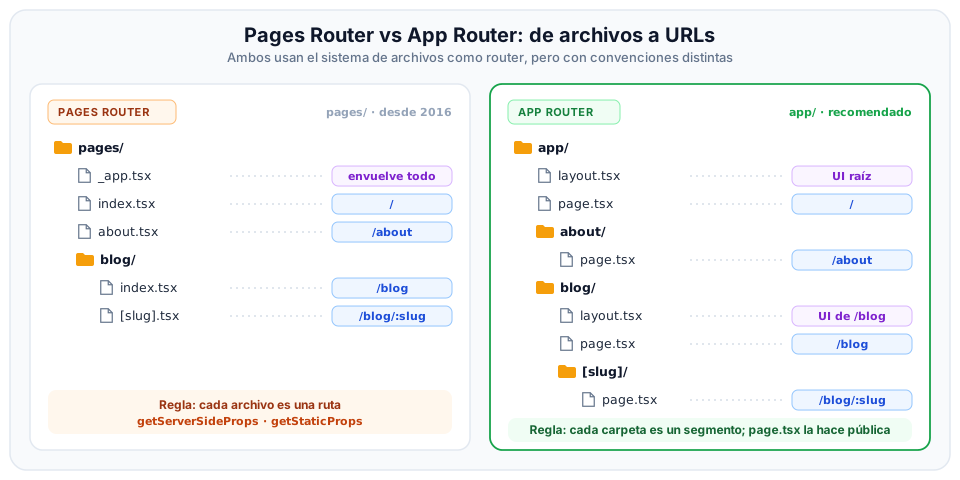
Architectural Breakdown of the Diagram
Left Panel: Pages Router (pages/)
- Core Rule: Every JavaScript or TypeScript file placed in the directory becomes an accessible public route.
pages/index.tsxmaps to/.pages/about.tsxmaps directly to/about.pages/blog/index.tsxserves/blog.pages/blog/[slug].tsxcaptures dynamic URL parameters (/blog/:slug).pages/_app.tsxwraps the entire application to inject global stylesheets and state providers, but re-evaluates across every page transition.
Right Panel: App Router (app/)
- Core Rule: Folders define URL route segments, and exclusively the special
page.tsxfile exposes that route to the public. app/layout.tsxdefines the root shell (<html>and<body>) shared across all child routes.app/page.tsxdefines the UI for the root route/.app/about/page.tsxdefines the/aboutroute.app/blog/page.tsxdefines the/blogroute.app/blog/[slug]/page.tsxserves dynamic blog segments.- Safe Colocation: Unlike
pages/, in the App Router you can safely store auxiliary components (button.tsx), scoped stylesheets (styles.module.css), unit tests (page.test.tsx), or helper utilities (utils.ts) inside the sameabout/directory without risking accidental exposure as public URL endpoints.
3. Data Fetching Comparison
Moving to the App Router changed not only file locations, but also fundamentally revamped the mental model for how data travels from servers to components:
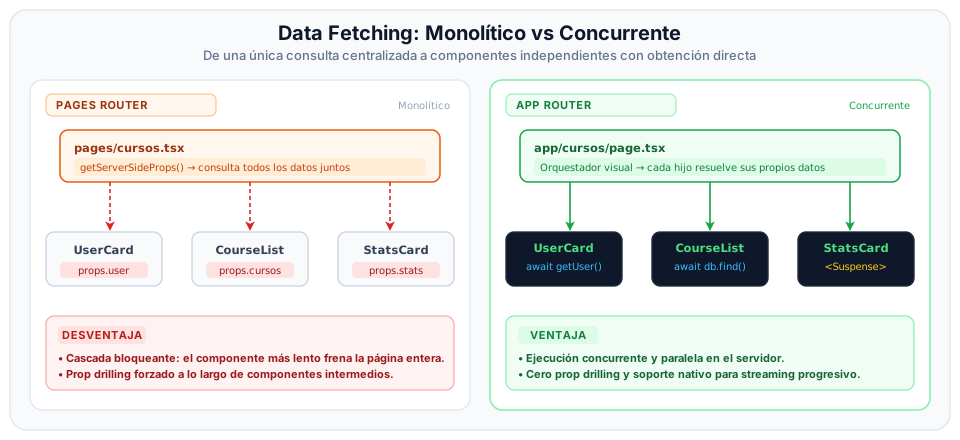
Evolution Analysis
- The Monolithic Approach of Pages Router (Left Panel):
- All responsibility for querying databases or external APIs resided strictly inside the top-level
getServerSidePropsfunction on the page. - If a page required user profile data, course listings, and statistical metrics, it had to aggregate all queries into a single blocking promise. If one query stalled for 2 seconds, the entire page remained frozen, displaying nothing to the end user.
- For deeply nested child components (such as
UserCard) to receive data, parents had to manually forward props through intermediate levels (MainSection), an architectural friction known as Prop Drilling.
- All responsibility for querying databases or external APIs resided strictly inside the top-level
- The Colocated and Concurrent Approach of App Router (Right Panel):
- The page (
page.tsx) no longer acts as a heavy data intermediary, but rather as a lightweight visual orchestrator. - Each Server Component (
UserHeader,CourseGrid,StatsWidget) autonomously executes its ownasync/awaitfetch logic or database query directly on the server (colocation). - Powered by React Suspense and Streaming, if an analytical widget takes longer to compute, wrapping it in
<Suspense fallback={<Skeleton />}>allows the rest of the page to stream to the browser immediately, with the heavy widget streaming in progressively without blocking the screen.
- The page (
Comparative Code: Data Fetching
In Pages Router (Classic Approach)
import { GetServerSideProps } from 'next';

interface CourseProps {
  course: { id: string; title: string; description: string };
}

// 1. The server function must be exported separately
export const getServerSideProps: GetServerSideProps = async (context) => {
  const { slug } = context.params!;
  const res = await fetch(`https://api.icesi.edu.co/courses/${slug}`);
  const course = await res.json();

  // 2. Injected into the component via mandatory props
  return { props: { course } };
};

// 3. The React component receives pre-resolved props
export default function CourseDetail({ course }: CourseProps) {
  return (
    <article>
      <h1>{course.title}</h1>
      <p>{course.description}</p>
    </article>
  );
}
In App Router (Modern RSC Approach)
In the App Router, every component inside app/ is by default a Server Component. It can be declared as an async function, allowing direct await calls inside its own body:
interface PageProps {
  params: Promise<{ slug: string }>;
}

// 1. The component is an async function running directly on the server
export default async function CourseDetail({ params }: PageProps) {
  // In Next.js 15+, dynamic route parameters are resolved as a Promise
  const { slug } = await params;

  // 2. Direct data fetching inside the component body
  const res = await fetch(`https://api.icesi.edu.co/courses/${slug}`);
  const course = await res.json();

  return (
    <article>
      <h1>{course.title}</h1>
      <p>{course.description}</p>
    </article>
  );
}
You no longer need to memorize the nuanced differences between getServerSideProps, getStaticProps, and getInitialProps. In the App Router, you simply use the standard JavaScript fetch() API with granular caching configurations (cache: 'force-cache', cache: 'no-store', or { next: { revalidate: 60 } }).
4. Comprehensive Comparison Matrix
| Feature | Pages Router (pages/) | App Router (app/) |
|---|---|---|
| Root Directory | pages/ | app/ (or src/app/) |
| Component Paradigm | Client Components by default with full hydration. | React Server Components (RSC) by default, explicit Client Components. |
| Route Definition | File-based (profile.tsx → /profile). | Folder-based with page.tsx convention (profile/page.tsx). |
| File Colocation | Difficult (any file in pages/ generates a public route). | Native (safely store components and utilities inside each folder). |
| Nested Layouts | Complex; requires getLayout or a monolithic _app.tsx. | Native and composable using per-segment layout.tsx files. |
| State Preservation | Page transitions usually re-mount the entire component tree. | Shared layouts preserve their state intact during navigations. |
| Error and Loading States | Manual state hooks (isLoading, error). | Declarative special files (loading.tsx and error.tsx). |
| Metadata Definition (SEO) | <Head> tag imported from next/head. | Static metadata object or asynchronous generateMetadata function. |
| API Endpoints | Files in pages/api/*.ts with (req, res) handlers. | Files named route.ts based on Web Fetch API standards (GET, POST). |
5. Which Router Should You Choose for New Projects?
The Vercel engineering team and the React core community designate the App Router as the recommended choice for all new web development. All recent React innovations—such as Server Components, streaming Suspense, Server Actions, and Turbopack compiler optimizations—are designed and prioritized specifically for the App Router architecture.
The Pages Router continues to be maintained for backward compatibility in legacy codebases, but does not receive new architectural features.