Architecture & Structure of a Next.js Project
To build scalable and maintainable applications in Next.js, understanding the anatomy of its filesystem is essential. Unlike other web development ecosystems where internal code structure is entirely arbitrary, Next.js relies on strict convention-driven naming rules that dictate routing, component nesting, and declarative handling of loading and error states.
In this document, we explore the initial structure scaffolded by official tooling, the exact purpose of each root configuration file, and the rendering hierarchy that Next.js applies when assembling a route.
1. Anatomy of a Project Scaffolded with create-next-app
When initializing a modern Next.js project with the official npx create-next-app@latest CLI command, the scaffolding generates a clean, production-optimized codebase:
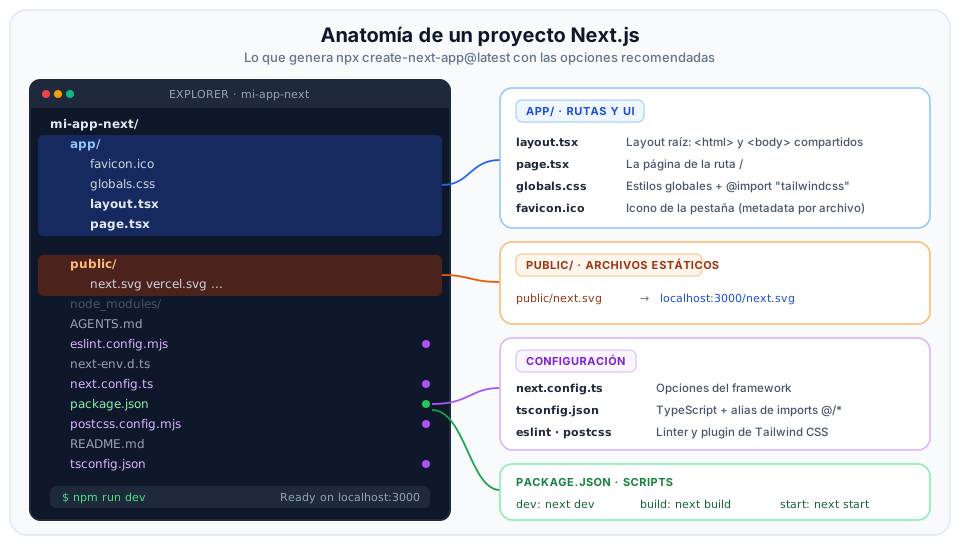
Breakdown of Filesystem Elements
1. The app/ Directory (or src/app/)
The operational core of an App Router application. Houses all routes, layouts, pages, and global stylesheets:
layout.tsx: The mandatory root layout. Defines the foundational<html>and<body>tags, configuring the shared shell across the entire application.page.tsx: The component that renders the visual UI of the root URL (/).globals.css: Shared stylesheet where Tailwind CSS directives and baseline design tokens are declared.favicon.ico: Tab icon rendered in the browser, handled automatically by Next.js file-based metadata API.
2. The public/ Directory
Stores static assets served directly from the domain's root URL:
- Files placed inside
public/(e.g.,public/logo.svg) are accessible from the base URL without prefixes (e.g.,https://mydomain.com/logo.svg). - Recommended location for institutional logos, robots.txt, static sitemaps, or media assets that do not pass through the bundler pipeline.
3. Root Configuration Files
next.config.ts: Master configuration file for the framework. Allows enabling experimental capabilities, whitelisting secure domains for remote images (images.remotePatterns), and defining HTTP rewrites/redirects.tsconfig.json: TypeScript compiler configuration. Pre-configured with import path aliases (paths: { "@/*": ["./*"] }), enabling clean imports from the root without brittle relative paths like../../../components/Button.package.json: Declares dependencies (next,react,react-dom) and standard lifecycle scripts:npm run dev: Launches the local development server with ultra-fast incremental compilation powered by Turbopack.npm run build: Compiles and optimizes the application for production deployment.npm run start: Starts the production HTTP server using the pre-compiled build artifacts.npm run lint: Runs ESLint code quality checks.
2. Special Convention Files in app/
Inside any folder of the app/ directory, Next.js reserves a specialized set of file names to address distinct user interface responsibilities:
| File Name | Extension | Architectural Role |
|---|---|---|
page | .tsx, .jsx | Mandatory to expose a public route. Contains the unique UI content of the URL. |
layout | .tsx, .jsx | Shared UI wrapper. Wraps descendant pages and layouts; does not re-mount during navigation. |
loading | .tsx, .jsx | Instant loading state. Displays an instant fallback UI powered by React Suspense. |
error | .tsx, .jsx | Exception boundary. Catches runtime exceptions and displays a recovery UI. Must be a Client Component ('use client'). |
not-found | .tsx, .jsx | 404 screen. Renders when a route does not exist or when notFound() is invoked. |
route | .ts, .js | HTTP API endpoint. Implements REST verb handlers (GET, POST, PUT, DELETE). |
template | .tsx, .jsx | Re-mounting layout. Similar to layout, but creates a fresh instance on every navigation. |
3. Rendering Hierarchy: The Nested Boundary Model
One of the most elegant architectural traits of the App Router is how Next.js composes special files within a given directory. The framework recursively nests them following a strict hierarchy of boundaries:
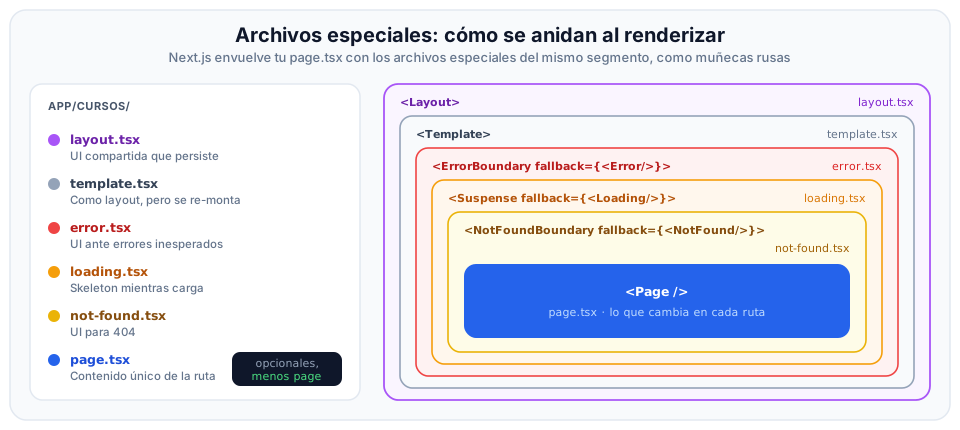
Visual Composition Explained
Think of a Russian nesting doll (matryoshka): each special file wraps the next in a protective sequence:
<Layout>(layout.tsx): The outermost container. Houses navigation bars, sidebars, and footers. Preserves state across navigations.<Template>(template.tsx): Optional. Positioned directly inside Layout; re-mounts on every route transition (ideal for enter animations or per-page analytics logging).<ErrorBoundary>(error.tsx): If an unhandled error occurs in the page or data fetching layer, this boundary intercepts it and renders a recovery view with areset()trigger, preventing the entire application from crashing.<Suspense>(loading.tsx): Wraps the page while asynchronous Server Components complete theirawaitoperations. Users see an immediate skeleton loader while server data streams in.<NotFoundBoundary>(not-found.tsx): CatchesnotFound()triggers within the segment.<Page />(page.tsx): At the very heart of the hierarchy sits the page component, delivering the unique view for that URL.
4. Advanced Directory Organization Conventions
To maintain a clean codebase in large enterprise projects, Next.js provides two structural patterns using folder prefixes:
A. Private Folders (Underscore Prefix: _folder)
To create a folder that stores internal components, auxiliary libraries, or stylesheets without Next.js considering it part of the public URL route tree, prefix its name with an underscore:
app/
├── courses/
│   ├── _components/       <-- Private folder: does NOT create /courses/_components route
│   │   ├── CourseCard.tsx
│   │   └── FilterBar.tsx
│   ├── page.tsx           <-- Maps to /courses
│   └── layout.tsx
B. Route Groups (Parentheses: (name))
Route Groups allow organizing routes into logical categories or applying entirely different layouts to distinct areas of the application without altering the public URL path:
app/
├── (marketing)/
│   ├── layout.tsx         <-- Layout with public commercial navbar
│   ├── about/
│   │   └── page.tsx       <-- Maps to /about (ignores marketing prefix)
│   └── contact/
│       └── page.tsx       <-- Maps to /contact
└── (dashboard)/
    ├── layout.tsx         <-- Layout with authenticated admin sidebar and profile bar
    └── admin/
        └── page.tsx       <-- Maps to /admin (ignores dashboard prefix)
Route Groups are especially valuable for decoupling the public visitor experience (marketing landing pages, terms of service) from the authenticated app experience (analytics dashboard, settings), enabling independent layouts without code duplication.
5. Nested Layouts and Pages in Action
To understand how layouts and pages cooperate in a production setting, consider a course catalog featuring a root global layout and a section-specific nested layout:
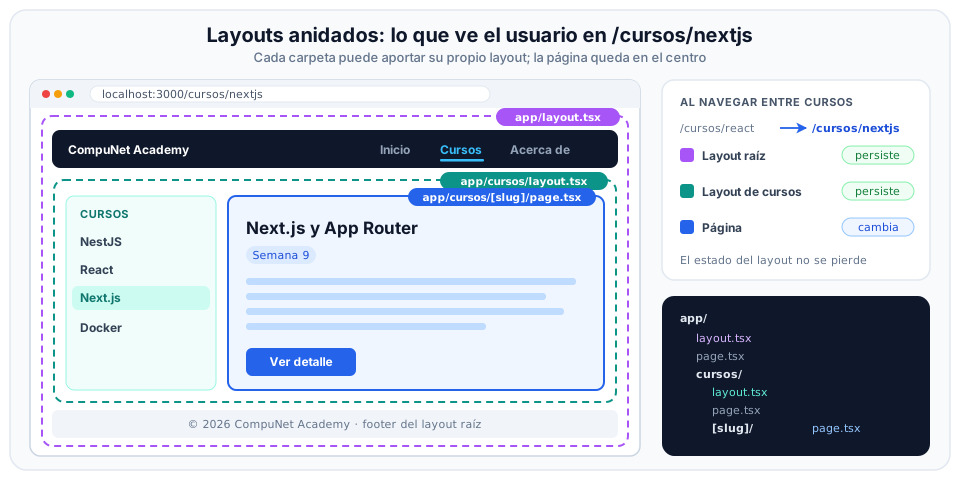
Core Layout Principles
- State Preservation: When navigating between
/courses/reactand/courses/nextjs, both the root layout and the courses layout remain continuously mounted. If a search input or collapsible sidebar lives in the layout, its state is not wiped out. childrenProp Ingestion: Every layout receives a mandatorychildren: React.ReactNodeprop, serving as the insertion slot for descendant pages or nested layouts.- Asynchronous Route Parameters (Next.js 15+): In dynamic pages (
[slug]/page.tsx), theparamsprop is provided as a Promise:
interface PageProps {
  params: Promise<{ slug: string }>;
}

export default async function CourseDetail({ params }: PageProps) {
  // In Next.js 15+, dynamic route parameters are resolved with await
  const { slug } = await params;

  return (
    <article className="p-6">
      <h1 className="text-3xl font-bold">Module: {slug}</h1>
      <p className="mt-2 text-slate-600">Course details rendered on the server.</p>
    </article>
  );
}
6. Metadata Configuration for SEO
The App Router streamlines search engine optimization (SEO) and social media sharing cards (Open Graph) via a unified metadata API.
A. Static Metadata & Title Templates
Inside static layouts or pages, export a metadata constant typed as Metadata:
import type { Metadata } from 'next';

export const metadata: Metadata = {
  // title.template lets child pages declare only their specific name
  title: {
    template: '%s | CompuNet Academy',
    default: 'CompuNet Academy',
  },
  description: 'Modern web development learning platform at Universidad Icesi',
};
If a child page defines title: 'Next.js', the final document title in the browser tab automatically evaluates to:
Next.js | CompuNet Academy
B. Dynamic Metadata with generateMetadata
When titles or descriptions depend on URL parameters or database queries, export the async function generateMetadata:
import type { Metadata } from 'next';

export async function generateMetadata({
  params,
}: {
  params: Promise<{ slug: string }>;
}): Promise<Metadata> {
  const { slug } = await params;
  const course = await getCourse(slug);

  return {
    title: course.title,
    description: course.summary,
  };
}
7. Client-Side Navigation: <Link>, usePathname, and useRouter
In Next.js applications, navigation between routes is orchestrated through optimized client-side mechanisms that prevent full browser document reloads:
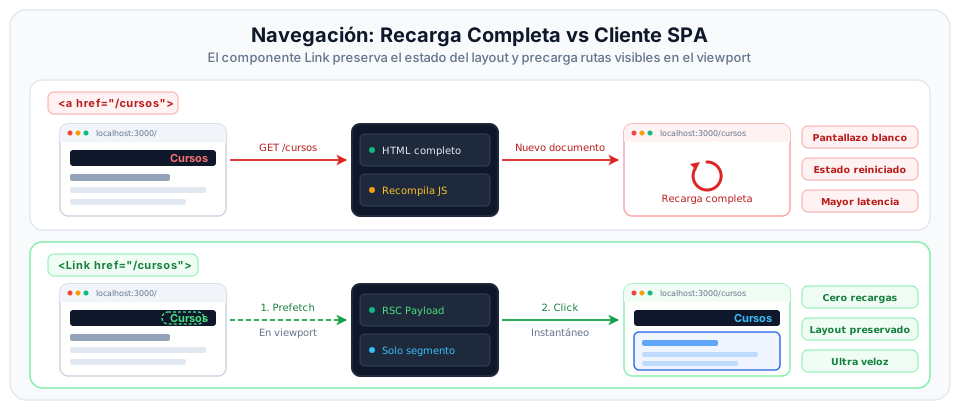
1. The <Link> Component
- Replaces standard HTML
<a>tags. - Performs smooth client-side SPA transitions while preserving application state in memory.
- Automatic Prefetching: In production, silently prefetches code and data for any link currently visible within the viewport.
import Link from 'next/link';

export function Navbar() {
  return (
    <nav className="flex space-x-4">
      <Link href="/" className="hover:underline">Home</Link>
      <Link href="/courses" className="hover:underline">Courses</Link>
    </nav>
  );
}
2. Active Route Detection with usePathname()
To apply active highlight styles to the navigation link matching the current URL, use the usePathname() hook inside a Client Component:
'use client';

import Link from 'next/link';
import { usePathname } from 'next/navigation';

export function NavLink({ href, label }: { href: string; label: string }) {
  const pathname = usePathname();
  const isActive = pathname === href;

  return (
    <Link
      href={href}
      className={`px-3 py-2 rounded-lg text-sm font-medium ${
        isActive ? 'bg-sky-600 text-white' : 'text-slate-600 hover:bg-slate-100'
      }`}
    >
      {label}
    </Link>
  );
}
3. Programmatic Navigation with useRouter()
When navigation must trigger imperatively as the result of a user workflow (such as submitting a validated form):
'use client';

import { useRouter } from 'next/navigation';

export function LoginButton() {
  const router = useRouter();

  const handleLogin = () => {
    // Imperative client-side redirection
    router.push('/dashboard');
  };

  return (
    <button onClick={handleLogin} className="btn-primary">
      Log In
    </button>
  );
}