Server Components vs. Client Components
One of the most powerful architectural pillars introduced by Next.js in the App Router is native integration with React Server Components (RSC). This paradigm transforms how we conceptualize the lifecycle of our components, establishing a distinct boundary between computation that should happen on the server and interactivity that requires execution in the client browser.
In this guide, we demystify the inner workings of Server and Client Components, learn how to strategically employ the 'use client' directive, and master industry-recommended composition and interleaving patterns.
1. The New Paradigm: Server by Default
In earlier versions of React and traditional frontend frameworks, all components were compiled and shipped to the client to be evaluated in the browser. In the App Router, this premise is inverted:
All components inside the app/ directory are Server Components by default, unless explicitly declared otherwise using the 'use client' directive.
This means when you create a file such as page.tsx or CourseList.tsx, its source code executes exclusively within the Node.js server environment. It never becomes part of the client JavaScript bundle that the user's browser must download.
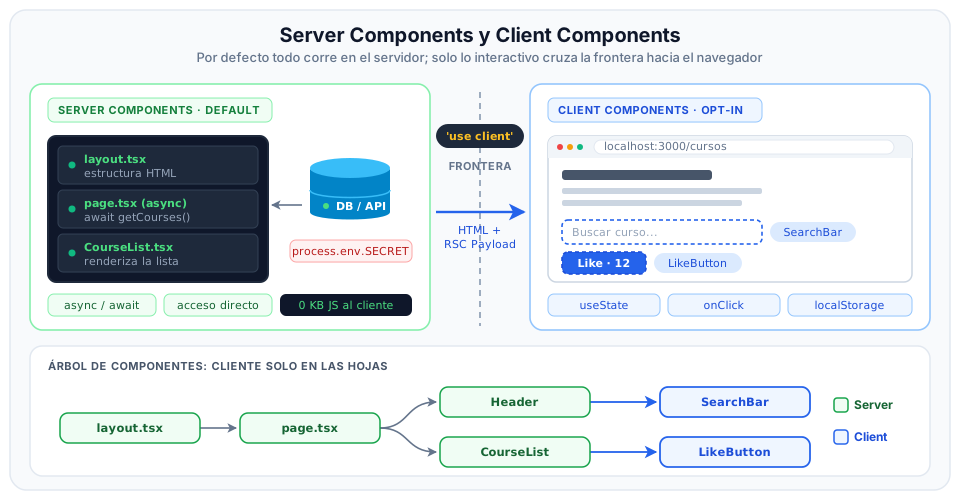
Diagram Breakdown & Network Boundary
- Left Block (Server Components - Default):
- Components live and run on the server (represented by the server rack and database).
- They enjoy direct access to the filesystem, secure environment variables (
process.env.DB_PASSWORD), databases (TypeORM, Prisma), and internal microservices. - Native support for top-level
async/awaitdirectly in the component body. - Zero kilobytes of JavaScript travel to the client for these components; only the resulting HTML and a lightweight format called RSC Payload are transmitted.
- The Boundary (
'use client'):- Represented by the dashed dividing line in the center. The
'use client'directive serves as a build-time marker for the compiler (Turbopack), indicating that from this node onward down the dependency graph, code must be bundled for the client browser.
- Represented by the dashed dividing line in the center. The
- Right Block (Client Components - On Demand):
- Execute in the browser (represented by the client screen).
- Manage reactive memory state (
useState), side effects (useEffect), and user DOM events (onClick).
- Component Tree (Bottom):
- Illustrates the recommended architectural strategy: structural components (
layout.tsx,page.tsx,Header,CourseList) remain Server Components, while interactivity is isolated strictly into the leaves of the tree (SearchBar,LikeButton).
- Illustrates the recommended architectural strategy: structural components (
2. What Does the 'use client' Directive Actually Mean?
A common misconception among developers is assuming 'use client' means "this component only runs in the client". That is incorrect:
'use client'defines a cut-off point (boundary) between server-only code and code that must be hydrated in the browser.
Client Components are also pre-rendered on the server during the initial page request to emit the corresponding static HTML. The difference is that their JavaScript source code is included in the client bundle and sent to the browser so React can attach event listeners during the hydration phase.
Example of a Client Component
'use client'; // Mandatory directive on the very first line

import { useState } from 'react';

interface LikeButtonProps {
  initialLikes: number;
}

export default function LikeButton({ initialLikes }: LikeButtonProps) {
  const [likes, setLikes] = useState(initialLikes);

  return (
    <button
      type="button"
      onClick={() => setLikes(likes + 1)}
      className="px-4 py-2 bg-blue-600 text-white rounded-lg hover:bg-blue-700 transition"
    >
      Likes ({likes})
    </button>
  );
}
3. Decision Matrix: When to Use Each Component Type?
To design clean, performant architectures, consult this quick decision guide before writing any component:
| Component Requirement | Server Component? | Client Component? |
|---|---|---|
| Fetch data directly from databases or backend microservices | Yes | No |
| Keep secret API keys and private authentication credentials safe | Yes | No |
| Minimize the JavaScript bundle size shipped to users | Yes | No |
Utilize reactive state hooks (useState, useReducer) | No | Yes ('use client') |
Listen to DOM events (onClick, onChange, onSubmit) | No | Yes ('use client') |
Use component lifecycle hooks (useEffect, useLayoutEffect) | No | Yes ('use client') |
Access browser-only APIs (window, localStorage, geolocation) | No | Yes ('use client') |
Use interactive navigation hooks (useRouter, usePathname) | No | Yes ('use client') |
4. Composition & Interleaving Patterns
One of the most frequent hurdles when adopting React Server Components is learning how to interleave server and client components without degrading performance.
Rule 1: Props Passed to a Client Component Must Be Serializable
When a Server Component renders a Client Component, properties (props) cross the network boundary between Node.js and the browser. Therefore, values passed must be serializable into JSON or RSC Payload:
import LikeButton from '@/app/components/LikeButton';

export default async function CoursesPage() {
  const course = await getCourseFromDB();

  return (
    <main>
      <h1>{course.title}</h1>
      {/* VALID: initialLikes is a primitive, serializable number */}
      <LikeButton initialLikes={course.likes} />

      {/* INVALID: Cannot pass non-serializable functions as props */}
      {/* <LikeButton onAction={() => console.log('Action')} /> */}
    </main>
  );
}
Rule 2: Passing Server Components as children to Client Components (Slot Pattern)
A frequent question from students is: If I turn an interactive container (like a modal or accordion) into a Client Component ('use client'), do all of its child components automatically turn into client components as well?
Not necessarily. The architectural solution lies in how dependencies are imported:
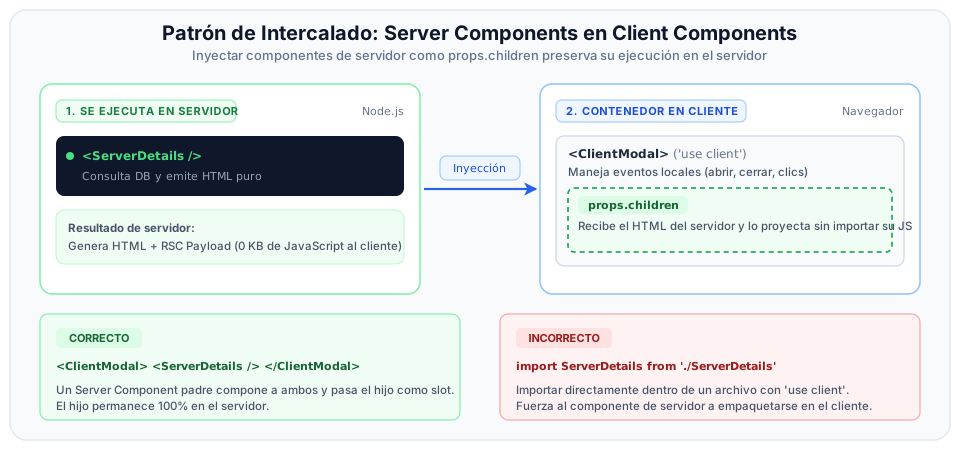
Breakdown of the Slot Pattern
- Server-Side Composition (Left Panel):
- A parent server page or component (
page.tsx) imports both elements: the client container (Modal) and the server content (ServerCard). - By declaring
<Modal><ServerCard /></Modal>, the Node.js server first resolves<ServerCard />, queries the database, and produces the HTML and lightweight RSC Payload.
- A parent server page or component (
- Client-Side Projection (Right Panel):
- The JavaScript source code for
<ServerCard />is never downloaded by the browser (0 KB bundle). - In the client,
<Modal>manages its local UI state (useState(open)) and animations, but simply projects the already resolved content through its specialprops.childrenslot.
- The JavaScript source code for
- The Anti-Pattern to Avoid (Bottom):
- If inside the
Modal.tsxfile (marked with'use client') you writeimport ServerCard from './ServerCard', the bundler treatsServerCardas a direct client dependency, forcing it to become a Client Component and unnecessarily bloating the bundle.
- If inside the
'use client';

import { useState } from 'react';

export default function Modal({ children }: { children: React.ReactNode }) {
  const [isOpen, setIsOpen] = useState(false);

  return (
    <div>
      <button onClick={() => setIsOpen(!isOpen)}>
        {isOpen ? 'Close' : 'Open Modal'}
      </button>

      {isOpen && (
        <div className="border p-4 rounded shadow-lg">
          {/* Children were rendered on the server and are simply projected here */}
          {children}
        </div>
      )}
    </div>
  );
}
Then, in a server page, you assemble both components:
import Modal from '@/app/components/Modal';
import ServerProfileData from '@/app/components/ServerProfileData';

export default function HomePage() {
  return (
    <main>
      <h1>Welcome to the Portal</h1>
      <Modal>
        {/* ServerProfileData executes on the server; its output projects into Modal */}
        <ServerProfileData />
      </Modal>
    </main>
  );
}
Push the 'use client' directive as far down the component tree as possible (into the leaves). This ensures that 80% to 90% of your interface reaps the performance and security benefits of Server Components, limiting hydration strictly to small interactive buttons, forms, or animated modals.