Feature-Based Organization
When we start building applications in Next.js, it is common to place all buttons in a components folder, all network functions in another, and all types in a shared file. In classroom projects or two-screen prototypes, this feels convenient. However, as the digital product grows with real-world modules such as login, registration, catalog, and admin panel, that organization collapses.
In this lesson, we will learn how to organize code by features (product capabilities), understand why the app/ folder should stay thin, and discover the exact place where external API consumption belongs through well-defined layers.
1. The Junk Drawer Problem
The most widespread traditional structure in basic tutorials organizes code by technical type:
src/
├── components/     <-- All application components together
├── hooks/          <-- All custom hooks
├── services/       <-- All backend endpoint calls
└── types/          <-- All TypeScript interfaces
At first glance it seems orderly, but it suffers from the same flaw as a poorly organized wardrobe.
The Wardrobe Analogy
Imagine organizing your clothes strictly by garment type:
- In the first drawer you keep all shirts (sports, formal, thermal, and pajamas).
- In the second drawer you keep all pants (jeans, shorts, and leggings).
- On the shoe rack you keep all shoes jumbled together.
Every morning, when you need to put together a full outfit to go training, you are forced to open all three drawers, rummage through items that have nothing to do with each other, and jump from one piece of furniture to another. If a garment wears out or you decide to give it away, you must check drawer by drawer to avoid leaving stray clothes behind.
In interface development, the exact same thing happens:
- Cognitive dispersion: To modify the login form, you have to open four distant folders (
components/LoginForm.tsx,hooks/useAuth.ts,services/authService.ts, andtypes/auth.ts). - Team collisions: Two designers or developers working on different screens constantly open the same global folders (
components/,hooks/), multiplying editing conflicts. - Fear of deletion: If a feature becomes obsolete, removing it requires archaeological digging to find out which files belonged to it without breaking unrelated components.
2. What Is a Feature
A feature is a complete vertical unit of value for the end user. It represents a concrete capability of the application:
- Authentication (
auth): login, registration, and password recovery. - Users (
users): profile list, bio editing, and role assignment. - Catalog (
productsorcatalog): listing, searching, and product filters.
The Golden Rule: Co-location
The Golden Rule of Co-location: Things that change together should live together in the same folder.
When we design or modify the authentication screen, we almost never touch the product catalog. What we do touch at the same time is the visual form, its state validation, the server call, and the data contract.
By grouping all those files into a self-contained folder (src/features/auth/), we gain three immediate benefits:
- Absolute focus: Opening the feature folder displays only what is relevant to that task.
- Isolation: Changes within a feature do not produce unintended side effects on other screens.
- Portability: If the project evolves or splits into microfrontends, moving or discarding the feature is as simple as moving or deleting its folder.
3. The app Folder Only Routes
In Week 11 we learned that Next.js uses the App Router system (src/app/) based on strict file-naming conventions (layout.tsx, page.tsx, loading.tsx, error.tsx).
A common temptation among beginners is to write the entire interface, forms, and fetch requests directly inside page.tsx. This turns route files into monsters that are hard to read and test.
Thin Pages
In a feature-based structure, files inside app/ serve a single purpose: defining the public URL and connecting the layout. They are thin pages whose code rarely exceeds 20 lines:
import { LoginForm } from '@/features/auth';

export const metadata = {
  title: 'Sign In | DocuKelo',
  description: 'Log in with your institutional email and password',
};

export default function LoginPage() {
  return (
    <main className="flex min-h-screen items-center justify-center p-4">
      <LoginForm />
    </main>
  );
}
Route Conventions Reminder
As we saw in the previous lesson on Next.js architecture:
- Route Groups
(auth)and(app): Allow grouping routes under their own visual layouts (for example,(auth)with a centered background without a navigation bar for/loginand/register, and(app)with a navigation bar and<AuthGuard>for private views like/dashboard) without altering the browser's public URL. - Private folders
_components: If a route needs an ultra-specific component that does not belong to any business feature and will never be reused, it can be placed in an underscored private folder. However, for reusable business components, the feature is always the preferred home.
4. Anatomy of a Feature
Each feature follows a predictable structural pattern. Let's look at the standard tree for the authentication feature:
src/features/auth/
├── components/          <-- Graphical interface elements specific to auth
│   ├── LoginForm.tsx
│   └── RegisterForm.tsx
├── hooks/               <-- Hooks with React state and lifecycle
│   └── useAuth.ts
├── services/            <-- HTTP requests and backend communication
│   └── auth.service.ts
├── types.ts             <-- TypeScript contracts, DTOs, and interfaces
└── index.ts             <-- Public export point (barrel)
Minimal Example of Each File
1. Data Types (types.ts)
Defines the shape of data traveling between the form, the client, and the backend:
export interface LoginInput {
  email: string;
  password: string;
}

export interface AuthState {
  token: string | null;
  isLoading: boolean;
  errorMessage: string | null;
}
2. HTTP Service (services/auth.service.ts)
Pure asynchronous functions calling API endpoints:
import { apiFetch } from '@/shared/lib/api';
import { session } from '@/shared/lib/session';
import type { LoginInput } from '../types';

export const authService = {
  async login(credentials: LoginInput): Promise<string> {
    // The course backend responds with the JWT token as plain text
    const token = await apiFetch<string>('/auth/login', {
      method: 'POST',
      body: JSON.stringify(credentials),
    });
    session.setToken(token);
    return token;
  },
};
3. React Hook (hooks/useAuth.ts)
Manages reactive state (loading, error) and exposes handler functions to the view:
'use client';

import { useState } from 'react';
import { authService } from '../services/auth.service';
import type { LoginInput } from '../types';

export function useAuth() {
  const [isLoading, setIsLoading] = useState(false);
  const [error, setError] = useState<string | null>(null);

  const login = async (credentials: LoginInput): Promise<string | null> => {
    setIsLoading(true);
    setError(null);
    try {
      const token = await authService.login(credentials);
      return token;
    } catch (err) {
      const message = err instanceof Error ? err.message : 'Unexpected error';
      setError(message);
      return null;
    } finally {
      setIsLoading(false);
    }
  };

  return { login, isLoading, error };
}
4. UI Component (components/LoginForm.tsx)
Renders the interactive form using the hook:
'use client';

import { useState } from 'react';
import { useRouter } from 'next/navigation';
import { useAuth } from '../hooks/useAuth';

export function LoginForm() {
  const [email, setEmail] = useState('');
  const [password, setPassword] = useState('');
  const { login, isLoading, error } = useAuth();
  const router = useRouter();

  const handleSubmit = async (e: React.FormEvent) => {
    e.preventDefault();
    const token = await login({ email, password });
    if (token) {
      // The token has already been saved to session by the service; redirect to main dashboard
      router.replace('/dashboard');
    }
  };

  return (
    <form onSubmit={handleSubmit} className="w-full max-w-sm space-y-4">
      {error && <p className="text-sm text-red-600">{error}</p>}
      <input
        type="email"
        placeholder="correo@icesi.edu.co"
        value={email}
        onChange={(e) => setEmail(e.target.value)}
        required
        className="w-full rounded border p-2"
      />
      <input
        type="password"
        placeholder="Password"
        value={password}
        onChange={(e) => setPassword(e.target.value)}
        required
        className="w-full rounded border p-2"
      />
      <button
        type="submit"
        disabled={isLoading}
        className="w-full rounded bg-blue-600 py-2 text-white disabled:opacity-50"
      >
        {isLoading ? 'Verifying...' : 'Sign In'}
      </button>
    </form>
  );
}
5. Public Barrel (index.ts)
Acts as the feature's entry gate. It only exports what the rest of the application (such as app/) is allowed to consume:
export { LoginForm } from './components/LoginForm';
export { RegisterForm } from './components/RegisterForm';
export { useAuth } from './hooks/useAuth';
export type { LoginInput, AuthState } from './types';
Naming Conventions
| Element | Convention | Example |
|---|---|---|
| React Components | PascalCase with .tsx extension | LoginForm.tsx, UserCard.tsx |
| React Hooks | camelCase with use prefix and .ts extension | useAuth.ts, useUserList.ts |
| Services and clients | camelCase or kebab-case with descriptive suffix | auth.service.ts, api.ts |
| Type files | types.ts or name.types.ts | types.ts, user.types.ts |
5. Where API Consumption Lives
One of the most serious mistakes in beginner projects is invoking fetch() directly inside the onClick or onSubmit event of a button:
// Anti-pattern: direct fetch inside the UI component
<button onClick={() => fetch('http://localhost:4000/auth/login', { method: 'POST', body: ... })}>
This couples the visual interface to the backend URL, duplicates headers, makes it impossible to handle errors consistently, and hinders updating the server address in production.
The Chain of Responsibilities
To resolve this with professional rigor, communication with the API is divided into five well-synchronized steps:
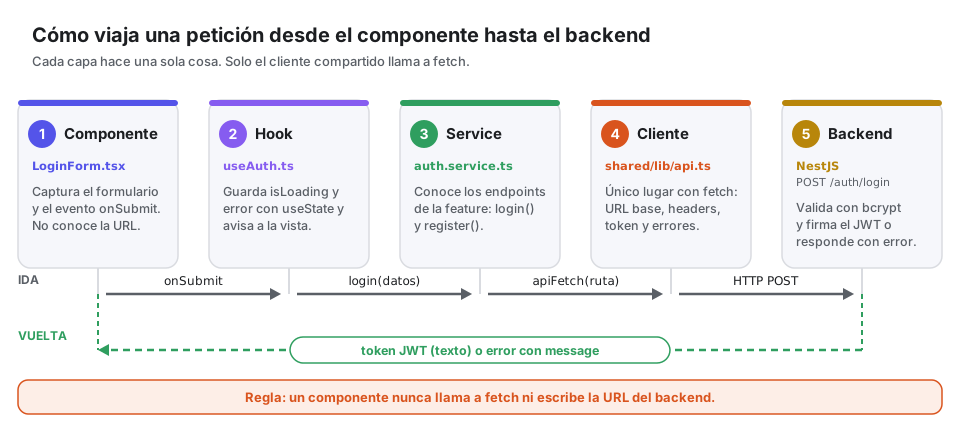
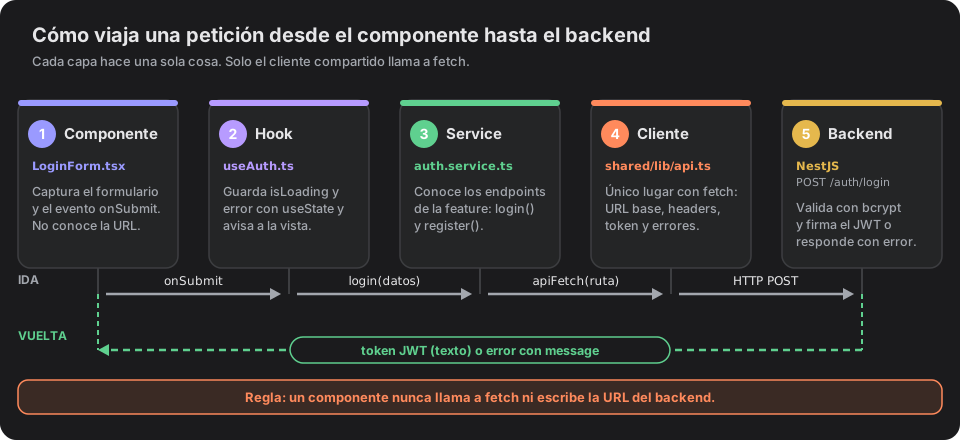
- Component (
LoginForm.tsx): Handles user interaction, label accessibility, andonSubmitevent capture. It does not know server URLs or HTTP headers; it delegates the action to the hook and redirects upon completion. - React Hook (
useAuth.ts): Controls reactive state flags (isLoading,error). Triggers the asynchronous service function and updates the view when data returns. - Feature Service (
auth.service.ts): Knows module-specific routes (/auth/login), transforms data according to TypeScript contracts (LoginInput), and stores the received token viasession.setToken(). - Centralized HTTP Client (
src/shared/lib/api.ts): Wraps the nativefetchfunction usingapiFetch, reads the environment variable with the base URL, adds automatic headers (Content-Type: application/json, authorization token fromsession.getToken()), and intercepts failed responses. - Backend (NestJS Server): Listens on port 4000, validates input with
ValidationPipe, verifies bcrypt-hashed passwords, and returns the signed JWT token or an HTTP error code (such as401 Unauthorized).
Environment Variables (.env.local)
To avoid hardcoding IP addresses or URLs in code, Next.js provides native support for environment variables via the .env.local file located at the project root:
# Base URL for the NestJS backend API (port 4000)
NEXT_PUBLIC_API_URL=http://localhost:4000
In Next.js, any variable that needs to be read from the browser (in Client Components or fetch wrappers) must carry the NEXT_PUBLIC_ prefix. Variables without this prefix are private and only exist within the Node.js server environment.
Centralized Client Implementation (api.ts)
This file lives in src/shared/lib/api.ts and exports the apiFetch function, becoming the project's unified point where fetch is used. It relies on session.ts to attach the authorization token whenever an active session exists:
import { session } from './session';

const API_BASE_URL = process.env.NEXT_PUBLIC_API_URL ?? 'http://localhost:4000';

export async function apiFetch<T>(endpoint: string, options: RequestInit = {}): Promise<T> {
  const token = session.getToken();

  const headers: HeadersInit = {
    'Content-Type': 'application/json',
    ...(token ? { Authorization: `Bearer ${token}` } : {}),
    ...options.headers,
  };

  const response = await fetch(`${API_BASE_URL}${endpoint}`, {
    ...options,
    headers,
  });

  if (!response.ok) {
    let errorMessage = `HTTP Error ${response.status}`;
    try {
      const errorBody = await response.json();
      if (Array.isArray(errorBody.message)) {
        errorMessage = errorBody.message.join(', ');
      } else if (typeof errorBody.message === 'string') {
        errorMessage = errorBody.message;
      }
    } catch {
      const errorText = await response.text();
      if (errorText) errorMessage = errorText;
    }
    throw new Error(errorMessage);
  }

  const contentType = response.headers.get('content-type') ?? '';
  if (contentType.includes('application/json')) {
    return response.json();
  }

  return (await response.text()) as unknown as T;
}
Token management in client-side storage is centralized in src/shared/lib/session.ts with methods such as session.getToken(), session.setToken(), and session.removeToken(). The full implementation of session.ts, along with step-by-step connection to forms and navigation, is detailed in the next document: 02. Case Study: Login, Registration, and Navigation.
6. Shared Code vs. Feature Code
One of the most frequent questions when designing interfaces is: where do I store a button, a modal, or a helper function?
The src/shared/ directory exists for this purpose:
src/shared/
├── components/
│   └── ui/              <-- Reusable visual primitives (Button, Input, Modal)
├── hooks/               <-- Generic hooks (useDebounce, useLocalStorage)
└── lib/                 <-- Pure clients and utilities (api.ts, formatters.ts)
The Promotion Criterion: The Rule of 2+
To keep a project healthy and avoid creating cluttered shared folders:
Promotion criterion to
shared: A resource belongs to a feature until two or more independent features need it without a direct relationship.
Lives in Feature (auth)
Lives in Shared (shared)
Examples of Location Decisions
| Resource | Correct Target | Reason |
|---|---|---|
UserAvatar.tsx used in Header and Profile | src/shared/components/ui/ | Consumed in two independent modules. |
UserCard.tsx only appearing in the user list | src/features/users/components/ | Its design and data only matter to the users feature. |
Currency formatter formatCOP() | src/shared/lib/formatters.ts | Mathematical utility reusable in billing and catalog. |
Validator isValidPassword() for registration | src/features/auth/ | Business rule exclusive to the credential flow. |
7. Recommended Full Structure
Below is the standard, scalable directory tree recommended for the course capstone project:
my-project/
├── .env.local                     <-- Local environment variables (NEXT_PUBLIC_API_URL)
├── package.json
├── tsconfig.json                  <-- Configures import aliases "@/..."
├── next.config.ts
├── public/                        <-- Static public assets (logos, favicons)
└── src/
    ├── app/                       <-- Dedicated router: only thin pages and layouts
    │   ├── (auth)/
    │   │   ├── layout.tsx         <-- Centered layout for authentication
    │   │   ├── login/
    │   │   │   └── page.tsx       <-- Renders <LoginForm />
    │   │   └── register/
    │   │       └── page.tsx       <-- Renders <RegisterForm />
    │   ├── (app)/
    │   │   ├── layout.tsx         <-- Layout with navigation and <AuthGuard />
    │   │   └── dashboard/
    │   │       └── page.tsx       <-- Renders user view and metrics
    │   ├── globals.css            <-- Tailwind CSS base styles
    │   └── layout.tsx             <-- Root html and body layout
    │
    ├── features/                  <-- Full product capabilities
    │   ├── auth/
    │   │   ├── components/
    │   │   │   ├── LoginForm.tsx
    │   │   │   └── RegisterForm.tsx
    │   │   ├── hooks/
    │   │   │   └── useAuth.ts
    │   │   ├── services/
    │   │   │   └── auth.service.ts
    │   │   ├── types.ts
    │   │   └── index.ts
    │   │
    │   └── users/
    │       ├── components/
    │       │   ├── UserCard.tsx
    │       │   └── UserList.tsx
    │       ├── hooks/
    │       │   └── useUsers.ts
    │       ├── services/
    │       │   └── user.service.ts
    │       ├── types.ts
    │       └── index.ts
    │
    └── shared/                    <-- Cross-cutting reusable core
        ├── components/
        │   └── ui/
        │       ├── Button.tsx
        │       ├── Card.tsx
        │       └── Input.tsx
        └── lib/
            ├── api.ts             <-- Base HTTP client with apiFetch
            ├── session.ts         <-- Token management in localStorage
            └── utils.ts
Common Mistakes and How to Avoid Them
| Common Mistake | Why It Is Dangerous | Correct Solution |
|---|---|---|
| Feature importing from another feature | If features/users imports internal files from features/auth, circular coupling occurs. | If they share contracts or components, promote them to shared or communicate via props. |
Creating a giant shared | Moving everything to shared/ preemptively recreates the original junk drawer. | Apply the rule of 2+: leave files in their feature until another genuinely requests them. |
Placing fetch calls in page.tsx | Makes logic hard to reuse, bloats the router, and mixes presentation with data. | Keep pages thin; delegate requests to the service and state to the hook. |
Forgetting the NEXT_PUBLIC_ prefix | Variables such as API_URL will be inaccessible in browser Client Components. | Always declare NEXT_PUBLIC_API_URL in .env.local for values the client must read. |