Zustand Concepts
In the previous lesson we saw why sharing state with props or with Context becomes uncomfortable. Zustand (German for "state") is a global state library for React that solves that problem with a very short idea: a store is a function that returns a hook.
If you already know Redux Toolkit (we studied it in Computación en Internet 3), you will be surprised by how little there is to learn: there is no dispatch, no action objects, no reducers and no Provider.
1. What Is Zustand
Zustand is a small library with no dependencies and no strong opinions about how to organize your code. Its mental model fits in four sentences:
- You create a store with the
createfunction. - The store keeps state and actions in the same object.
- Actions change the state by calling
set. - Components read with the hook that
createreturns, indicating with a selector which data they need.
We use Zustand 5 with React 19 and Next.js 16. If you find old tutorials (version 3 or 4), most of the code still works; the difference that affects you most is explained in Zustand Capabilities.
2. Anatomy of a Store
This is the notifications store we will use throughout the week. Read it completely once; then we take it apart piece by piece.
import { create } from 'zustand';

export type NotificationItem = {
  id: number;
  title: string;
  read: boolean;
};

type NotificationsState = {
  // State
  notifications: NotificationItem[];
  // Actions
  addNotification: (title: string) => void;
  markAllRead: () => void;
};

export const useNotificationsStore = create<NotificationsState>()((set) => ({
  notifications: [],

  addNotification: (title) =>
    set((state) => ({
      notifications: [
        { id: Date.now(), title, read: false },
        ...state.notifications,
      ],
    })),

  markAllRead: () =>
    set((state) => ({
      notifications: state.notifications.map((n) => ({ ...n, read: true })),
    })),
}));
create
create receives a function that describes the store and returns a hook (by convention it is named useSomethingStore). That hook is the only thing components import.
With TypeScript we write create<State>()(...): first we indicate the type and then we pass the function. This "curried" form is required when we use middleware (we will see it in lesson 4), so we always use it to avoid changing it later.
State and Actions Together
Unlike Redux, where the state lives in a slice and actions are dispatched from somewhere else, in Zustand the state and the functions that modify it are properties of the same object. An action is simply a function.
set: Changing the State
set is the only way to modify the state. It has two forms:
// 1. With an object: when the new value does not depend on the previous one
set({ notifications: [] });

// 2. With a function: when it depends on the current state (the most common)
set((state) => ({ notifications: [...state.notifications, newItem] }));
Two rules worth memorizing:
setmerges shallowly (shallow merge): you only need to return the properties that change. The rest are kept. You do not need to write...state.- State is immutable: never do
state.notifications.push(...). Return a new array ([...],map,filter). Later we will seeimmer, which lets you write "mutating" code without breaking the rule.
get: Reading the State Inside an Action
The second parameter of the function passed to create is get, which returns the current state. It is useful when an action needs to read something before deciding:
export const useAuthStore = create<AuthState>()((set, get) => ({
  token: null,
  isAuthenticated: () => get().token !== null,
}));
Selector: Which Part of the Store I Need
A selector is a function that receives the whole state and returns only what the component needs:
const notifications = useNotificationsStore((s) => s.notifications);
const addNotification = useNotificationsStore((s) => s.addNotification);
The component subscribes only to that value. If another part of the store changes, it does not render again. That is why selectors are not optional in practice.
const store = useNotificationsStore() works, but it subscribes the component to everything in the store: it renders on any change, and we lose the main advantage over Context.
3. The Data Flow
The path of a change in Zustand is shorter than in Redux. Follow step by step what happens when the user emits a notification:
Summary of the path:
- The component calls the action directly (
addNotification("Hello")). There is nodispatchor action object. - The action calls
setwith the change. - The store replaces its state and notifies the subscribers.
- Each selector compares its previous result with the new one (using
Object.is). - Only the components whose selector returned a different value render again.
NotificationCreator only selects the addNotification action. Store functions are created only once, so their reference never changes and that component does not find out that the list grew. It is one of the reasons why separating "reading data" from "calling actions" with different selectors is cheap and keeps performance clean.
4. Zustand Outside React
The hook returned by create also brings three functions that work without components. This is useful for the HTTP client, a utility or a test:
// Read the current state (without subscribing)
const { notifications } = useNotificationsStore.getState();

// Modify it from any file
useNotificationsStore.getState().addNotification('Saved');
useNotificationsStore.setState({ notifications: [] });

// Listen to changes (returns the function to cancel the subscription)
const unsubscribe = useNotificationsStore.subscribe((state) => {
  console.log('There are now', state.notifications.length);
});
A classic example: the week 12 apiFetch can read the token with useAuthStore.getState().token without being a component or a hook.
5. Comparison: Context, Zustand and Redux Toolkit
No tool is the best in every scenario. This is the same comparison we saw in Redux, now with Zustand in the center:
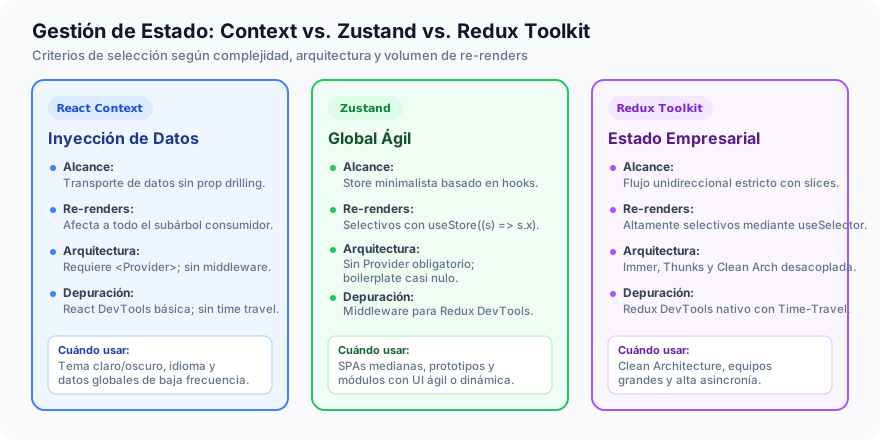
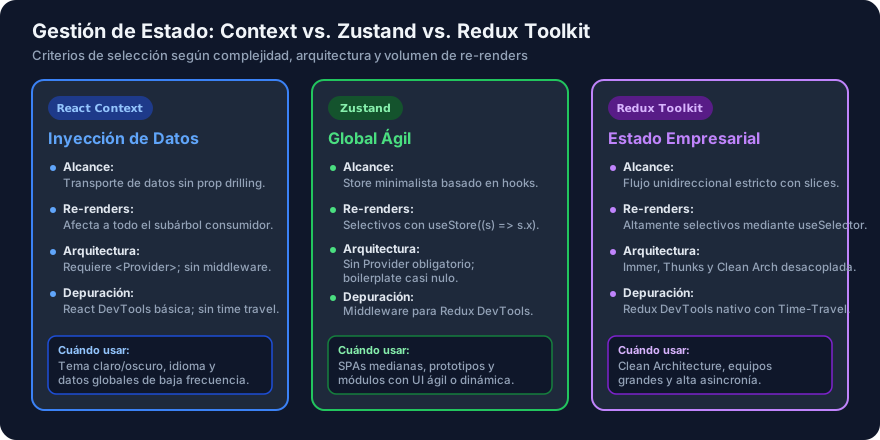
| Criterion | React Context | Zustand | Redux Toolkit |
|---|---|---|---|
| Pieces you learn | createContext, Provider, useContext | create, set, selector | configureStore, slice, reducer, action, dispatch, Provider, selector |
| Boilerplate | Medium | Minimal | Moderate |
Provider required | Yes | No (in the simple version) | Yes |
| Re-renders | All consumers | By selector | By selector |
| Data flow | Free | Free (you decide the structure) | Strict and unidirectional |
| Async effects | You solve it | Normal async actions | Thunks / createAsyncThunk |
| Debugging tools | React DevTools | devtools middleware (Redux DevTools) | Native Redux DevTools |
| Convention imposed on the team | None | None | High |
| When it fits | Almost static data (theme, language) | Small and medium apps, UI and session state | Large teams, complex domains, traceability |
Same Change, Two Tools
Adding a notification in Redux Toolkit and in Zustand:
// slice
reducers: { add: (state, action: PayloadAction<string>) => { state.items.unshift(...) } }
// component
const dispatch = useAppDispatch();
dispatch(add('Hello'));
const items = useAppSelector((s) => s.notifications.items);
// store
addNotification: (title) => set((s) => ({ notifications: [...] }))
// component
const addNotification = useNotificationsStore((s) => s.addNotification);
addNotification('Hello');
const notifications = useNotificationsStore((s) => s.notifications);
That Zustand does not impose structure is its advantage and its risk. In a large team, without agreements you end up with twenty different ways of writing a store. That is why this week we also set where stores live and how they are named (next lesson).