Security Prerequisites and Core Concepts
Security is one of the fundamental pillars in modern backend architecture development. In enterprise applications and RESTful APIs, merely implementing business features is not enough; systems must strictly ensure that every incoming request originates from a legitimate identity and that executed actions adhere rigorously to established access control policies.
In this guide, we explore the conceptual foundations of web security, protected credential storage using cryptographic key derivation functions (hashing), and the architectural distinction between authentication and authorization.
1. Architectural Prerequisites
Before implementing perimeter security mechanisms and route guards in NestJS, the project must establish a persistence schema for users, roles, and permissions (also known as authorities or privileges).
A robust access control architecture relies on a normalized relational model:
During early prototyping phases, user creation services often mistakenly store plain-text passwords:
async create(createUserDto: CreateUserDto) {
  const role = await this.roleService.findByName(createUserDto.roleName);
  if (!role) {
    throw new NotFoundException('Role not found');
  }

  // Security hazard: Plain-text credential persistence
  const newUser = this.userRepository.create({
    ...createUserDto,
    role,
  });
  return await this.userRepository.save(newUser);
}
Storing passwords in plain text is one of the most severe vulnerabilities categorized under OWASP Top 10 (Cryptographic Failures). If the database is compromised via SQL injection, exposed backup dumps, or unauthorized access, all user credentials are leaked instantaneously.
2. Password Hashing with bcrypt
To safeguard user credentials, applications employ one-way cryptographic hash functions combined with salting techniques. Unlike symmetric or asymmetric encryption (which can be decrypted with an appropriate key), a secure cryptographic hash cannot be reversed back to its original plaintext.
Why Use bcrypt?
- One-Way Function: There is no feasible mathematical algorithm capable of reversing the resulting hash back to the original password.
- Automatic Salting: Every generated hash incorporates a dynamically generated random salt. This prevents precomputed dictionary and Rainbow Table lookups and ensures that two users with identical passwords yield completely distinct stored hashes.
- Adaptive Cost Factor (Salt Rounds): bcrypt is intentionally designed to be computationally slow. The cost parameter determines the iteration count (, where a cost factor of 10 corresponds to internal derivation rounds), effectively mitigating GPU-accelerated brute-force attacks.
Step 1: Install Dependencies
Execute in your NestJS project terminal:
npm install bcrypt
npm install -D @types/bcrypt
Step 2: Configure Environment Variables
Define the cost factor in your .env file. A value of 10 is an industry-standard recommendation for production workloads:
SALT_ROUNDS=10
Each increment of 1 in SALT_ROUNDS doubles the CPU computation time required to generate or verify the hash. A value between 10 and 12 offers strong brute-force resistance without causing perceptible latency spikes during registration or login requests.
Step 3: Refactor the Users Service
Inject ConfigService into your service and hash the password before entity persistence:
import { Injectable, NotFoundException, BadRequestException } from '@nestjs/common';
import { ConfigService } from '@nestjs/config';
import { InjectRepository } from '@nestjs/typeorm';
import { Repository } from 'typeorm';
import * as bcrypt from 'bcrypt';
import { User } from './entities/user.entity';
import { CreateUserDto } from './dto/create-user.dto';
import { RolesService } from '../roles/roles.service';

@Injectable()
export class UsersService {
  constructor(
    @InjectRepository(User)
    private readonly userRepository: Repository<User>,
    private readonly roleService: RolesService,
    private readonly configService: ConfigService,
  ) {}

  async create(createUserDto: CreateUserDto): Promise<User> {
    const role = await this.roleService.findByName(createUserDto.roleName);
    if (!role) {
      throw new NotFoundException(`Role '${createUserDto.roleName}' not found`);
    }

    if (!createUserDto.password) {
      throw new BadRequestException('Password is a required field');
    }

    // Retrieve salt rounds from environment variables
    const saltRounds = parseInt(
      this.configService.get<string>('SALT_ROUNDS') ?? '10',
      10,
    );

    // Compute cryptographic hash
    const passwordHash = await bcrypt.hash(createUserDto.password, saltRounds);

    const newUser = this.userRepository.create({
      email: createUserDto.email,
      passwordHash,
      role,
    });

    const savedUser = await this.userRepository.save(newUser);

    // Omit sensitive hash from the returned response
    const { passwordHash: _, ...userWithoutPassword } = savedUser;
    return userWithoutPassword as User;
  }
}
If you had existing unit or integration test suites for UsersService, they will likely fail following this refactoring because mock implementations will expect bcrypt.hash calls and look for passwordHash rather than plaintext attributes. Ensure test suites provide mocked ConfigService providers.
3. Authentication vs. Authorization
Understanding the architectural and conceptual distinction between Authentication (AuthN) and Authorization (AuthZ) is essential for designing resilient APIs.
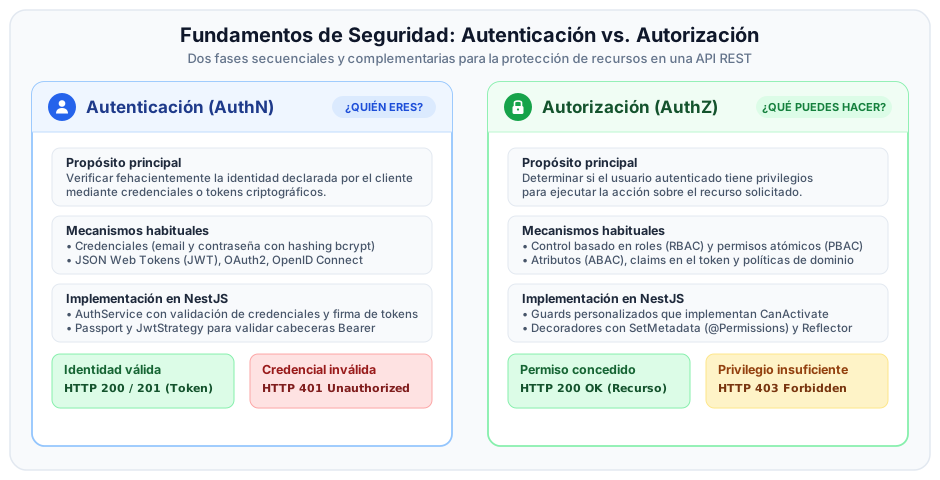
Comparative Breakdown
| Dimension | Authentication (AuthN) | Authorization (AuthZ) |
|---|---|---|
| Core Question | Who is the user? | What actions is the user permitted to execute on this resource? |
| Primary Goal | Verify the identity claimed by the client. | Regulate permitted operations based on roles and assigned permissions. |
| Common Mechanisms | Credentials (email/password), JWT tokens, OAuth2, SAML. | RBAC (roles), PBAC (permissions), Route Guards, Access Policies. |
| Execution Phase | At session start or upon decoding the request bearer token. | Immediately prior to invoking the targeted controller route handler. |
| HTTP Failure Status | 401 Unauthorized | 403 Forbidden |
| NestJS Representation | Managed via Passport and JwtStrategy. | Managed via Guards (CanActivate) and metadata Reflector. |
Request Lifecycle Flow
401 Unauthorized: The client has not identified itself, or the token is expired/invalid. The client may retry the request by supplying valid credentials.403 Forbidden: The server verified the client's identity successfully, but the caller lacks the necessary privileges to access the targeted endpoint. Retrying with identical credentials will always yield the same rejection.