Terminal AI Agents
In previous sessions, you learned how to build declarative interfaces in Flutter through the composition of Stateless widgets and the strict separation between Screen and Page. From this point forward in the course, we make the leap into agent-assisted software development, transforming the command-line terminal into a guided co-creation environment.
1. From Passive Assistants to Terminal Agents
In recent years, the typical interaction with Large Language Models (LLMs) has been through browser chat interfaces or code editor autocompletion extensions (inline completion or ghost text). However, this approach exposes an evident operational gap:
The Limitation of Traditional Assistants (Chatbot / Copilot)
- Passive and decoupled: The model answers your questions or drafts isolated snippets, but lacks direct contact with the operating system.
- Constant manual friction: As a developer, you must copy the generated snippet, paste it into your file, format it, run
flutter analyzein the terminal, read error messages if something broke, and draft another prompt explaining the failure back to the chatbot. - Architectural amnesia: Unable to inspect the project tree or dependencies in
pubspec.yaml, chatbots often assume outdated library versions or invent non-existent widgets.
Terminal AI Agents (ReAct Loop)
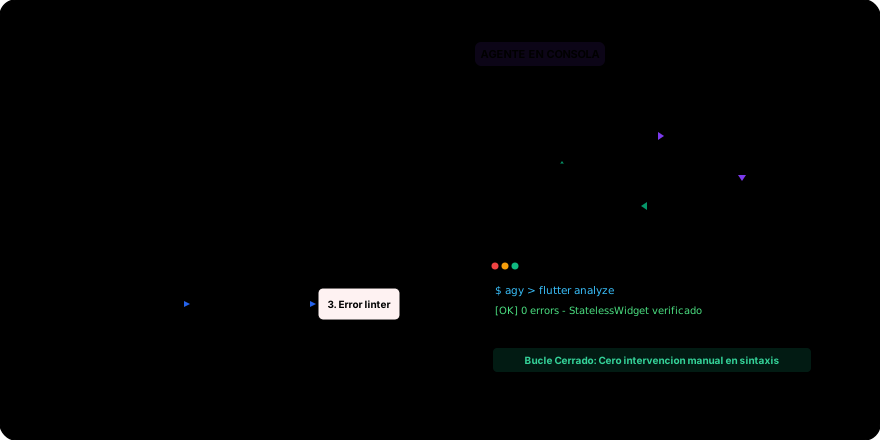
A software agent is not merely a conversational LLM; it is a program executing an ongoing cycle of Perception Reasoning Action Verification (ReAct Loop):
- Perception: Uses tools to explore the directory tree, read specific files (such as
lib/screens/home_screen.dart), and inspect Git history. - Reasoning: Analyzes the requested goal against project context and architecture rules established by the team.
- Action: Proposes and applies precise code edits (diffs), creates files, and runs terminal commands (
flutter pub get,dart format). - Verification: Evaluates terminal output (
stdoutandstderr). If runningflutter analyzereports a syntax error or linter violation, the agent reads the error, reasons about the cause, and self-corrects before marking the task complete.
2. Operating Modes and Autonomy Levels
When running a terminal agent on your development machine, the central question is not just what the agent can do, but how much control you delegate to it. Agentic environments categorize operation into four autonomy levels:
| Level | Operating Mode | Autonomy Level | Developer Control |
|---|---|---|---|
| 0 | Query Only (Ask) | Read-only access to files | Maximum (zero commands or disk writes) |
| 1 | Supervised (Human-in-the-Loop) | Proposes actions and diffs | Explicit confirmation [y/n] before each action |
| 2 | Planned (Plan Mode) | Phased execution following a plan | Prior approval of proposed architecture |
| 3 | Autonomous (Full Auto) | Continuous loop without pauses | Deferred supervision (only for mature pipelines) |
Level 0: Query Only (Ask Mode)
The agent operates in read-only mode. It can inspect files to answer conceptual questions (for instance, "Explain why this Container causes an overflow"), while file modifications and command execution remain locked.
Level 1: Step-by-Step Supervision (Human-in-the-Loop)
The agent investigates the problem and proposes atomic actions. Before applying any modification or executing a shell command, it pauses and requests explicit confirmation:
# 1. Shell command confirmation:
? Agent wants to run: flutter analyze
  [y] Allow  [n] Deny  [a] Always allow for this session
# 2. Diff confirmation before touching file on disk:
--- a/lib/pages/home_page.dart
+++ b/lib/pages/home_page.dart
@@ -15,3 +15,5 @@
+ return SingleChildScrollView(
+   child: Column(
- return Column(
Throughout this university course, Level 1 is your primary working mode. It requires you to audit every line of code before it touches your repository, preventing development from turning into a black box.
Level 2: Prior Planning (Plan Mode)
Before writing a single line of code for complex tasks (such as scaffolding a new screen with 4 subcomponents), the agent generates a structured, phased plan. The developer reviews and approves the high-level architectural plan; once approved, the agent executes editing steps semi-autonomously.
Level 3: Full Autonomy (Full Auto / YOLO Mode)
The agent runs commands, creates Git branches, fixes errors, and refactors without requiring human interaction until the goal is achieved. This mode is only viable in projects with mature automated unit test suites and disposable container sandboxes. Not recommended for learning stages.
3. From Human-in-the-Loop to Human-in-the-Lead
One of the most common pitfalls when beginning to develop with AI agents is adopting a passive posture, simply pressing the [y] key whenever the agent proposes an action. This phenomenon is known as confirmation fatigue and reduces the developer to an inattentive gatekeeper.
To practice disciplined software engineering, we must evolve from Human-in-the-Loop to Human-in-the-Lead:

- Human-in-the-Loop (Reactive)
- Human-in-the-Lead (Strategic)
- Posture: The developer reacts to whatever the model proposes.
- Mechanics: Issues a vague prompt ("Build me the profile screen"), the agent assumes design decisions on its own, and the developer attempts to correct hallucinations by approving or rejecting diffs in the terminal.
- Risk: Loss of architectural control, spaghetti code, and cognitive dependence on the assistant.
- Posture: The developer acts as the Architect and Technical Lead.
- Mechanics:
- Defines non-negotiable constraints upfront (for example: "100% StatelessWidget, no nested Scaffolds in Pages, strict Material 3 adherence").
- Codifies these rules into an explicit contract (
AGENTS.md). - Deconstructs the problem into clear specifications and audits that the agent operates strictly within contract boundaries.
- Benefit: You retain intellectual ownership of the system, maximize delivery speed, and guarantee a clean, maintainable codebase.
4. Why Operate from the Terminal
Why favor a terminal-native agent over a graphical editor extension?
- Alignment with the software lifecycle: Real compilation commands (
flutter run), type checking (dart analyze), package management (flutter pub add), and version control (git commit) live in the terminal. A terminal agent interacts natively with these tools. - Editor-agnostic: Works identically whether you use VS Code, Android Studio, Vim, or a remote server over SSH.
- Composability and automation: Allows chaining workflows through pipes, shell scripts, and continuous integration pipelines (CI/CD).
- Unvarnished visibility: Everything the agent reads, proposes, and executes is logged chronologically in your terminal history with semantic colors and timestamps.
In the next lesson, we will install the leading terminal tools in this ecosystem: Antigravity CLI (agy) and OpenCode (opencode).