Context Management
An artificial intelligence model does not magically "remember" your project, nor does it possess awareness of your repository. In computer science terms, LLMs are pure, stateless functions: every time you interact with an agent in the terminal, it evaluates a structured block of text known as the Context Window.
The quality, accuracy, and architectural adherence of the Flutter code generated by the agent depends directly on what is present (and what is absent) in that window.
1. Anatomy of the Context Window
Each request you send to the agent assembles a layered information structure before being dispatched to the language model:
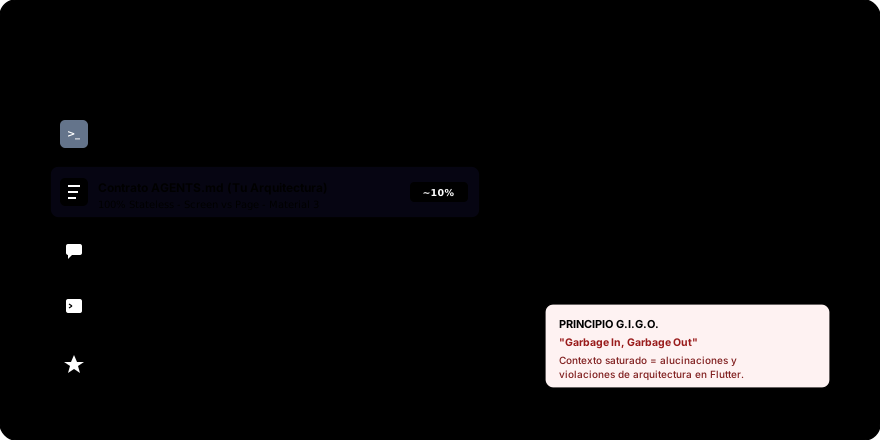
The 5 Layers of Agentic Context
- CLI System Prompt: Foundational instructions injected by the tool (
agyoropencode). It defines the agent's identity, the schemas of available tools (reading files, executing bash/PowerShell commands), and security protocols. - Project Context Contract (
AGENTS.md/CLAUDE.md): Your architectural specification. It tells the agent that we are working in Flutter with Material 3, that all UI components must useStatelessWidget, and that there is a strict rule separatingScreenandPage. - Conversation History: The recent sequence of messages exchanged during the terminal session.
- Tool Outputs and Files: Source code the agent has deliberately opened (e.g.,
lib/pages/home_page.dart) and console results (e.g., the output offlutter analyze). - Generation Buffer (Completion Tokens): The maximum token quota allowed for the model to draft its response and propose diffs.
2. The Two Pitfalls: Amnesia and Context Bloat
To lead the agent effectively (Human-in-the-Lead), you must avoid two detrimental extremes:
| Dimension | Extreme 1: Architectural Amnesia | Sweet Spot (Human-in-the-Lead) | Extreme 2: Context Bloat |
|---|---|---|---|
| Root Cause | No AGENTS.md or ambiguous rules. | Concise, modular, and surgical contract. | Entire folders (build/, .dart_tool/, logs) injected. |
| LLM Behavior | Statistical hallucination, generic and outdated code. | Adheres to local conventions (MD3, StatelessWidget). | Lost in the Middle: ignores intermediate instructions. |
| Team Impact | Mandatory manual refactoring and frustration. | Minimal, clean, and console-verifiable diffs. | High latency (TTFT), excessive token consumption, and subtle bugs. |
Pitfall 1: Architectural Amnesia ("Garbage In, Garbage Out")
If you do not provide a context file or if it is vague, the model falls back on global statistical probabilities learned during Internet training. Since outdated tutorials abound on public forums:
- It will generate deprecated buttons like
FlatButtonorRaisedButtoninstead ofElevatedButton. - It will create unnecessary
StatefulWidgetcomponents for static layouts. - It will nest a
Scaffoldinside anotherScaffold, breaking theScreenvs.Pageconvention.
Pitfall 2: Attention Degradation and Overload (Lost in the Middle)
Loading massive directories such as build/, .dart_tool/, or iOS/Android configuration files (Podfile.lock) leads to Context Bloat:
- Attention Degradation: Transformer attention research shows that when the context window is saturated with irrelevant data, the model tends to overlook critical instructions placed in the middle of the prompt (Lost in the Middle).
- Higher Latency: The Time To First Token (TTFT) increases significantly.
- Unnecessary Costs: Every interaction resends thousands of redundant tokens to the API.
"Can the agent infer this by reading existing code?" If the answer is yes (for instance, if the agent can deduce variable naming conventions by inspecting the file), do not include it in your instruction file. Only specify business rules, non-inferable architectural patterns, and prohibited anti-patterns.
3. Essential Inspection Commands in the CLI
Professional terminal environments offer slash commands to inspect the agent's cognitive state:
1. /context: What is inside the agent's working memory?
Allows you to inspect the exact list of files loaded into memory and the percentage of the context window consumed:
# Active memory audit in terminal
> /context
Active Context Tokens: 14250 / 128000 (11%)
Loaded Files:
  - AGENTS.md (Root context)
  - pubspec.yaml (Project manifest)
  - lib/screens/home_screen.dart (Active edit target)
  - lib/pages/home_page.dart (Active edit target)
2. /usage (or /cost): Resource and Cost Monitoring
Displays cumulative token usage for the active session:
# Real-time consumption and cost metrics
> /usage
Session Usage:
  Prompt Tokens (Input): 42100
  Completion Tokens (Output): 3850
  Total Tool Invocations: 8
  Estimated Session Cost: $0.014 USD
3. /model: Selecting the Right Engine
Allows you to switch models depending on task complexity:
# Interactive agentic model selector
> /model
Available Models:
  1: Gemini 1.5 Flash / Claude 3.5 Haiku (Fast, ideal for quick queries or minor fixes)
  2: Gemini 1.5 Pro / Claude 3.5 Sonnet (Advanced, recommended for architecture and refactoring)
Select: 2
4. What If Your CLI Lacks Native Inspection Commands?
If you are using a tool that does not support /context or /usage directly, you can audit the agent using metacognitive prompts:
- Emulate /context
- Verify Contract Adherence
Concisely list which files from this project you currently have loaded into
your working context, and summarize the architectural rules you are applying in 3 bullet points.
Before generating code, quote verbatim the rule from AGENTS.md regarding
the separation between Screen and Page, and explain how it applies to the view requested.
In the next session, we will learn how to construct our first AGENTS.md (or CLAUDE.md) file using the /init command or its equivalent prompt, establishing a modular and scalable structure for the .agents/ directory.