Practical Challenge: Workout & Fitness Routine App (FitTrack)
In this challenge, you will put your Flutter layout and architecture skills into practice by building the mobile user interface for FitTrack, a workout tracking application designed under Google Material Design 3 guidelines using the Deep Purple (#6750A4) seed color.
1. Reference Mockups
Below are the two high-fidelity mobile screens generated in Stitch that you must implement accurately:
- Screen 1: Daily Routine
- Screen 2: Exercise Detail
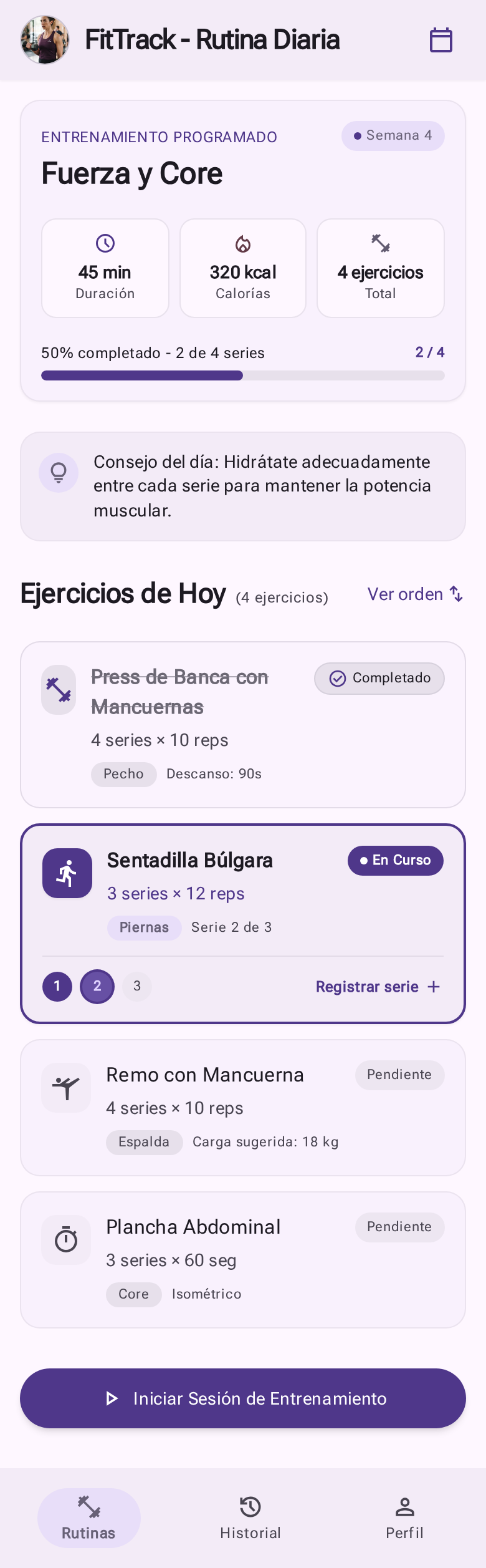
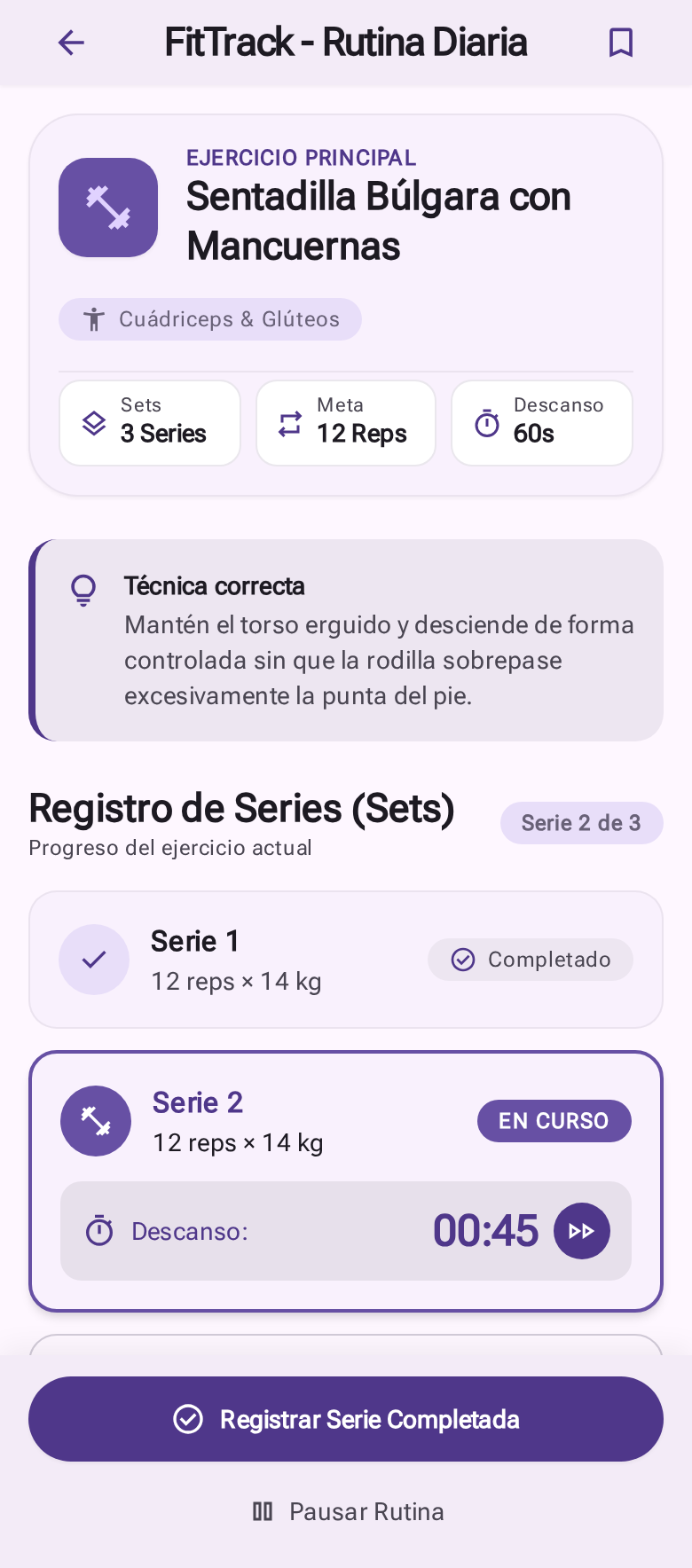
2. Architectural Requirements
Your solution must strictly adhere to the following design constraints:
Screenvs.PageSeparation:Screensare the only components authorized to return aScaffold(with itsAppBar,NavigationBar, or persistent bottom action bar).Pagesrepresent the inner visual canvas rendered within thebody. They must never return aScaffold.
- 100%
StatelessWidget:- The application must be purely declarative. Zero
StatefulWidgetand zero calls tosetState. - All data must flow from immutable models passed as constructor arguments (
props).
- The application must be purely declarative. Zero
- Responsive Layout and Hardware Insets:
- Protect all views using
SafeAreato accommodate the notch, dynamic island, and bottom system gesture insets. - Eliminate overflow errors (RenderFlex overflow) by wrapping scrollable viewports with
SingleChildScrollView. - Use
Expandedandflexto ensure rows and long text labels adapt gracefully to any screen width without manual dimension calculations.
- Protect all views using
3. Mission: UI Decomposition & Componentization
As a software engineer, your task is to visually analyze both screens and extract modular, reusable widgets into lib/widgets/:
lib/
├── models/       # Model your immutable data entities here (exercises, sets, summaries)
├── widgets/      # Modular components that you must identify, specify, and build
├── pages/        # WorkoutDashboardPage and ExerciseDetailPage (Canvases without Scaffold)
├── screens/      # WorkoutDashboardScreen and ExerciseDetailScreen (Scaffolds and bars)
└── main.dart
Components you must specify and implement:
- Atoms and Chips: Identify statistical metric chips (duration, calories, counts) and tonal badges for target muscle groups or statuses.
- Molecules and Cards: Design the modular workout exercise card for the dashboard list and the tonal technique/posture notification banner.
- State-Aware Components: Design the set tracking card capable of rendering distinct visual states (completed with checkmark, in-progress with highlighted border and active rest timer, or pending).
- Action Buttons: Build reusable pill-shaped buttons (stadium border) for primary calls-to-action.
4. Evaluation Rubric
| Criterion | Description |
|---|---|
| Clean Architecture | Strict separation between Screen (Scaffold) and Page (Canvas). Zero nested Scaffolds. |
| Custom Componentization | Modular decomposition into reusable widgets in lib/widgets/ with strongly typed, immutable parameters. |
| Responsiveness & Hardware | Proper use of Expanded, SafeArea, and total elimination of RenderFlex overflow using SingleChildScrollView. |
| Fidelity & MD3 Styling | High visual adherence to design mockups, rounded corners, and proper BoxDecoration usage without color conflicts. |