Persistence with Supabase
So far the agenda's contacts live in an in-memory list: when the app closes, they disappear. To make them survive you need a database, and for several devices to see the same data, that database has to live on a server. Building that server (API, security, deployment) is a lot of work; Supabase hands it to us ready-made.
In this session we will connect the agenda to Supabase, covering:
- What Supabase is and what it offers.
- The architecture of a Flutter app with Supabase: the service layer as the boundary between the UI and the database.
- Installing the SDK, getting the project keys, and storing them in environment variables.
- CRUD through PostgREST: list, view the detail, create, edit and delete.
- UI states for an asynchronous operation: loading and error.
1. What is Supabase?
Supabase is an open-source backend as a service (BaaS) platform built on Postgres. With a single project you get a real relational database and, around it, the rest of the pieces an app needs. It is often presented as the open alternative to Firebase, with one fundamental difference: here the data lives in SQL tables, not in documents.
| What it offers | What it is for |
|---|---|
| Postgres database | Tables, relationships, SQL, indexes: a complete database, not a simplified store. |
| Automatic REST API | Every table is exposed over HTTP without writing a server: PostgREST generates it from the schema. |
| Authentication | Sign-up, sign-in (email, Google, GitHub…) and sessions, integrated with the database. |
| Row Level Security (RLS) | Postgres policies that decide which rows each user can read or modify. |
| Storage | File storage (images, PDFs) with the same access rules. |
| Realtime | Live notifications when data changes. |
| Edge Functions | Server functions for logic that should not live in the app. |
Today we will use only the first two: the database and its REST API. Authentication, Storage and Realtime rely on the same SDK, so what you learn here applies to everything else.
Creating an account and a project at supabase.com does not require a credit card. A free-plan project is paused after a week without activity; you can resume it from the dashboard and it does not lose data.
2. Architecture of a Flutter app with Supabase
The design question is where the code that talks to Supabase goes. The answer is the same layer separation from previous weeks:
- The UI (the page, the widgets) draws and handles the user. It does not know which database is behind it.
- The service layer (
ContactoService) is a Dart class with one method per operation. It is the boundary: the only one that importssupabase_flutter. - The SDK (
supabase_flutter) builds the HTTP requests, and the Supabase REST API runs them against Postgres.
Walk through the five pieces and follow a request there and back: listing the contacts.
If the page called Supabase.instance.client directly, renaming a table or testing the screen with fake data would force you to edit widgets. With the service in between, the UI depends on a contract (listar(), crear(), borrar()) and not on a technology. It is the same principle by which the week 12 list lived in AgendaPage and not inside each card.
3. Installing Supabase in the app and configuring credentials
3.1. Install the SDK
The official package is supabase_flutter. From the project folder:
flutter pub add supabase_flutter
This adds the dependency to pubspec.yaml and downloads the packages.
3.2. Get the project credentials
The SDK needs to know which project to connect to and with which key. Both are in the Supabase dashboard.
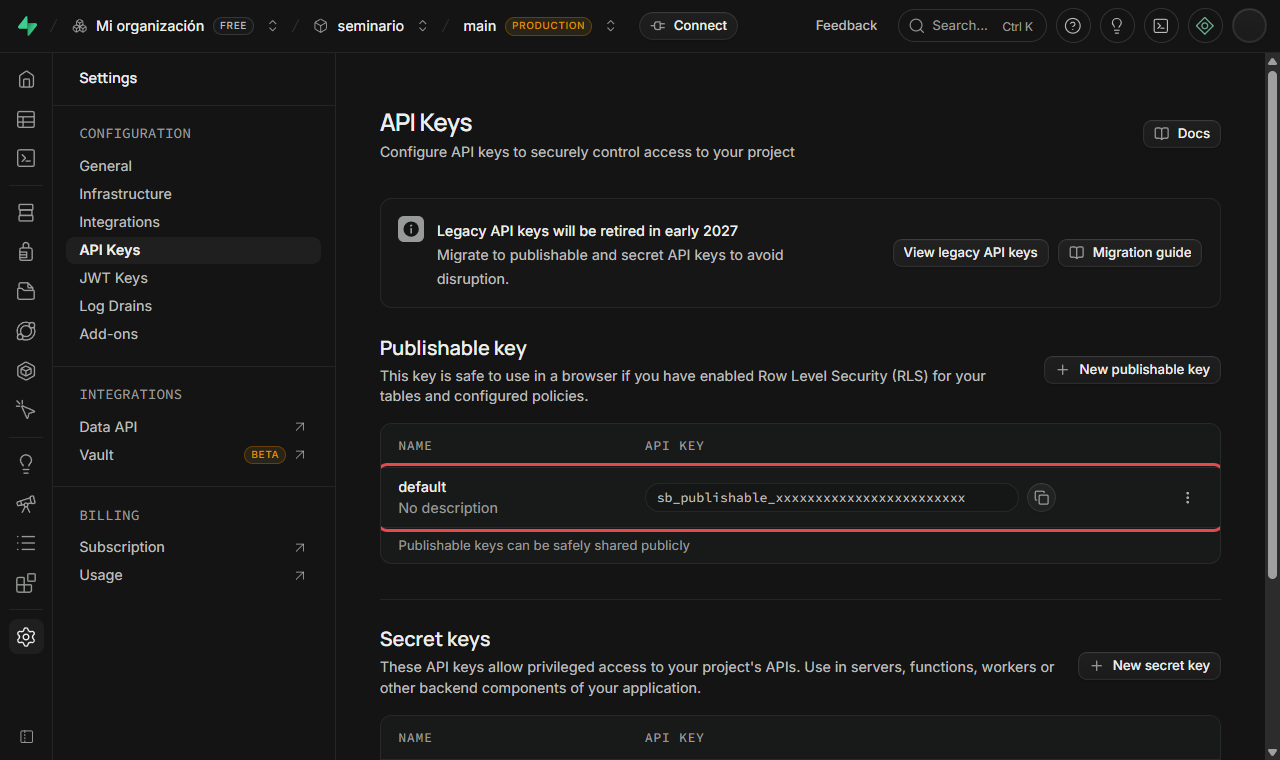
The key (publishable key). In the dashboard, open your project and go to Project Settings → API Keys. In the Publishable key section you will find the default key, which starts with sb_publishable_. Copy it with the button on the right.
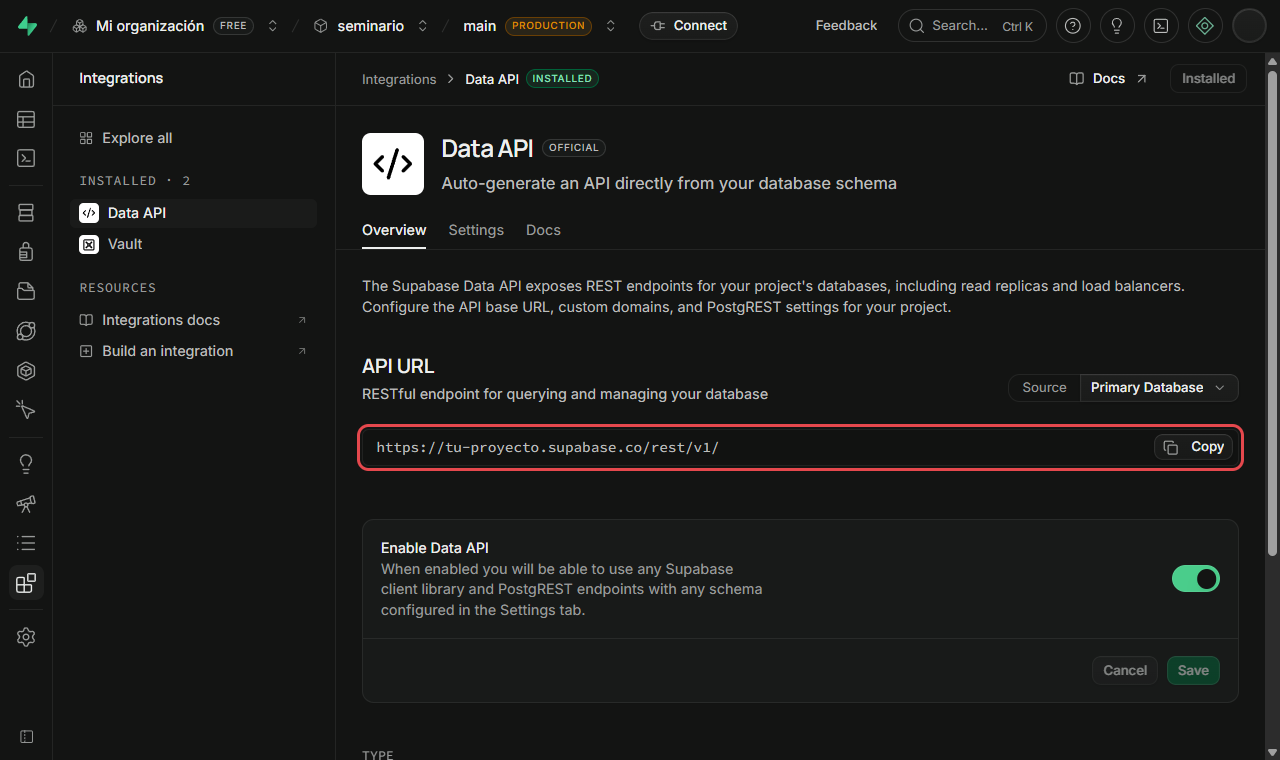
The project URL. It is in Integrations → Data API, in the API URL field. It looks like https://<project-id>.supabase.co/rest/v1/. For the SDK you will use only the base, without /rest/v1/ (the SDK adds that path on its own).
New projects have two types of key:
- Publishable (
sb_publishable_…): public by design, it goes in the app. On its own it gives access to nothing: what it can do is decided by the RLS policies of each table. - Secret (
sb_secret_…): it bypasses RLS and has full access. It is only used on servers. It never goes in a mobile app or a repository.
In older projects and tutorials the public key was called the anon key (a long text starting with eyJ…). It is the same idea under another name; it keeps working while your project has it enabled.
3.3. Keep the credentials out of the code
Do not write the URL and the key directly in main.dart: they would end up in the repository, and switching projects (development, testing) would require editing code. Flutter lets you pass them at build time with --dart-define, with no extra packages.
Create an env.json file at the project root:
{
  "SUPABASE_URL": "https://your-project.supabase.co",
  "SUPABASE_PUBLISHABLE_KEY": "sb_publishable_xxxxxxxxxxxxxxxx"
}
Add it to .gitignore so it is not pushed to the repository, and leave an env.example.json with sample values for your teammates:
env.json
Run the app pointing to the file:
flutter run --dart-define-from-file=env.json
To avoid typing the parameter every time, add it to .vscode/launch.json under "args": ["--dart-define-from-file=env.json"]. In Android Studio, it goes in Edit Configurations → Additional run args.
The --dart-define values end up inside the compiled app, and anyone with patience can extract them. That is acceptable with the publishable key because it is meant to be public; that is why the real security of the data lives in RLS (section 4), not in hiding the key.
3.4. Initialize the SDK
In Dart, a constant with String.fromEnvironment reads the value passed with --dart-define. Supabase is initialized only once, before runApp:
import 'package:flutter/material.dart';
import 'package:supabase_flutter/supabase_flutter.dart';
import 'pages/contactos_page.dart';

const supabaseUrl = String.fromEnvironment('SUPABASE_URL');
const supabaseKey = String.fromEnvironment('SUPABASE_PUBLISHABLE_KEY');

Future<void> main() async {
  WidgetsFlutterBinding.ensureInitialized();
  await Supabase.initialize(url: supabaseUrl, publishableKey: supabaseKey);
  runApp(const MaterialApp(home: ContactosPage()));
}
WidgetsFlutterBinding.ensureInitialized()is needed becausemainisasyncand uses plugins beforerunApp.Supabase.initializeis asynchronous: it opens the client and restores the saved session. That is why it is awaited withawait.- From that moment on,
Supabase.instance.clientis available throughout the app.
In supabase_flutter versions before 2.13 the parameter was called anonKey. If the pubspec.yaml of an old project uses it, write anonKey: supabaseKey.
4. The table and its security policies
Before the code, we need the table. In the dashboard open the SQL Editor and run:
create table public.contactos (
  id         bigint generated always as identity primary key,
  nombre     text not null,
  email      text not null,
  created_at timestamptz not null default now()
);

-- RLS: with no policies, the API lets you neither read nor write anything
alter table public.contactos enable row level security;

-- For the class exercise only: open access with the publishable key
create policy "demo: leer"    on public.contactos for select to anon using (true);
create policy "demo: crear"   on public.contactos for insert to anon with check (true);
create policy "demo: editar"  on public.contactos for update to anon using (true) with check (true);
create policy "demo: borrar"  on public.contactos for delete to anon using (true);
idis generated by Postgres (generated always as identity): the app never sends it when creating.enable row level securityturns on RLS. With RLS on and no policies, the API returns empty lists and rejects writes. It is the safe default.- The four
demopolicies open the table to anyone who has the key. They are fine for this exercise; in a real app they are restricted to authenticated users (to authenticated using (auth.uid() = user_id)), a topic built on top of Supabase authentication.
5. The service layer
First the model: a class that represents a row and knows how to convert itself from and to the Map the SDK works with.
class Contacto {
  final int? id;
  final String nombre;
  final String email;

  const Contacto({this.id, required this.nombre, required this.email});

  factory Contacto.fromMap(Map<String, dynamic> m) => Contacto(
        id: m['id'] as int,
        nombre: m['nombre'] as String,
        email: m['email'] as String,
      );

  // No id: Postgres generates it on insert.
  Map<String, dynamic> toMap() => {'nombre': nombre, 'email': email};
}
Then the service: one method per operation, and the UI only sees Contacto, never Map or Supabase.
import 'package:supabase_flutter/supabase_flutter.dart';
import '../models/contacto.dart';

class ContactoService {
  final _db = Supabase.instance.client;
  static const _tabla = 'contactos';

  Future<List<Contacto>> listar() async {
    final filas = await _db.from(_tabla).select().order('nombre');
    return filas.map(Contacto.fromMap).toList();
  }

  Future<Contacto> obtener(int id) async {
    final fila = await _db.from(_tabla).select().eq('id', id).single();
    return Contacto.fromMap(fila);
  }

  Future<void> crear(Contacto c) => _db.from(_tabla).insert(c.toMap());

  Future<void> editar(Contacto c) =>
      _db.from(_tabla).update(c.toMap()).eq('id', c.id!);

  Future<void> borrar(int id) => _db.from(_tabla).delete().eq('id', id);
}
Every method returns a Future: talking to Supabase is a network operation, and that has consequences for the UI (section 7).
6. CRUD with PostgREST
Each service call becomes an HTTP request to the Supabase REST API, which PostgREST translates into SQL. Understanding that translation lets you debug: when something fails, the error talks about HTTP and SQL, not about Dart.
Hover over the code or the requests to see which part of the query produces which part of the request.
| Operation | SDK method | HTTP request | SQL |
|---|---|---|---|
| List | select().order(...) | GET /contactos?select=*&order=nombre.asc | SELECT … ORDER BY nombre |
| Detail | select().eq(...).single() | GET /contactos?id=eq.7 (one object) | SELECT … WHERE id = 7 |
| Create | insert(datos) | POST /contactos + JSON body | INSERT INTO … |
| Edit | update(datos).eq(...) | PATCH /contactos?id=eq.7 + body | UPDATE … WHERE id = 7 |
| Delete | delete().eq(...) | DELETE /contactos?id=eq.7 | DELETE … WHERE id = 7 |
Without .eq(...), an update() or a delete() has no filter and applies to every row the security policy allows. Before running a delete, check that the line has its .eq('id', id).
7. UI states: loading and error
A service call does not answer instantly: the request travels over the Internet, Supabase queries the database, and the response comes back. Meanwhile, the app does not freeze: await suspends only the function that is waiting, and the UI stays alive. But what should build() draw while there is no data? Three different things depending on the moment:
| State | When | What is drawn |
|---|---|---|
| Loading | The request went out and has not come back | A loading indicator |
| Error | The request failed | A message and a retry button |
| Data | The request came back fine | The list |
These three states are kept in the page's State with two variables (_cargando, _error) and the data. Choose what Supabase responds (fine, slow, API error or no connection) and follow what happens, line by line:
The full page code, with the mounted safeguard explained below:
class _ContactosPageState extends State<ContactosPage> {
final _servicio = ContactoService();
bool _cargando = true;
String? _error;
List<Contacto> _contactos = [];
void initState() {
super.initState();
_cargar();
}
Future<void> _cargar() async {
setState(() {
_cargando = true;
_error = null;
});
try {
final filas = await _servicio.listar();
if (!mounted) return;
setState(() => _contactos = filas);
} on PostgrestException catch (e) {
if (!mounted) return;
setState(() => _error = e.message);
} catch (e) {
if (!mounted) return;
setState(() => _error = 'Sin conexión');
} finally {
if (mounted) setState(() => _cargando = false);
}
}
Widget build(BuildContext context) {
return Scaffold(
appBar: AppBar(title: const Text('Agenda')),
body: _cuerpo(),
);
}
Widget _cuerpo() {
if (_cargando) {
return const Center(child: CircularProgressIndicator());
}
if (_error != null) {
return Center(
child: Column(
mainAxisSize: MainAxisSize.min,
children: [
Text(_error!),
const SizedBox(height: 12),
FilledButton(onPressed: _cargar, child: const Text('Reintentar')),
],
),
);
}
return ListView(
children: [
for (final c in _contactos)
ListTile(title: Text(c.nombre), subtitle: Text(c.email)),
],
);
}
}
Points worth understanding:
_cargandostarts astrue. That way the firstbuild()already draws the indicator and not an empty list that flickers._cargar()cleans the state before requesting. That is why the Retry button can call the same function: there is no second path.finallyalways turns the indicator off, whether it went well or badly. Without it, an error would leave the app loading forever.- Two
catchblocks, because there are two kinds of failure.PostgrestExceptionis a Supabase response with an error (a table that does not exist, an RLS policy that does not allow reading, invalid data) and carries amessage. If there is no network, the request never leaves and the SDK throws another exception: the genericcatchhandles it. if (!mounted) return;after everyawait. If the user left the screen while waiting, theStateno longer exists, and callingsetStatewould throw an error. It is the same golden rule as navigation'scontext.mounted.
Flutter ships the FutureBuilder widget, which manages these three states for you from a Future (snapshot.connectionState, snapshot.hasError, snapshot.data). It is convenient for a read-only query. With setState and explicit variables, as above, you control retries and operations that modify data (create, edit, delete) better, and it is what we will use in the agenda.
8. Common errors
| Symptom | Likely cause | What to check |
|---|---|---|
| The list arrives empty although rows exist | RLS enabled and no select policy | Dashboard: Authentication → Policies for the table |
new row violates row-level security policy when creating | The insert policy is missing | Create the insert policy |
| Editing or deleting "does nothing" and gives no error | The update/delete policy is missing, or the filter does not match | Policies and .eq(...) |
Could not find the table 'public.contactos' in the schema cache | Table name misspelled in from(), or the table does not exist | Spelling in from('contactos') |
Invalid API key or 401 | Wrong URL or key, or env.json was not passed | --dart-define-from-file=env.json |
SocketException / ClientException | No connection, or misspelled URL | Internet, and that the URL does not include /rest/v1/ |
PGRST116 when using single() | The query returned 0 or more than 1 row | The filter by id; or use maybeSingle() |
| The app stays on the loading indicator forever | The finally that turns _cargando off is missing | The try / catch / finally structure |