Components and the Declarative Paradigm
In modern frontend application development, the user interface is not built as a series of monolithic screens or through the manual manipulation of pixels or tags. Instead, design and architecture rest on two essential pillars: the declarative paradigm and the reusable component concept.
The Declarative Paradigm: The Interface as a Function of State
To understand how Flutter and contemporary frontend frameworks (such as React, SwiftUI or Jetpack Compose) work, you need to contrast the declarative approach with the traditional imperative model you used in previous courses such as APO 1 and APO 2 with Java, Swing or JavaFX.
Imperative Model vs. Declarative Model
-
Imperative Approach (JavaFX / Swing / classic DOM): You, as the programmer, are responsible for giving step-by-step orders to change the screen every time an event happens. If a user clicks a button, your event handler must locate the component in memory and explicitly mutate its value:
ControladorImperativo.java// The programmer manually mutates the widget's property in memoryint contador = 0;void onClickBoton() {contador++;etiquetaContador.setText("Counter: " + contador);if (contador >= 10) {etiquetaContador.setStyle("-fx-text-fill: red;");}}Problem: As the screen grows, keeping all the visual elements in sync with the internal logic produces fragile code that is prone to inconsistent states (visual bugs).
-
Declarative Approach (Flutter): You do not tell the framework how to mutate each element on the screen; you describe what the interface should look like for a given data state:
Where:
- represents the truth of the data at that instant (numbers, lists, booleans, business objects).
- is the builder function (in Flutter, the
build(BuildContext context)method of your widgets). - is the graphical interface that the user sees and interacts with.
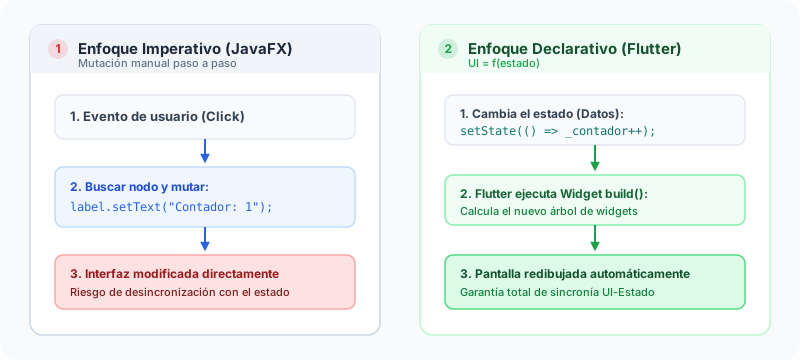
When an event occurs (for example, the user taps a button), the code simply modifies the state variable and notifies the engine. The framework runs the function again and efficiently redraws only the nodes that need updating.
In Flutter, widgets are immutable, lightweight configurations. Destroying and rebuilding widget instances does not degrade the application's performance because the underlying graphics engine keeps a persistent element tree and render tree on the GPU, applying a high-speed reconciliation algorithm (diffing).
What Is a UI Component?
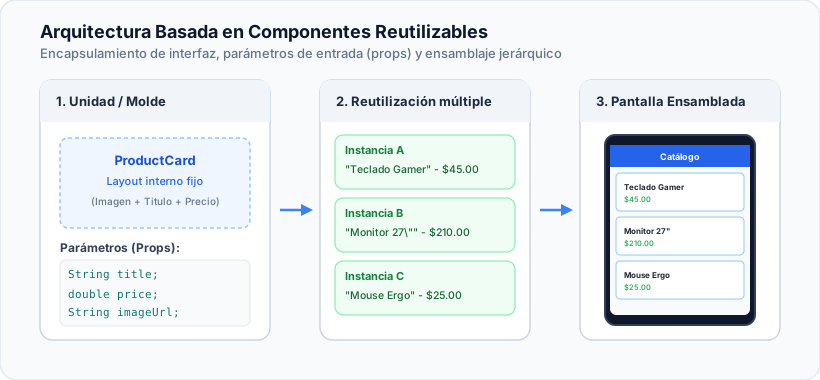
A component (called a Widget in the Flutter ecosystem) is a self-contained, modular and reusable piece of software that encapsulates both the visual structure and the visual behavior of a fragment of the screen.
Fundamental Characteristics of a Component
- Encapsulation: A component defines its own internal layout rules (margins, typography, colors, alignment) without depending on who its parent is in the widget tree.
- Parameterization (Props / Constructor Arguments): For a component to be genuinely reusable, it must not hold rigid (hardcoded) information. It receives data from the outside through its constructor arguments:
- Titles, prices, descriptions (
String,double). - Image URLs or local resource paths (
String). - Functions or actions to run on events (
VoidCallback,Function(String)).
- Titles, prices, descriptions (
- Composition over Inheritance: Instead of inheriting from a complex base class to change its behavior, components are configured by grouping and nesting simpler components.
Anatomy of a Basic Flutter Component: StatelessWidget
When a component presents static information or depends only on the parameters supplied by its parent widget, it is implemented with the StatelessWidget class:
import 'package:flutter/material.dart';
// Definition of a reusable, parameterizable component
class ProductCard extends StatelessWidget {
// 1. Declaration of immutable properties (props)
final String title;
final double price;
final String imageUrl;
final VoidCallback onAddToCart;
// 2. Constructor with named, required parameters
const ProductCard({
super.key,
required this.title,
required this.price,
required this.imageUrl,
required this.onAddToCart,
});
// 3. build method: describes the UI as a function of the properties
Widget build(BuildContext context) {
return Card(
elevation: 2,
shape: RoundedRectangleBorder(
borderRadius: BorderRadius.circular(12),
),
child: Padding(
padding: const EdgeInsets.all(12.0),
child: Column(
crossAxisAlignment: CrossAxisAlignment.start,
children: [
// Product image
ClipRRect(
borderRadius: BorderRadius.circular(8),
child: Image.network(
imageUrl,
height: 120,
width: double.infinity,
fit: BoxFit.cover,
),
),
const SizedBox(height: 8),
// Title
Text(
title,
style: const TextStyle(
fontSize: 16,
fontWeight: FontWeight.bold,
),
),
// Price
Text(
'\$${price.toStringAsFixed(2)}',
style: const TextStyle(
fontSize: 14,
color: Colors.green,
fontWeight: FontWeight.w600,
),
),
const SizedBox(height: 8),
// Action button with callback
SizedBox(
width: double.infinity,
child: ElevatedButton(
onPressed: onAddToCart,
child: const Text('Add'),
),
),
],
),
),
);
}
}
Advantages of Adopting a Component Architecture
- Maintainability: If the product card design changes (for example, adding a discount badge or changing the border radius), you edit a single file (
product_card.dart) and the change is reflected throughout the application. - Separation of Concerns: The main screen coordinates the product list and navigation, while the card focuses only on presenting a single item with visual fidelity.
- Testability: You can test each widget in isolation through unit tests and widget tests (Widget Testing).