Cross-Platform Frontend
Cross-platform frontend development is a software engineering paradigm that lets you build applications for multiple operating systems (Android, iOS, Web, Windows, macOS and Linux) from a single shared codebase.
Instead of requiring independent development teams with separate languages and tools for each platform, modern cross-platform technologies unify business logic, interface design and state management, which speeds up delivery and makes long-term maintenance easier.
From Java and OOP to Modern Frontend

So far in your degree, in the Algorithms and Object-Oriented Programming (APO 1 and APO 2) courses, you have worked mainly with Java, learning the fundamentals of strict typing, data structures, class design, inheritance, interfaces and desktop libraries such as JavaFX or Swing.
The transition to modern frontend development involves three key conceptual changes:
1. Imperative Paradigm vs. Declarative Paradigm
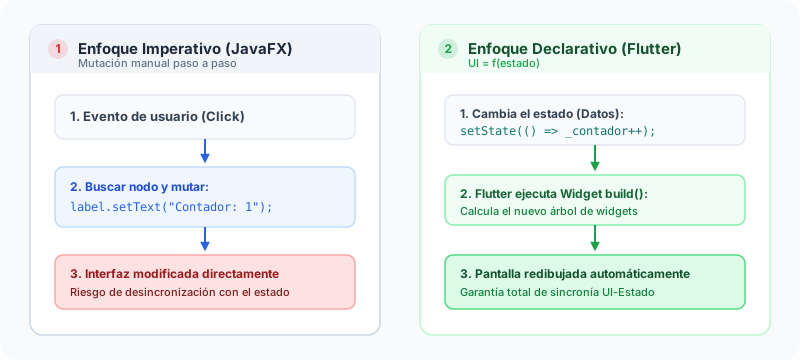
In programming courses with JavaFX or Swing, building interfaces follows an imperative model:
- Imperative Approach (JavaFX): You create interface objects in memory and manually program the exact steps to modify them on every event. If a value changes, you must look up the component's reference and mutate its state directly (
etiqueta.setText("New text")). - Declarative Approach (Flutter / Modern Frontend): The user interface is the mathematical result of the application's current state:
You do not directly manipulate the on-screen components to change their content; you simply describe what the interface should look like for a given state. When the state changes (through calls such as setState()), the framework re-evaluates the function and automatically redraws the elements that need it.
2. OOP Inheritance vs. Hierarchical Widget Composition
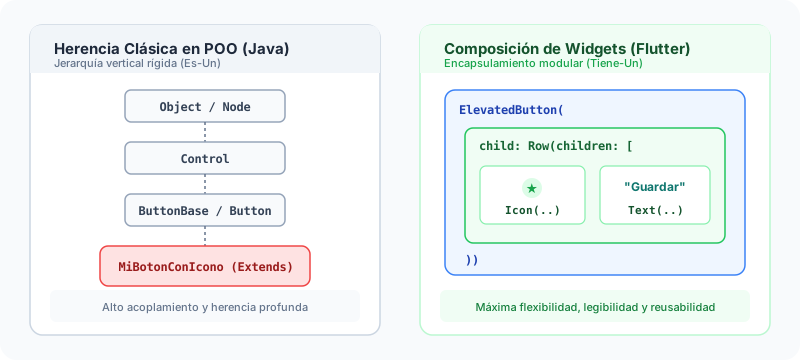
In traditional Object-Oriented Programming in Java, it is common to extend base classes to create new behaviors (public class MiBotonCustom extends Button).
In modern frameworks such as Flutter, the principle of composition over inheritance applies:
- UI components are not created through complex inheritance hierarchies, but by combining small, specialized and highly reusable components (Widgets).
- A button with an icon and text is not a special subclass; it is simply an
ElevatedButtonwidget that contains aRowwidget, which in turn nests anIconand aText.
3. Execution Model: JVM vs. Native Compilation and Hot Reload
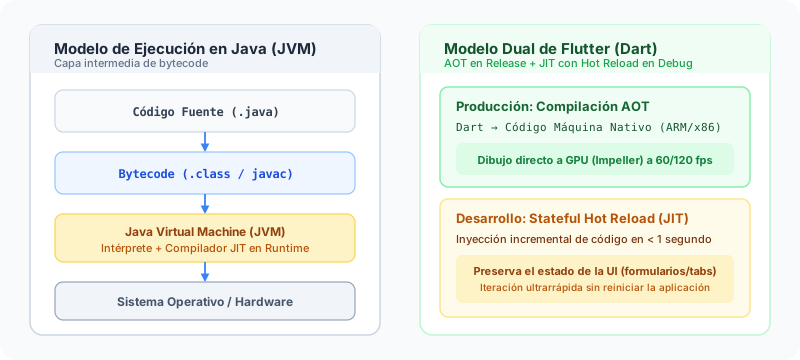
- Java and the JVM: Java code is compiled to Bytecode and runs inside the Java Virtual Machine (JVM), which interprets or compiles the instructions at runtime (JIT) for the host system.
- Dart and Flutter:
- In Production (Release): The code is compiled ahead of time (Ahead-of-Time - AOT) directly to native machine code (ARM or x86). This removes intermediate interpretation layers and ensures smooth performance at 60 or 120 frames per second (fps).
- In Development (Debug): It uses Just-in-Time (JIT) compilation to provide Stateful Hot Reload, which lets you inject code changes into the running application in under a second without losing the current screen state (such as filled-in forms or active navigation).
Practical Comparison: JavaFX vs. Flutter
Below is a comparison of how a counter with an interactive button is implemented:
- JavaFX (Imperative in Java)
- Flutter (Declarative in Dart)
public class ContadorApp extends Application {
    // 1. State stored in the class
    private int contador = 0;

    @Override
    public void start(Stage stage) {
        // 2. Explicit creation of the interface nodes
        Label labelContador = new Label("Counter: 0");
        Button btnIncrementar = new Button("Increment");

        // 3. Imperative mutation: look up the reference and change the text
        btnIncrementar.setOnAction(event -> {
            contador++;
            labelContador.setText("Counter: " + contador); // Manual mutation of the node
        });

        VBox root = new VBox(10, labelContador, btnIncrementar);
        stage.setScene(new Scene(root, 300, 200));
        stage.setTitle("Counter in JavaFX");
        stage.show();
    }
}
class ContadorWidget extends StatefulWidget {
const ContadorWidget({super.key});
State<ContadorWidget> createState() => _ContadorWidgetState();
}
class _ContadorWidgetState extends State<ContadorWidget> {
// 1. Local state of the screen
int _contador = 0;
void _incrementar() {
// 2. Declarative state change: setState notifies the rebuild
setState(() {
_contador++;
});
}
Widget build(BuildContext context) {
// 3. The interface is described as a function of the value of _contador
return Scaffold(
appBar: AppBar(title: const Text('Counter in Flutter')),
body: Center(
child: Column(
mainAxisAlignment: MainAxisAlignment.center,
children: [
Text('Counter: $_contador', style: const TextStyle(fontSize: 20)),
const SizedBox(height: 10),
ElevatedButton(
onPressed: _incrementar,
child: const Text('Increment'),
),
],
),
),
);
}
}
The 4 Cross-Platform Architectural Approaches
Throughout the evolution of mobile and frontend development, four main architectural strategies have emerged:
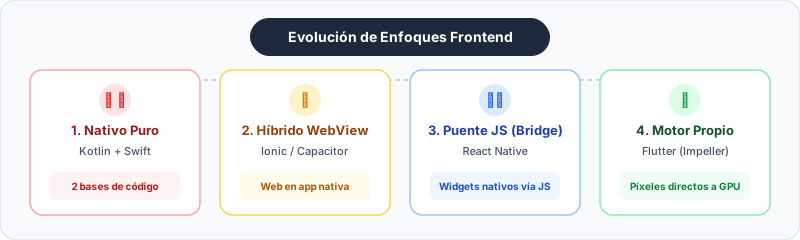
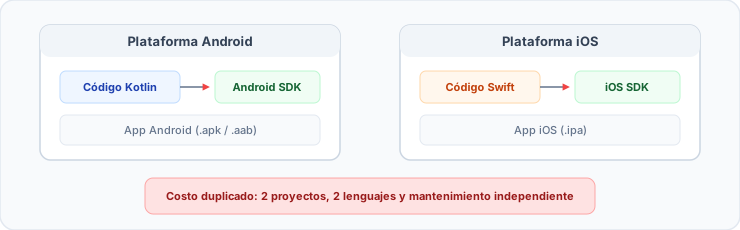
1. Traditional Native Development (Separate Code)
- Technologies: Swift / Objective-C for iOS, Kotlin / Java for Android.
- How it works: Two completely independent applications are written using each platform's official APIs.
- Advantages: Maximum performance and immediate access to the latest hardware APIs.
- Disadvantages: Duplicated development cost, two work teams and a higher chance of functional inconsistencies.
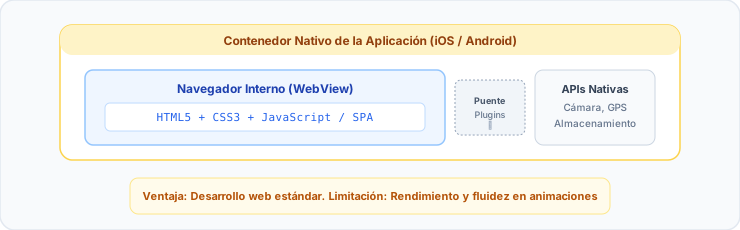
2. Hybrid Based on WebViews
- Technologies: Apache Cordova, Ionic, Capacitor.
- How it works: The application is essentially a web page (HTML, CSS and JavaScript) packaged inside a native web container (WebView).
- Advantages: Full reuse of standard web development skills.
- Disadvantages: Limited performance in complex animations, latency when processing touch events and an appearance that is not always identical to a native application.
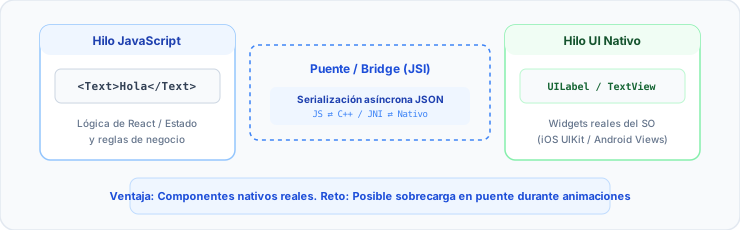
3. Interpreted / Reactive Bridge
- Technologies: React Native.
- How it works: The logic is written in JavaScript/TypeScript, but instead of rendering in a WebView, it invokes the operating system's native visual components (
UIViewon iOS,android.view.Viewon Android) through an asynchronous communication bridge (Bridge or JavaScript Interface - JSI). - Advantages: It uses the operating system's native components and takes advantage of the massive React ecosystem.
- Disadvantages: It can suffer bottlenecks in intensive animations and requires adaptations to keep exact visual parity between iOS and Android.
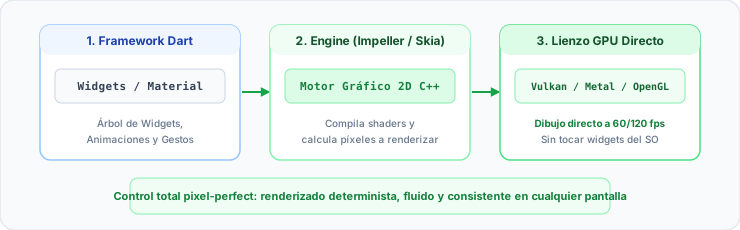
4. Own Rendering Engine (Direct Canvas)
- Technologies: Flutter.
- How it works: Flutter does not use WebViews or delegate drawing to the operating system's widgets. Instead, it ships its own high-performance 2D graphics engine (Impeller / Skia) and draws every pixel directly on the screen using the GPU (similar to how game engines such as Unity operate).
- Advantages: 100% identical visual parity on any device, deterministic performance at 60/120 fps and absolute control over every pixel.
- Disadvantages: Larger initial size of the installable binary because the rendering engine is included.
Main Ecosystems in the Market
In today's industry landscape, Flutter and React Native lead enterprise adoption for cross-platform projects:

Flutter
Own Graphics Engine

React Native
Native Bridge / JSI
Flutter (Google)
Dart-based cross-platform framework with its own rendering engine (Impeller). It compiles to native AOT machine code and supports Mobile, Web and Desktop from a single codebase.
React Native (Meta)
JavaScript and React-based framework that maps declarative components to the operating system's native widgets through a decoupled-thread architecture.
Technical Comparison Matrix
| Criterion | Flutter | React Native |
|---|---|---|
| Creator and Backing | Meta (Facebook) | |
| Programming Language | Dart (strictly typed, object-oriented) | JavaScript / TypeScript |
| Rendering Architecture | Own graphics engine (Impeller / Skia at pixel level) | Mapping to native OS components (JSI / Fabric) |
| Animation Performance | Excellent (native AOT compilation straight to GPU) | Very good (native rendering with a separate JS thread) |
| Visual Consistency | Identical across all platforms | Varies according to each OS's own visual style |
| Development Experience | Ultra-fast Stateful Hot Reload | Fast Refresh |
| Platform Support | iOS, Android, Web, Windows, macOS, Linux | iOS, Android (Web and Desktop through community extensions) |